Preview


Description
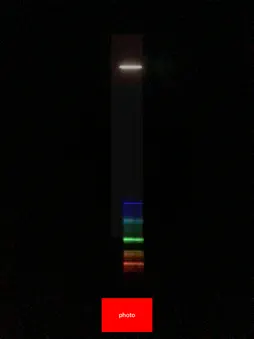
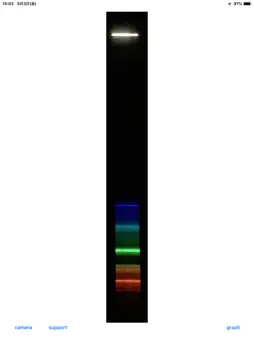
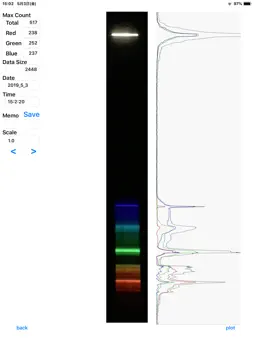
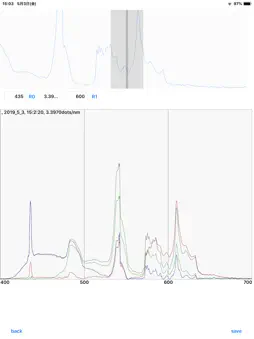
By using iPhone or iPad camera, you can measure a spectral intensity of the light by a spectrum image from a spectrometer. Press camera > photo button to shoot a spectrum image dispersed by the spectrometer. If reflected light is observed, please be the in the area of the dark rectangle on the upper side of the camera screen. For iPadOS 13, open the Control Center and then tap the "Lock Orientation" button to avoid rotating the spectrum capture area. Press the graph button to show the light intensity distribution of the spectrum calculated by the camera image. The values of R, G and B are respectively calculated as the average value of the central quarter width of the spectral image. Adjust the intensity of the input light by, for example, narrowing the slit so that each color does not exceed the maximum value 255. The value of R+G+B is also plotted in black. You can change the plot scale of spectral intensity by <> button. By pressing the plot button, sliding the upper spectral image to the left and right, and entering two points with known wavelengths, you can plot the wavelength scale. If the R0 wavelength is set as reflected light (0 nm) and the R1 wavelength is set only for the first time, the wavelength scale is plotted only by setting the R0 wavelength after the second time. You can save the plot with wavelength scale as image. For the data to be stored, a filter was applied so as to smoothly connect the intensity curves of the sensitivity wavelength regions of R, G and B colors. Because it is very dangerous, please never see strong light such as the sun, and please do not put it in the iPhone's camera.
What's New
Version 1.5 2020-07-30
Fixed a bug that the app does not launch on iPadOS 13. For iPadOS 13, you can stop the rotation of the spectrum capture area, by enabling the "Lock Orientation"...Fixed a bug that the app does not launch on iPadOS 13. For iPadOS 13, you can stop the rotation of the spectrum capture area, by enabling the "Lock Orientation" button in the Control Center. Since no function has been added, there is no need to update if the app is working properly. Technical Analysis
Package Overview Basic metadata
Bundle ID
com.jun1wata.spectraView Current Version 1.5
Minimum iOS 9.2
Package Size App Store Size
Package Metadata 1 / 6 version records
3.8 / 5.0 (4 ratings)
Detailed binary, privacy manifest, framework, and Info.plist results have not been indexed for this package yet. The verified App Store and archive metadata above remains available.
Known Version Records
1 version record with stored package metadata • 6 known version records
Stored metadata does not guarantee a package is currently available to download.
| Details | Version / IDs | Version date | Action |
|---|---|---|---|
 5.94 MB | v1.5 App Store ID: 837052108Build: 1 | 2020-07-28 23:04:58 | Get Version |
| Not archived | App Store ID: 831169284 | Unknown | Request Version |
| Not archived | App Store ID: 831050001 | Unknown | Request Version |
| Not archived | App Store ID: 821068001 | Unknown | Request Version |
| Not archived | App Store ID: 820903103 | Unknown | Request Version |
| Not archived | App Store ID: 820783027 | Unknown | Request Version |