
Preview


Description
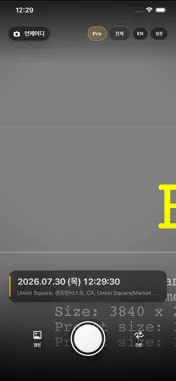
Keep the date, time, and area visible on the photo itself. WhenWhere creates timestamped photos for jobsites, fitness, meals, study, and travel, then saves captures directly to Photos. There are no ads or accounts, and photo processing stays on device. Useful for - Recording jobsite progress and before-and-after work - Keeping fitness, meal, or study proof photos - Saving travel photos with the capture date and area - Making original capture information visible on an existing photo Capture and stamp - Show the area quickly by checking a recent location first while an accurate fix updates. - Fix the date and time when you press the shutter and save the stamped JPEG directly to Photos. - Optionally show an area such as state, city, district, or neighborhood instead of precise coordinates. - Do not print street names, building numbers, postal codes, or GPS coordinates. - Use the front or rear camera with Full, 4:3, 1:1, and 16:9 framing. Customize the record card - Start editing an existing photo from the gallery-style Edit button to the lower left of the shutter. - Show or hide Date and Location independently; at least one must remain visible. - Choose Date + time or Date only. - Choose a Black, White, or Signal card and place it in any of the four corners. - Choose another photo, preview the result, or return to editing before saving. - Review the finished edited photo before saving or sharing it. Use an existing photo - Read only the photo you choose. - Use available original EXIF capture time and location in the stamp. - The original capture time cannot be edited. If it is unavailable, show it as unavailable instead of substituting the current time. Grow pet friends and achievements - Open Pet+ at the top of the camera to view your selected cat or dog, growth stages, and achievements. Pets are never added to a saved photo. - Each completed save or share shows one meal and adds one growth action. - Grow through Baby, Buddy, Grown-up, and Star stages, then welcome a partner and baby at 50. - Collect 15 cat and 15 dog breed friends, for 30 friends total. - Twelve achievements unlock permanently at disclosed fixed milestones, with no random rewards or virtual currency. - Pets never go hungry or lose progress, so daily check-ins are not required. - The pet feature works normally without iCloud. Photo privacy - Photos and photo EXIF are processed on the device and are not sent to developer servers. - Each result is a newly generated JPEG; hidden EXIF metadata from the source is not copied. - The native app uses the operating system geocoder first. The developer does not receive or retain the location request or address result, although an OS-vendor network service may be used depending on the device. - The public website provides app information, support, privacy, and terms only. It does not request access to the camera, photos, or location. - There are no advertising, analytics, or user-tracking SDKs and no developer-held user account. - Pet progress and selection are stored on device and may synchronize between app installations on the same account through Apple's private iCloud key-value store. The developer cannot view them. Premium Pets - Timestamp capture, editing, saving, and sharing are free without a usage limit. - Premium Pets is a one-time lifetime purchase, not a monthly subscription. - The purchase unlocks premium cat and dog breeds only. Regular pets, growth, family, and achievements stay free. - Purchase and restore use the current Apple store account. - The price shown is the current App Store price for your country or region. The app Settings screen provides the privacy policy and support contact.
What's New
Version 1.6.1 2026-11-13
The support email shown in Settings is now [email protected]. Technical Analysis
Package Overview Basic metadata
Bundle ID
com.grigent.whenwhere Current Version 1.6.1
Minimum iOS 15.0
Package Size App Store Size
Package Metadata 0 / 0 version records
Detailed binary, privacy manifest, framework, and Info.plist results have not been indexed for this package yet. The verified App Store and archive metadata above remains available.
Developer Information
Known Version Records
0 version records with stored package metadata
Stored metadata does not guarantee a package is currently available to download.
| Details | Version / IDs | Version date | Action |
|---|