
Preview


Description
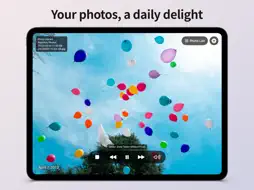
Your photos, a daily delight. PopSlide turns the iPad you already have into a photo frame that displays your favorite photos, one after another. Choose photos from your iPad’s Photo Library, Google Photos shared albums, and folders in the Files app, then tap “Start Slideshow” to let your photos play automatically. It’s free, with no in-app purchases and no PopSlide account required. ALL YOUR ALBUMS, ONE SLIDESHOW Combine albums from your iPad’s Photo Library (including photos synced with iCloud and iCloud Shared Albums), shared albums from Google Photos, and folders in the Files app (including iCloud Drive and Dropbox). Choose what to show in one place: “Photo Sources to Show” in Settings. To include a Google Photos shared album, add its sharing link. When you add photos to a selected album, they join the slideshow once the app checks the album for updates. SKIP DUPLICATE PHOTOS Photos that PopSlide identifies as duplicates are treated as a single photo in the slideshow, even across albums and services. This reduces repeats without deleting your original photos. NEW PHOTOS AND OLD MEMORIES Newly added photos appear more often, alongside photos taken around this time in previous years. Turn on “Show Date Taken” to see labels such as “3 years ago” on those older photos. VIDEOS AND PHOTOS IN MOTION Videos from your Photo Library and Google Photos shared albums play right in the slideshow, and you can set a maximum length. Live Photos, burst photos, and photos taken in quick succession play in motion too. Videos that start on their own play silently unless you’ve recently touched the screen. Adjust the volume with the on-screen controls. PICK FROM THE PHOTO LIST Browse your photos by date taken and start the slideshow from any photo. You can also choose the display order. Tap the screen to see the album and date taken for the current photo. YOUR SLIDESHOW, YOUR WAY Choose the “Time per Photo” and how photos are shown—“Auto,” “Fit to Screen,” or “Fill Screen.” Swipe left or right to see the next or previous photo. The screen rotates with your iPad. You can also show a clock in a corner of the screen. DIMS AT NIGHT Set “Display Hours” to choose when your slideshow runs. The screen dims and the slideshow pauses at your chosen end time, then resumes at the next start time while PopSlide remains open. Adjust “Brightness While Paused” to choose how dim the screen becomes. KEEP ENJOYING PHOTOS OFFLINE If your connection drops, PopSlide keeps playing photos already saved on your iPad. PRIVACY PopSlide does not send your photos to JUNO Tokyo’s servers. It sends only anonymous usage and diagnostic data to help improve the app. This is enabled by default, but you can turn off “Share Usage Data” at any time in Settings. Requires an iPad running iPadOS 16 or later. Apple, iPad, and iCloud are trademarks of Apple Inc. Google and Google Photos are trademarks of Google LLC. Dropbox is a trademark of Dropbox, Inc. PopSlide is an independent app from JUNO Tokyo and is not endorsed or sponsored by Apple, Google, or Dropbox.
What's New
Version 1.2.0 2026-11-12
• Videos from your Photo Library and Google Photos shared albums now play in the slideshow. • Live Photos and burst photos can now play in motion. • Show a cloc...• Videos from your Photo Library and Google Photos shared albums now play in the slideshow. • Live Photos and burst photos can now play in motion. • Show a clock on screen. • Tap the screen to see the album, date taken, and more for the current photo or video. • Redesigned Settings: choose albums and folders to show on one screen. • Photos taken in the same second now appear in the order they were taken, plus bug fixes. Technical Analysis
Package Overview Basic metadata
Bundle ID
tokyo.juno.PopSlide Current Version 1.2.0
Minimum iOS 16.0
Package Size App Store Size
Package Metadata 0 / 0 version records
Detailed binary, privacy manifest, framework, and Info.plist results have not been indexed for this package yet. The verified App Store and archive metadata above remains available.
Developer Information
Known Version Records
0 version records with stored package metadata
Stored metadata does not guarantee a package is currently available to download.
| Details | Version / IDs | Version date | Action |
|---|