
Preview





Description
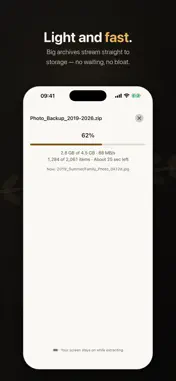
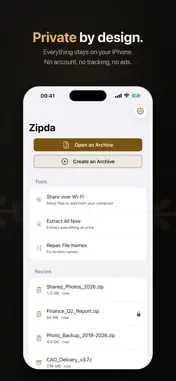
Zipda is a light, fast archive app. Open, browse and preview ZIP, RAR, 7z and TAR archives, and unzip ZIP and TAR in one step. Big archives stream straight to storage, so there is no waiting. Everything happens on your iPhone: no account, no tracking, no advertising SDKs. WHY FILENAMES BREAK, AND HOW ZIPDA FIXES IT Archives made on Windows often store filenames in a regional code page instead of Unicode, so on an iPhone they arrive looking like "ÇѱÛ.txt". Zipda works out the original encoding right on your iPhone — CP949/EUC-KR, Shift_JIS, GB18030, Big5 and more — and shows the most likely original name. A banner tells you which encoding was detected, and one tap lets you override it if you disagree. Already extracted a folder full of mangled names somewhere else? The Repair File Names tool renames the whole folder back in one pass, shows you a before-and-after preview first, and never touches file contents. FORMATS • Extract: .zip, .tar, .tar.gz, .tar.bz2, .tar.xz; .rar, .7z, .lzh, .alz (Pro) • Create: .zip; AES-256 encryption (Pro) • Password-protected .zip opens whether it uses legacy ZipCrypto or AES (Pro) • Multi-part sets extract in one pass — pick the first part and Zipda finds the rest (Pro) BUILT FOR BIG ARCHIVES Zip64 archives past 4 GB, tens of thousands of entries, split volumes: Zipda streams them instead of loading them into memory. The progress view shows real bytes, real entry counts and a time estimate that matches reality. Cancel stops immediately and cleans up the half-written files it made. WHEN AN ARCHIVE IS DAMAGED A truncated download or one bad sector usually means the whole archive fails to open. Zipda extracts every entry it can still read, then tells you exactly which entries it skipped and why — so you get the 900 photos back instead of nothing. MADE FOR IPHONE • Got an archive in Mail, a messaging app or the Files app? Share it to Zipda and it opens • Choose where the files go in the Files app, or look inside first and pull out just the one file you need • Select photos, videos or files in Photos or the Files app and compress them right from the share sheet • Follow a long extraction on the Lock Screen and in the Dynamic Island • Move files between your iPhone and a computer on the same Wi-Fi, using the computer's browser and a PIN • Dynamic Type and VoiceOver labels throughout • 12 languages, switchable inside the app without restarting PRIVACY Nothing leaves your iPhone. No account, no analytics, no advertising SDKs, and the app makes no network requests of its own. Zipda's App Store privacy label is "Data Not Collected" — because there is nothing to collect. Zipda Pro (optional) Zipda Pro is optional and comes in three plans: a monthly or yearly auto-renewable subscription, or a one-time lifetime purchase. All plans unlock the same features on iPhone, iPad and Mac and can be shared with your family through Family Sharing. Pro unlocks extracting RAR, 7z, ALZ and LZH archives, split archives and password-protected archives; extracting Korean, Japanese and Chinese filenames with their original names; the filename repair tool; and creating 7z, password-protected and split archives. Opening, browsing and previewing any archive, plus everyday zip and tar work, do not need Pro. Payment is charged to your Apple Account at confirmation of purchase. Subscriptions renew automatically unless auto-renew is turned off at least 24 hours before the end of the current period; manage or cancel anytime in your Apple Account settings. If a subscription ends, Pro features lock again; the lifetime purchase does not expire. Terms of Use (EULA): https://www.apple.com/legal/internet-services/itunes/dev/stdeula/ Privacy Policy: https://juki-j.github.io/privacy-policy/zipda-en.html
What's New
Version 1.2.5 2026-11-11
• Fixed folders that appeared empty inside some archives, including zip files made without folder entries. • File names: Korean, Japanese and other non-English ...• Fixed folders that appeared empty inside some archives, including zip files made without folder entries. • File names: Korean, Japanese and other non-English names are now less likely to look garbled in archives that also contain many English file names, and Zipda uses the Unicode names stored in a zip when they are present. • 7z: if some files in a damaged 7z are broken, Zipda now extracts the rest, and Verify results are more accurate. • When you retry an extraction, files that were already extracted are no longer duplicated. • Creating archives: file names that Windows can’t use are now actually renamed in the saved archive, as the notice says. • Changing the file-name encoding now refreshes the list right away. • Stability: improved handling of damaged or tampered archives. Technical Analysis
Package Overview Basic metadata
Bundle ID
net.setlog.zipda Current Version 1.2.5
Minimum iOS 16.1
Package Size App Store Size
Package Metadata 0 / 0 version records
Detailed binary, privacy manifest, framework, and Info.plist results have not been indexed for this package yet. The verified App Store and archive metadata above remains available.
Known Version Records
0 version records with stored package metadata
Stored metadata does not guarantee a package is currently available to download.
| Details | Version / IDs | Version date | Action |
|---|