
Preview




Description
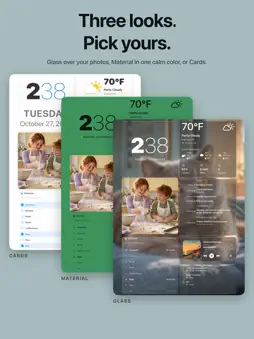
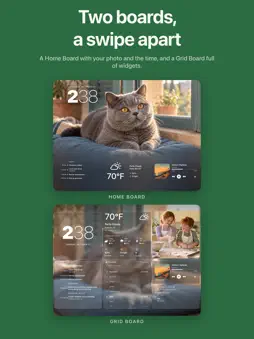
Turn your iPad into a beautiful home dashboard, family wall calendar, smart home controller, and digital photo frame. Hearthboard brings calendars, reminders, notes, timers, shortcuts, weather, photos, Apple Music, HomeKit, and Home Assistant together on one calm screen—on the wall, the kitchen counter, or by the door. THREE LOOKS • Glass: frosted glass over your own photos, with adjustable frost • Material: widgets set straight on one calm color • Cards: each widget on its own card, in your accent color Try each on your own board before you keep it, and change it any time. THE HOME BOARD Your photos fill the top of the screen, with the time set behind the people in them, over a shelf of widgets. Write your family's name there instead, if you like. Every household gets a Home Board and a Grid Board, a swipe apart. BUILT YOUR WAY Pick widgets and sizes, then arrange them on a flexible grid that adapts between portrait and landscape. Hold anywhere to edit. Start from a ready-made board, or pick your own. READABLE FROM ACROSS THE ROOM When no one is close, the time, the weather, your next event, and your lists get big. A touch brings the detail back. ROOMS AND BOARDS Give each room its own boards and swipe between them. Boards can change on a schedule through the day. FAMILY ORGANIZATION • Calendar agendas, the next event, and availability • Reminders, chores, and a shared shopping list, checked off on the board • Notes to write or draw with your finger or Apple Pencil, or type to fill their tile • Timers with six visual styles, quick-start times, and optional soft chimes • A PDF or picture from Files, like a meal plan, kept up to date • Clocks in digital, analog, word, sentence, flip, and bold styles Tap Calendar, Reminders, Shopping List, or Chores to open a larger view. Read documents full screen, browse every PDF page, and zoom into pictures. SHORTCUTS AND SIRI Put buttons on your board to run your favorite shortcuts. Use Hearthboard actions in Shortcuts, Siri, and personal automations on your iPad to show a board, start a timer, or put the board to sleep and wake it. SMART HOME HomeKit and Home Assistant widgets sit beside your family information: • Lights with brightness, warmth, and color, including Home app light groups • Switches, outlets, fans, humidifiers, and thermostats • Locks, garage doors, blinds, and security systems • Sensors, scenes, cameras, and TVs with a remote • Home Assistant media players, vacuums, scripts, and home energy PHOTOS, MUSIC, AND WEATHER • Photos, albums, slideshows, and Live Photos • What's playing on your iPad, with progress and AirPlay • Apple Music albums and playlists • Hourly and multi-day forecasts powered by WeatherKit MADE FOR A HOME DISPLAY • Widget sizes from small tiles to full-height panels • Photos and album art dim with the board at night • Permission requests only when a feature needs access TRY IT FREE Try any three widgets free. Hearthboard Pro is a one-time purchase, no subscription, that unlocks: • Unlimited widgets • More rooms and boards, with schedules and rotation • A sleep schedule with an overnight black screen • Wake on approach using motion detection • Idle photo wallpaper and Live Photo playback PRIVACY No Hearthboard account needed. Your HomeKit, Home Assistant, calendar, reminder, photo, document, and music content only powers the widgets you choose and is never sold or used for advertising. Home Assistant connects directly to your server, and its token stays on your device. Some features need compatible hardware, services, permissions, subscriptions, or network access.
What's New
Version 1.6 2026-11-02
Three new widgets, more room to see everything, and new ways to make Hearthboard part of your day. NEW WIDGETS • Timer: Count down minutes or count down to a t... Technical Analysis
Package Overview Basic metadata
Bundle ID
JudeWorks.Hearthboard Current Version 1.6
Minimum iOS 17.0
Package Size App Store Size
Package Metadata 0 / 2 version records
Detailed binary, privacy manifest, framework, and Info.plist results have not been indexed for this package yet. The verified App Store and archive metadata above remains available.
Developer Information
Known Version Records
0 version records with stored package metadata • 2 known version records
Stored metadata does not guarantee a package is currently available to download.
| Details | Version / IDs | Version date | Action |
|---|---|---|---|
| Not archived | App Store ID: 888089877 | Unknown | Request Version |
| Not archived | App Store ID: 877324605 | Unknown | Request Version |