Preview




Description
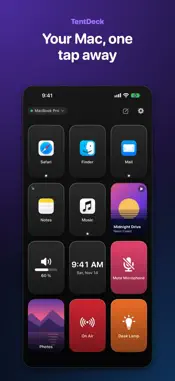
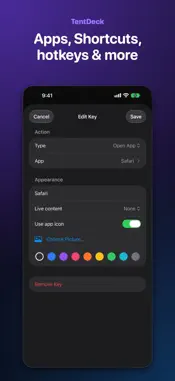
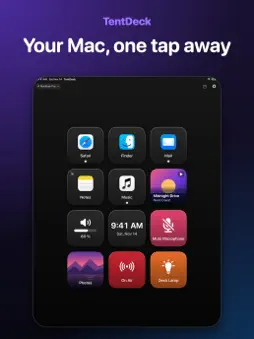
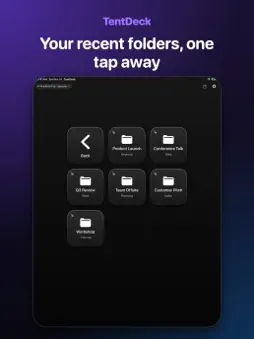
TentDeck turns your iPhone or iPad into a clean, customizable deck of keys for your Mac. One tap launches an app, opens a website or a folder, runs a Shortcut or controls your smart home – so you can stay focused on your work, your stream or your meeting. BUILT FOR FOLDABLES Fold your foldable iPhone into a tent and set it next to your keyboard: TentDeck detects the pose and switches to a full-screen deck without any distractions. It works just as well on any iPhone and iPad. ONE TAP, MANY ACTIONS • Open apps and bring them to the front • Open websites and files • Run Shortcuts from the Shortcuts app • Play/pause and skip tracks in Music, change the volume, mute • Mute your microphone with one tap • Take a screenshot, open Mission Control • Macros: chain several actions with pauses in between • Web requests: trigger webhooks, Home Assistant and other smart home services • Open the folders you last worked in with an app ORGANIZED YOUR WAY • Swipe between pages and group keys in folders • Real app icons, SF Symbols and colors for every key • Your own pictures on keys – a photo or a logo from your library • Live status: see which apps are running and whether your mic is muted • Live keys: current track, volume and time • Toggle keys with two states, each with its own symbol • Long press a key for a second action • Choose your key style: physical, flat or glass PROFILES FOR EVERY APP The deck switches automatically with the app in front on your Mac – its own keys for Keynote, Final Cut or Safari. A menu on your iPhone lets you pick a profile yourself. Export profiles to back them up or move them to another Mac. EDIT ANYWHERE Arrange keys right on your iPhone or iPad, or use the editor on your Mac: drag apps, files and links from the Finder straight onto the grid. Changes appear on all your devices instantly. PRIVATE AND SECURE TentDeck connects your devices directly in your local network – no account, no cloud, no tracking. Pairing uses a one-time 6-digit code and every connection is encrypted. It even works without a shared Wi-Fi network, using a direct peer-to-peer connection. THOUGHTFUL DETAILS • Haptic feedback on every press • Keeps the screen awake while you work and dims the deck when idle • Available in English, German and Spanish REQUIREMENTS TentDeck needs the free TentDeck app for Mac (macOS 14 or later), available on the Mac App Store.
What's New
Version 1.1 2026-11-19
Welcome to TentDeck! This is the first release. Technical Analysis
Package Overview Basic metadata
Bundle ID
de.fgj.TentDeck Current Version 1.1
Minimum iOS 17.0
Package Size App Store Size
Package Metadata 0 / 0 version records
Detailed binary, privacy manifest, framework, and Info.plist results have not been indexed for this package yet. The verified App Store and archive metadata above remains available.
Developer Information
Known Version Records
0 version records with stored package metadata
Stored metadata does not guarantee a package is currently available to download.
| Details | Version / IDs | Version date | Action |
|---|