
Preview




Description
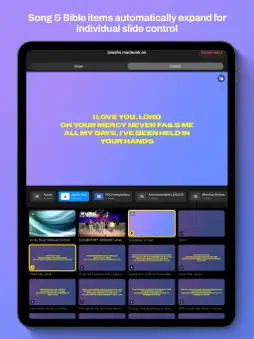
LightLoop Remote turns your iPhone or iPad into a powerful live presentation controller for Apple TV. Designed for worship teams, event producers, and AV operators, LightLoop Remote connects wirelessly to an Apple TV running LightLoop and gives you full control of your presentation from anywhere in the room — no cables, no adapters, no internet required. TWO MODES, ONE REMOTE Control Mode puts your entire presentation in your hands. Browse all of your playlists, tap any item to trigger it on the Apple TV, and monitor a live preview of exactly what your audience sees — all on the same screen. Song items expand inline to show every individual slide, so you can jump to any lyric with a single tap. Bible passages expand verse by verse. A timeline scrubber lets you seek through video and audio with precision. On iPad, a floating picture-in-picture preview keeps the full grid visible so you never lose your place in the playlist. Stage Mode is built for the person running the room. Your current slide fills the screen in large, easy-to-read text — song lyrics, Bible verses, or a live thumbnail of whatever is playing. The next slide or upcoming item is always visible below, so you're always one step ahead. Swipe left or right to navigate, or connect a Bluetooth page-turner and keep your hands free. On landscape iPhone, Stage Mode goes completely full-screen for a clean confidence monitor experience. BUILT FOR THE ROOM • Instant wireless connection — LightLoop Remote discovers your Apple TV using Apple's Multipeer Connectivity framework. No pairing codes, no accounts, no setup screens. No internet or local network needed (this is the same tech that powers AirDrop). • Auto-reconnect — the app silently reconnects to your Apple TV every time you open it, so you're always ready before the room is. • Multiple devices, one session — connect a phone and an iPad simultaneously. Use the iPhone as a controller in Control Mode while the iPad runs Stage Mode as a confidence display. Both stay perfectly in sync. • Real-time preview — see the exact content your audience sees, including song styling, background images, and Bible verse formatting, rendered faithfully on your device. • Slide-accurate thumbnails — the Control Mode grid renders song slide text at the correct proportional size so every thumbnail looks exactly like the TV output, making it easy to spot the right lyric at a glance. • Timeline scrubber — seek through video, audio, and marker-based song tracks with a touch. Scrubbing automatically pauses playback and resumes when you lift your finger. • Page-turner support — connect any Bluetooth keyboard or page-turner device and use left/right keys to advance slides hands-free in Stage Mode. • iPad PiP preview — toggle between a floating picture-in-picture preview in the corner of your grid, or expand to a full-width preview panel. Your preference is remembered across launches. REQUIREMENTS LightLoop Remote requires a nearby Apple TV running the LightLoop tvOS app on the same local Wi-Fi, wired network or bluetooth proximity. No internet connection is required for control. LightLoop Remote is a companion app and cannot be used as a standalone application. LightLoop Remote is built for the moments when everything has to work.
What's New
Version 1.3.2 2026-08-14
Voice Follow — scripture on screen the moment it's spoken. "This won't be on the screen, but Genesis 3:12 says…" Every operator knows that sinking feeling. Now... Technical Analysis
Package Overview Basic metadata
Bundle ID
com.josiaho.LightLoop-Remote Current Version 1.3.2
Minimum iOS 17.6
Package Size App Store Size
Package Metadata 0 / 4 version records
Detailed binary, privacy manifest, framework, and Info.plist results have not been indexed for this package yet. The verified App Store and archive metadata above remains available.
Developer Information
Known Version Records
0 version records with stored package metadata • 4 known version records
Stored metadata does not guarantee a package is currently available to download.
| Details | Version / IDs | Version date | Action |
|---|---|---|---|
| Not archived | App Store ID: 887311418 | Unknown | Request Version |
| Not archived | App Store ID: 886969205 | Unknown | Request Version |
| Not archived | App Store ID: 886598005 | Unknown | Request Version |
| Not archived | App Store ID: 885761584 | Unknown | Request Version |