
Preview








Description
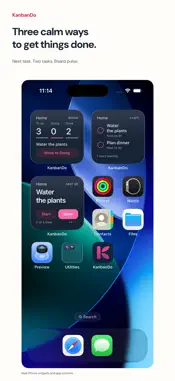
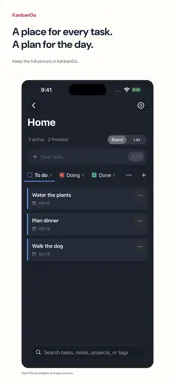
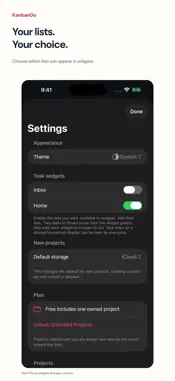
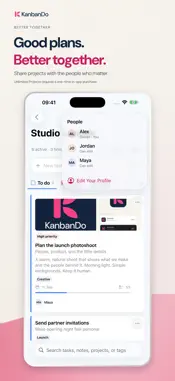
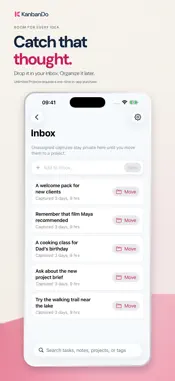
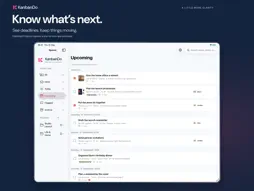
Bring work, life and all the little things into one clear plan—without another subscription. KanbanDo gives your tasks a home, your projects a shape and your next step a place to start. Plan a client launch, organize a home renovation or share the weekend to-do list. See the big picture on a board, then open a task for the details that make it happen. START FREE. KEEP IT SIMPLE. Your first owned project is free. Need more? Unlock Unlimited Projects with a one-time in-app purchase. Projects shared with you never count toward your limit, so you can keep joining shared projects for free. No subscriptions. FROM IDEAS TO DONE • Organize projects with visual boards and a focused list view. • Keep notes, checklists, links and image attachments with the task they belong to. • Add due dates, priorities and tags. Use Today and Upcoming to see what needs your attention. • Collect quick thoughts in your private Inbox, then file them into a project when you're ready. THREE WAYS TO KEEP YOUR DAY MOVING Choose the widget that fits your moment. Next task puts one clear next step within reach, with Start and Done controls. Two tasks is a calm checklist you can complete with a tap. Board pulse shows your columns at a glance and moves the next task into Doing. Undo brings a recent change back. Enable only the lists you want to show, and choose a different list for each widget. DESIGNED WITH APPLE HOMEVIEW IN MIND Bring a little more calm to the kitchen counter. Our small widgets are designed around Apple's announced HomeView widget format, which brings widgets from a connected iPhone or iPad to the home. Prepare your household list in KanbanDo and choose the view you prefer. HomeView availability and its connected-device software requirements are set by Apple. HomeView hardware interaction testing is pending; the widgets are available on supported iPhone and iPad Home Screens. Contents placed on a shared household display may be visible to everyone. BETTER TOGETHER Share iCloud projects with colleagues, friends or family. Assign tasks and keep the details together. Invite people with editing or view-only access, so everyone has the right place in the project. CAPTURE THE THOUGHT. KEEP YOUR FOCUS. On Mac, press Command+Shift+I to open Quick Capture from anywhere while KanbanDo is running. Type your thought, press Return and find it in your Inbox. On iPhone and iPad, add a thought to Inbox or send content to KanbanDo from the share sheet. YOUR PROJECTS. YOUR STORAGE CHOICE. Keep projects on your device, or choose iCloud to sync them across iPhone, iPad and Mac. iCloud projects use Apple's CloudKit service under an Apple Account; your project content isn't stored on servers run by us. Share only the projects you choose. You can also export complete backups, including your images. We built KanbanDo for people who want to organize their lives without another subscription. Your purchase supports the developers as we continue building a more useful, thoughtful organizational tool. iCloud sync and collaboration require iCloud to be enabled. Everyone joining a shared project needs KanbanDo and an Apple Account with iCloud. Device-only projects, private Inbox captures and images you choose to keep on a device do not sync through iCloud.
What's New
Version 1.1.3 2026-10-30
A little more joy in getting things done. • Meet Button: our animated squirrel celebrates completed tasks with 100 tiny victory performances. • See your progre...A little more joy in getting things done. • Meet Button: our animated squirrel celebrates completed tasks with 100 tiny victory performances. • See your progress with weekly activity, completion percentages, checklist points and streaks. Three sparkling stars celebrate a stronger week or a new personal best. • Keep Done tidy with newest completions first, a weekly Archive cleanup and Undo. Browse completed work by week, month, year or a date range. • Invite your team more easily with clearer access settings and sharing through Messages, email and your favorite chat apps. • Enjoy a cleaner task editor and Settings, plus optional calendar deadlines with times. • Explore the KanbanDo roadmap and send optional bug reports or feature ideas from the app. This update also improves iCloud syncing, invitation handling, accessibility and translations. Your existing projects and cards stay in place. Technical Analysis
Package Overview Basic metadata
Bundle ID
com.joshuascigala.Kanban Current Version 1.1.3
Minimum iOS 17.0
Package Size App Store Size
Package Metadata 0 / 0 version records
Detailed binary, privacy manifest, framework, and Info.plist results have not been indexed for this package yet. The verified App Store and archive metadata above remains available.
Developer Information
Known Version Records
0 version records with stored package metadata
Stored metadata does not guarantee a package is currently available to download.
| Details | Version / IDs | Version date | Action |
|---|