
Preview





Description
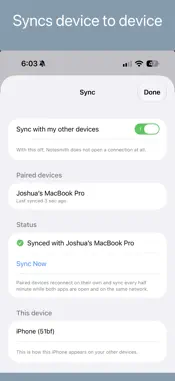
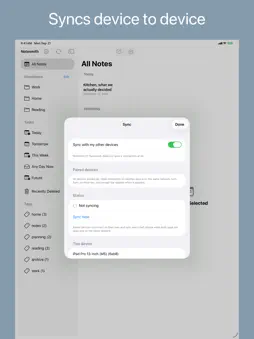
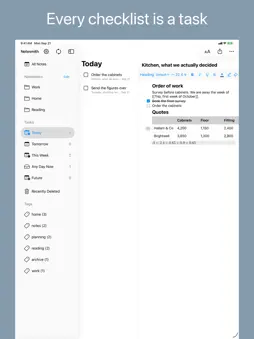
Notesmith keeps your notes on your own iPhone, iPad and Mac. No account and no server. Turn on Sync and your notes go straight between your own devices, so nothing sits in the middle. SYNC • Pair once with your Mac and your notes and tags come over • Your notes travel straight between your own devices. They never reach a server, because there is none • The first time a device asks to pair, you accept it by hand, and every session is encrypted • Off by default. With Sync off, the app opens no connection at all • Edits travel both ways every half minute while both apps are open on the same network • A small preview of each picture comes over too; the original, PDFs and recordings stay on the Mac. Locked blocks arrive still locked WRITING • A note is a stack of blocks. Type / for a heading, a list, a checklist, a quote or code • The / menu knows other names for things, so todo finds a checklist and bullet finds a list • On iPad, a toolbar keeps marks and lists one tap away. Hide it to have the page to yourself • On iPhone, the toolbar docks above the keyboard and appears only while you are typing • Bold, italic, underline, strikethrough and highlight, with the Markdown markers hidden • Three heading sizes, round or dashed bullets and numbered lists that renumber themselves • Checklists, with a tap to check one off • Nest list items, then fold them away with a chevron • Long-press the margin beside a block to move it, turn it into another kind or delete it • Select across several blocks to copy, cut or delete them in one go • With a hardware keyboard, shortcuts cover indent, every mark, each heading size, moving blocks and links CONNECTIONS • Write [[Note Title]] to link another note, and #tag to tag it • Connections draws what a note links to, what links to it and what shares a tag. Tap any of them to open that note • A note that cites a Bibliome document shows that too SIRI & SHORTCUTS • Create a note or notebook, append, open by name, get its text or find notes by title or tag • Mark a task done and list what is still open STAYING TIDY • Swipe or long-press a note to pin it, and pinned notes get their own section at the top • The list is grouped into Today, Yesterday, Previous 7 Days, Previous 30 Days, then by month • The sidebar lists every tag with a count, and a tap shows the notes that carry it • A deleted note waits 30 days before it is gone for good, and one tap restores it • Import an Apple Notes export or an Evernote .enex file • Also Markdown, plain text, HTML, PDF and spreadsheets (.csv, .tsv) • Import on the Mac to keep pictures and PDFs, because Sync does not carry them from the phone • Mark a note Never Share with AI to keep Writing Tools out of it. Sync carries the choice to your Mac, which also keeps the note from Apple Intelligence, Spotlight, Shortcuts and Bibliome The app is in English, German, French, Italian, Spanish and Simplified Chinese. ON THE MAC These are on the Mac today, not on iPhone or iPad: • Search, find in a note, undo and note history • Notebooks and saved searches, plus templates and Someday/Maybe notes, which sync but show only on the Mac • Due dates for checklist items, the Tasks list and the Getting Things Done section • Organise Library, which proposes notebooks from your tags • Full-size pictures, PDFs and voice notes • Tables, dividers, callouts and maths • Locking and opening a block with a passphrase • Exporting a note as PDF, Word, Markdown, Rich Text, a web page or plain text • Apple Intelligence writing help, on Macs that support it • Asking your Bibliome library and finding sources, with Bibliome 1.6 or later • Connecting an AI app, which can keep notes of its own. AgentScribe, our Mac app, is only that notebook Notesmith is one purchase for both, so if you have this you have that. Evernote is a trademark of Evernote Corporation. Apple Notes is a trademark of Apple Inc. Notesmith is not affiliated with or endorsed by either.
What's New
Version 1.2 2026-11-06
• colours: pick a Theme in Settings, and give a notebook or a note its own colour with Color… • Add Link ▸ Link to Section… points at one heading in a note, and... Technical Analysis
Package Overview Basic metadata
Bundle ID
com.langberg.privatenote Current Version 1.2
Minimum iOS 26.0
Package Size App Store Size
Package Metadata 0 / 0 version records
Detailed binary, privacy manifest, framework, and Info.plist results have not been indexed for this package yet. The verified App Store and archive metadata above remains available.
Price History (USA store)
2 recorded price change points. These are historical observations, not a guarantee of the current price.
| Recorded at | Price | Currency |
|---|---|---|
| 39.99 | USD | |
| 29.99 | USD |
Developer Information
Known Version Records
0 version records with stored package metadata
Stored metadata does not guarantee a package is currently available to download.
| Details | Version / IDs | Version date | Action |
|---|