
Preview





Description
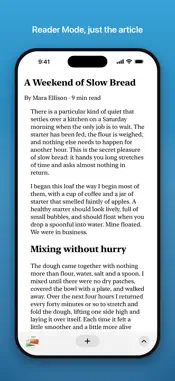
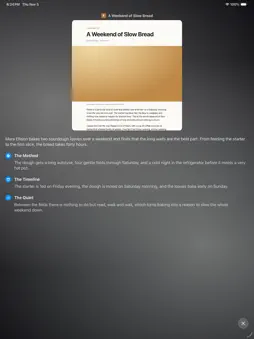
Swipe along the bottom bar to change tabs. Pull up from the tab button, or pinch the page, to see every tab at once, then flick away the ones you are done with. Sail blocks ads, trackers and cookie banners from the start, asks for no account, and keeps everything on your phone. TABS THAT MOVE WITH YOUR FINGER Your tabs sit side by side in a deck, newest on the right. Swipe the bar to move to the next one, or flick up from the tab button to jump back to the tab you were on before. Pinch in on a page and the deck opens, the same way as tapping the tab button. Swipe a card up to archive it. Tabs you leave alone are archived for you after a day; choose 12 hours, a day, or 3, 7 or 30 days in Settings, or pin a tab so it stays. The archive is searchable, and a tap brings a page back. Every landing comes with a small tap you can feel. SEARCH THAT IS READY WHEN YOU ARE Tap the plus button and the keyboard is already up. You see the sites you visit most, then your history and suggestions as you type. Return opens a new tab. Pick Google, DuckDuckGo, Bing, Ecosia, Kagi or Perplexity as your search engine. ADS, TRACKERS AND COOKIE BANNERS, GONE Blocking is on from the first page. The page menu shows how many trackers were stopped. If a site breaks, one tap allows it, for that site only. The block lists (EasyList, EasyPrivacy, EasyList Cookie List and Fanboy's Annoyance List) ship inside the app. The app downloads no lists and talks to no server of ours. A PAGE WITH NOTHING IN THE WAY No address bar. The bar slides away when you scroll down and comes back when you scroll up. Pull down to refresh. Swipe in from the edge to go back or forward. The page menu holds back, forward, copy link, reload, find on page, pin, share, reader mode, page zoom, desktop site and site settings. Links that belong to an app on your phone can open in that app or stay in Sail; you choose in Settings. READER MODE Open an article as clean text, with no clutter around it. Page zoom applies to the reader too. TRANSLATE ON YOUR PHONE When a page is in another language, a translate button appears in the bar. Tap to translate, tap again for the original. Translation runs on your phone with Apple's on-device translation and the languages installed in iOS. The page is not sent to a translation service. INCOGNITO TABS Tap the eyes in the search field to turn Incognito on. Incognito tabs keep no history, are not saved between launches, and drop their website data when the app closes. DOWNLOADS Files land in a Downloads folder you can open in the Files app under On My iPhone. A download that fails can be retried, even after a relaunch. TAKE YOUR TABS WITH YOU Export your open tabs as a list of links to share or save. Import a list of links from pasted text or a file, and Sail opens them as tabs. PRIVATE BY DESIGN No account. No sign-in. No sync. No analytics. No servers of ours. What leaves your phone is what you asked for: the pages you load, and what you type in search, which goes to the search engine you chose. Website data, history and archived tabs can be cleared from Settings at any time. Sail is Sailfish for iPhone.
What's New
Version 1.0.3 2026-11-06
Smoother tab switching: the tab deck follows your finger and coasts the way you expect, and closing a tab slides the next one in. Pinch a page to fold it into a... Technical Analysis
Package Overview Basic metadata
Bundle ID
com.haladir.arcmobile Current Version 1.0.3
Minimum iOS 26.0
Package Size App Store Size
Package Metadata 0 / 0 version records
Detailed binary, privacy manifest, framework, and Info.plist results have not been indexed for this package yet. The verified App Store and archive metadata above remains available.
Developer Information
Known Version Records
0 version records with stored package metadata
Stored metadata does not guarantee a package is currently available to download.
| Details | Version / IDs | Version date | Action |
|---|