Preview





Description
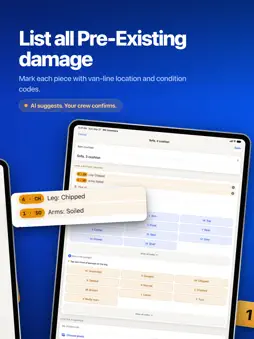
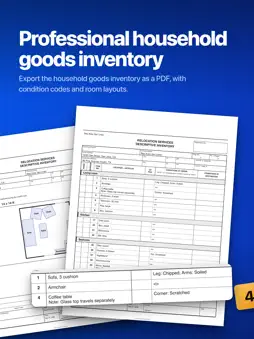
An un-noted scratch becomes a claim. MC Inventory is the move-day inventory app for professional movers: tag every piece as the truck loads, record Pre-Existing damage with the standard location symbols and condition codes, and hand the shipper a signed household goods inventory before you pull away. If your crews already run the descriptive inventory the major van lines use, they will know this one on day one. Same item tables, same condition codes, same sticker method. It is just faster to fill in. ORIGIN TO DESTINATION The inventory is made as the truck loads and signed on the spot. At destination, open the bingo sheet and check off each number as the crew calls it; the sheet counts what is short. Pre-move surveys and estimates are a different job, and this app does not do them. FOUR WAYS TO TAG A PIECE Scan: point the phone around the room and LiDAR finds the furniture and measures its cube. Speak: call pieces out as you work and they land on the inventory, hands free. Photograph: snap a piece and the app names it. Catalog: tap to add from a library of furniture, appliances, electronics and cartons. PRE-EXISTING DAMAGE Photograph a piece and the app points out likely Pre-Existing damage, written the way the form wants it: location symbol plus condition code, 6 CH for a chipped leg. The crew confirms, edits or rejects every suggestion before anything is recorded. SPEED INVENTORY Keep pace with the sticker roll. The next number stays on screen, you type the piece and move on. Every piece keeps its number for good: a mistake is voided, never deleted, and a number is never reused. CERTIFIED FORMS Pre-Existing damage, property damage and high-value inventory forms print with their liability language, column headers, condition codes and location symbols intact. A signed form locks. Changing it clears the signature, and the shipper signs again. LIVE TOTALS Cube, estimated weight and piece count add up at the top of the job as you go. SIGN AND EXPORT Finalize, capture the shipper's signature, and export a print-ready PDF: room-by-room itemization, measured floor plans, totals, a condition photo appendix and the signature block, on your company letterhead. BUILT FOR CREWS Set up a company workspace and invite the crew with a code. Every job saves to the phone first, so the app works in a basement or a driveway with no signal and uploads to the company account when the signal comes back. Sign in on a new phone and your jobs come with you; an admin sees the whole company's. Find any job by shipper name or order number. REQUIREMENTS LiDAR scanning needs an iPhone or iPad with a LiDAR sensor (iPhone 12 Pro and later, iPad Pro). Everything else works on any supported iPhone or iPad. Free to download and use. Questions: [email protected] or movingcommand.com/help/inventory.
What's New
Version 2.5 2026-10-18
Signed forms are now locked, and the app holds on to your work when the signal drops or a save fails. - Signed Pre-Existing damage, property damage and high-va...Signed forms are now locked, and the app holds on to your work when the signal drops or a save fails. - Signed Pre-Existing damage, property damage and high-value forms are read-only. To change one, tap Edit. That removes the customer's signature, and the customer signs again once the changes are made. - A job signed on another phone opens locked on yours. - A job captured and signed with no signal now reaches the office with all of its pieces, photos and the signature. - Settings > Uploads shows whether everything on the phone is uploaded, or how many changes are waiting for a connection. Uploads start again as soon as you come back to the app. - Speed Inventory keeps your draft when a save fails and won't save the same piece twice. - Dictation keeps what you said when you tap Add or get interrupted. - When photo identification can't reach our server, the phone names the items itself and tells you nothing was checked for damage. - Leaving a scan, deleting a photo and Clear all now ask first, and so does cancelling a piece with unsaved changes. - A personal account can join a moving company with the company's code. Moves already on the account don't come along, so export or delete them first. - Finished bingo sheets show in Customer files with the date signed and how many pieces are short, and export as a PDF. - A signed job prints as signed even when the signature drawing isn't on this phone, and the export points out missing condition photos before the preview. - Your company logo prints on exports made with no signal. - Sign-up tells you when an email already has an account. A trailing space after your email no longer reads as a wrong password, and a pasted code with a space in it works. - Error messages now say what went wrong in plain words. Questions? Email [email protected] or visit movingcommand.com/help/inventory. Technical Analysis
Package Overview Basic metadata
Bundle ID
pro.interstate-inventory Current Version 2.5
Minimum iOS 26.0
Package Size App Store Size
Package Metadata 0 / 0 version records
Detailed binary, privacy manifest, framework, and Info.plist results have not been indexed for this package yet. The verified App Store and archive metadata above remains available.
Developer Information
Known Version Records
0 version records with stored package metadata
Stored metadata does not guarantee a package is currently available to download.
| Details | Version / IDs | Version date | Action |
|---|