
Preview




Description
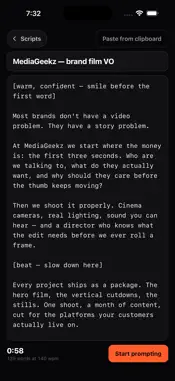
A teleprompter that keeps your pace, not the other way round. Most prompters scroll at an arbitrary speed you have to chase. MediaGeekz Prompter sets speed in words per minute, the way you actually talk. Change the font size and the words-per-minute stays put — the script still lands in the same time. Every script shows its real runtime before you roll. BUILT FOR THE WAY YOU SHOOT Beam-splitter ready. One control on the prompter bar flips the text for 45-degree glass, and flips it back. The reading line, the scrims and the 3-2-1 count-in all flip with it, so nothing reads backwards in the reflection. A second press adds the vertical flip for overhead and prism rigs. Record while you read. Put the front camera behind your script and record a take without a second device. Your text never ends up in the video — the mirror is on the text, not the lens, so a take is never recorded backwards. Tap the record button on the bar to start and stop a take at any time — you can roll first and start reading after. Takes save straight to your Photos and to the Files app, and go out through the standard share sheet. Read from the lens, not the page. A reading line marks your eyeline and the text falls off softly above and below it, so your eye locks to one spot instead of wandering. CONTROLS THAT DO NOT COST YOU A TAKE Tap to play or pause — that is all it does. Time left and progress stay on screen, so checking them never stops the read. Drag to scrub, swipe to change speed, and pause brings the controls back on its own. Lock the screen when the phone is in the rig, so a bump never stops the read. Bluetooth remotes and page-turner pedals that act as a keyboard work too: Space or Enter plays and pauses, arrow up and down change the speed. The screen holds full brightness while you prompt and goes back to your setting when you leave. WRITE OR PASTE Keep a library of scripts with live word counts and runtimes. Paste from the clipboard in one tap. Put director notes in [square brackets] and they render dimmed, italic — and stay out of the word count, so the speed you set is the pace of the words you actually say. Set speed, size, margins, line height, colour and eyeline per script, not just globally. YOURS, AND ONLY YOURS No account. No sign-in. No server. Scripts and recordings stay on your device, and the whole app works with no signal at all — which is what you need on set. No subscription. Built by MediaGeekz, a video production company in Orlando, because we needed it on our own shoots.
What's New
Version 1.1 2026-10-06
Shooting on your phone just got easier — and steadier on set: • Takes now save straight to your Photos, and also appear in the Files app. • A record button rig...Shooting on your phone just got easier — and steadier on set: • Takes now save straight to your Photos, and also appear in the Files app. • A record button right on the prompter bar whenever the camera is on. Start rolling first, then start reading. • The camera preview now shows the whole frame you're recording, instead of a cropped, zoomed-in view. • The screen no longer dims or locks mid-read. • New touch lock: a bump in the rig can't pause or jump the script. • Recording is sturdier. If the microphone is off, takes still record, silent, and the app tells you why. A take that can't be saved now says so instead of disappearing. • Leaving the app mid-read pauses the script and saves the take. • Director notes no longer speed up the words around them, and Time left is right before you press play. • Press play at the end of a script to go again from the top. • The Full brightness setting is now remembered. Thanks to everyone who sent notes on 1.0. Technical Analysis
Package Overview Basic metadata
Bundle ID
com.mediageekz.prompter Current Version 1.1
Minimum iOS 16.0
Package Size App Store Size
Package Metadata 0 / 0 version records
Detailed binary, privacy manifest, framework, and Info.plist results have not been indexed for this package yet. The verified App Store and archive metadata above remains available.
Developer Information
Known Version Records
0 version records with stored package metadata
Stored metadata does not guarantee a package is currently available to download.
| Details | Version / IDs | Version date | Action |
|---|