Preview




Description
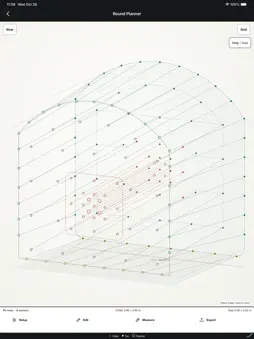
Mining Toolkit brings underground planning, calculations and field references together for miners, drillers, trainers, supervisors and engineers. ROUND PLANNER • Work with Standard, Ring and Grid layouts. Review plans in 2.5D, face, toe and side views. • Adjust heading dimensions, cut position, hole directions and floor allowance. • Use Line and Path tools at collars or toes. Tap heatmap links for gaps between rows and around the lifters, perimeter and cut. • Heatmap gaps are projected toe-to-toe distances, not full 3D distances. • Save and reopen plans; import/export supported DP and XML files. Confirm file compatibility with the receiving drill. BOLTING & GROUND SUPPORT • Set heading dimensions, Grid or Staggered patterns, bolt types/lengths, mesh and hanger options. • Review 2.5D layouts and estimates for bolts, screens and consumables, including resin requirements. • Use full-encapsulation tools for hole/bolt/resin dimensions, cartridge and packaging quantities, and Load/Spin/Hold timing guidance. DRILLING & DEVELOPMENT • Find a baseline RPM for the entered setup and compare it with the motor ceiling. • Keep drill-setting records locally on your device. • Check drill deviation and compare planned/actual toes in Drill Deviation Map. • Use the Rod Count Cheat Sheet with custom rod lengths, metres/feet, graph and table. • Use Grade Carry to see how grades and lifter settings affect projected floor positions. • Estimate mucking quantities and shotcrete for drift development or shaft sinking, with admixture calculations. GROUT • Plan a loaded batch, a number of holes, or a ring with mixed hole depths. • Enter diameter, depth and mix/yield settings to estimate coverage, materials and batches; check mixer/active-pot capacity and water to add. • Track the active pot with a timer and expiry reminder. Reset or clean-out confirmation clears the timer. Notification delivery depends on permissions and device settings; follow the grout manufacturer's working time. PRINT TOOLS — EXPERIMENTAL Print Scale and Auto Backsites help work from a print image. Check detected references, scale and proposed geometry before use. Detection can fail. ON SHIFT & FIELD REFERENCES • Set up Shift Calendar rotations and view paycheck estimates from your entered settings. • Browse drill specifications, mine-gas references and metric/US unit conversions. • Time and record ground-support rounds. Optional Scoreboard posting shares your handle, selected country, equipment and performance details with other users. Scoreboard posts are public. • Open curated training videos on YouTube. Choose English, French or Spanish, Light/Dark appearance and Theme Studio palettes. Core calculators, saved plans and local logs work offline; shared Scoreboard, videos and external links need internet. Check quantities against current product data and approved designs. Pay figures are estimates. Verify exported plans on the drill's system. The app does not replace training, engineering review or site procedures. Support: [email protected] Privacy: https://miningtoolkit.com/privacy/
What's New
Version 1.1.1 2026-11-10
Explore Round Planner in 2.5D with Standard, Ring and Grid layouts. Measure at collars or toes using Line and Path tools, and tap heatmap links to check toe spa... Technical Analysis
Package Overview Basic metadata
Bundle ID
UELABS.Mining-Toolkit Current Version 1.1.1
Minimum iOS 15.0
Package Size App Store Size
Package Metadata 1 / 1 version records
Detailed binary, privacy manifest, framework, and Info.plist results have not been indexed for this package yet. The verified App Store and archive metadata above remains available.
Developer Information
Known Version Records
1 version record with stored package metadata
Stored metadata does not guarantee a package is currently available to download.
| Details | Version / IDs | Version date | Action |
|---|---|---|---|
| 33.88 MB | v1.1.0 App Store ID: 879429676Build: 1.1.0 | 2026-08-26 02:39:32 | Paid / Arcade |