
Preview




Description
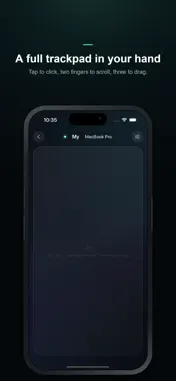
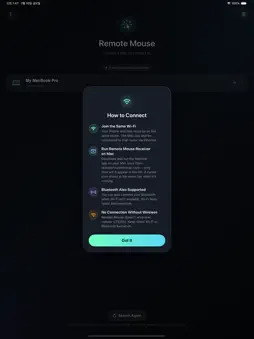
Turn your iPhone and iPad into a wireless trackpad for your Mac. Remote Mouse for Mac lets you control your Mac using the device in your hand — just like a Magic Trackpad, with no cables and no extra mouse. From the couch, during a presentation, or in bed, move your Mac's cursor freely from anywhere. ■ Just Like a Real Trackpad · Tap to click, two-finger tap to right-click · Two-finger scroll · Three-finger drag and double-tap drag · Adjust tracking speed and scroll sensitivity to your liking It feels exactly like a Magic Trackpad. ■ Connect Without Cables On the same Wi-Fi, your Mac is discovered automatically and shown in the list. One tap connects. No Wi-Fi? It connects over Bluetooth too. ■ Multiple Macs at Once Home and office, MacBook and Mac mini — every Mac running the Receiver appears in the list, so you can pick and connect to any of them. ■ Secure by Design When your iPhone connects, your Mac must approve it. No one can access your Mac without permission. ■ A Refined Experience A neon glow blooms with every touch, wrapped in a design like no other. Available in Korean, English, Japanese, and Chinese, following your device language automatically. ■ Getting Started 1. Install this app. 2. Run the free Receiver on your Mac (download from remotemouseformac.com). 3. Pick your Mac in the app, approve it, and it becomes a trackpad instantly. Note: To control your Mac's cursor, you need to run the free Receiver app on your Mac once. After the first launch, it starts automatically at login.
What's New
Version 1.0.4 2026-11-06
• iPhone Duo support: unfolded, the trackpad gets a scroll strip and Left/Right Click buttons. Half-fold it like a laptop and the lower screen becomes the track... Technical Analysis
Package Overview Basic metadata
Bundle ID
com.jkit.remotemouseformac Current Version 1.0.4
Minimum iOS 15.0
Package Size App Store Size
Package Metadata 0 / 0 version records
Detailed binary, privacy manifest, framework, and Info.plist results have not been indexed for this package yet. The verified App Store and archive metadata above remains available.
Developer Information
Known Version Records
0 version records with stored package metadata
Stored metadata does not guarantee a package is currently available to download.
| Details | Version / IDs | Version date | Action |
|---|