Preview




Description
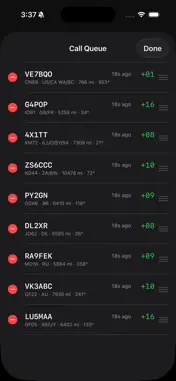
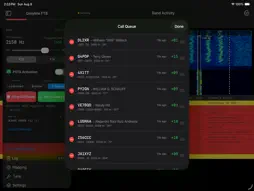
Greyline FT8 is a highly portable, capable amateur radio app designed specifically for field operation with an iOS device. I designed this app because I got very used to my full-stack FT8 solution: GridTracker, WSJT-X, PSK Reporter, WRL Desktop, several browser tabs, and more. But I didn't want the bulk and weight of a full Windows PC in the field. At the same time, while there are excellent and lightweight FT8 iOS solutions out there, they were lacking features I really wanted. Greyline is everything you need and nothing you don't. It automatically locates your grid square, performs callsign and calling station DXCC lookups (internet access required), and can even show you real-time spot data from PSK Reporter. Want to adjust your directional antenna? Now you've got the info you need to do it! Greyline also incorporates automated calling features. Gatherer mode calls CQ, responds to the first reply it gets, finishes the QSO and returns to calling CQ all without your input. On the other side of things, Hunter mode listens for CQ calls and pounces on them, finishing a QSO then returning to the live band to find the next. Or, take control of the conversation yourself with standard mode. That's the experience you're already used to from WSJT-X and other digital mode apps. Some other noteworthy features are: - Intelligent automatic free frequency selection - Dynamically adjusted audio delay for virtually drift-free message timing - PSK Reporter integrated Live Spots - Direct-to-QRZ, WRL and private Cloudlog logging and ADI export - Configurable waterfall settings - CQ addendums - CQ filtering for contesting and general courteous operation - Configurable retransmissions - Intelligent log recovery (didn't get that last 73 but want to log the contact anyway? Now you can!) - Log import and export - Antenna tuning - POTA Autospotting - One touch POTA activation and POTA.app-compatible ADIF export - Multiple POTA activation support - And so much more! Greyline uses audio VOX and not serial PTT. Most radios support this with simple cabling or an audio interface like a Digirig. For helpful tips on cabling and configuring popular radios, visit the Support URL below. Built by a ham, for hams, I'm very open to your feedback and hope Greyline can be your field companion. Want to share your own Field Notes (https://greylineft8.com/fieldnotes.html)? Email me at [email protected]!
What's New
Version 1.6.1 2026-11-08
“The one with UDP logging improvements” Love Greyline? Stop by my Ko-Fi! https://ko-fi.com/kb0rb **NOTE** - The WRL logging API is a work in progress, and I ... Technical Analysis
Package Overview Basic metadata
Bundle ID
com.kb0rb.Greyline Current Version 1.6.1
Minimum iOS 26.5
Package Size App Store Size
Package Metadata 1 / 7 version records
Detailed binary, privacy manifest, framework, and Info.plist results have not been indexed for this package yet. The verified App Store and archive metadata above remains available.
Developer Information
Known Version Records
1 version record with stored package metadata • 7 known version records
Stored metadata does not guarantee a package is currently available to download.
| Details | Version / IDs | Version date | Action |
|---|---|---|---|
| 17.93 MB | v1.4.0 App Store ID: 887565968Build: 1.4.0 | 2026-08-29 23:13:57 | Paid / Arcade |
| Not archived | App Store ID: 887408305 | Unknown | Paid / Arcade |
| Not archived | App Store ID: 887364511 | Unknown | Paid / Arcade |
| Not archived | App Store ID: 887318309 | Unknown | Paid / Arcade |
| Not archived | App Store ID: 886953256 | Unknown | Paid / Arcade |
| Not archived | App Store ID: 886901524 | Unknown | Paid / Arcade |
| Not archived | App Store ID: 886554861 | Unknown | Paid / Arcade |