
Preview





Description
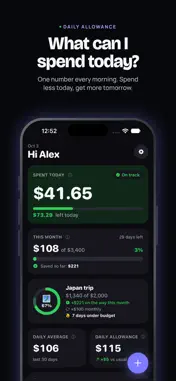
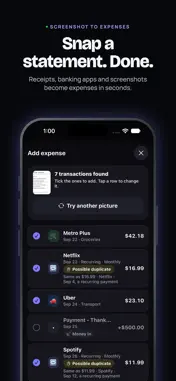
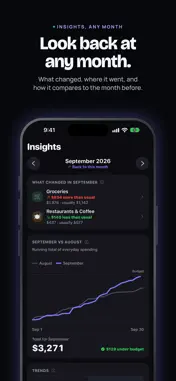
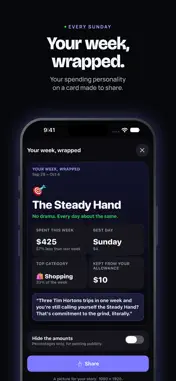
Budgets don't fail at the end of the month. They fail on a random Tuesday at the checkout. Orbit turns your monthly budget into one calm number: what you can spend today. No spreadsheets. No bank login. No guilt. ONE NUMBER FOR TODAY Your daily allowance is what's left of the month, divided by the days left, recalculated every morning. You always know where you stand, before you tap your card. • Spend less today and tomorrow grows • Overspend and Orbit quietly spreads it over the rest of the month, no starting over • Green, amber or red at a glance, always with a symbol and a label • Will I make it to payday? A warning days ahead, with the day and how much less a day fixes it • Irregular income? "When money arrives" spreads what you have until your next pay • Rent, Netflix and the gym every two weeks tracked as recurring payments, outside your daily number SNAP IT, SHARE IT, SAY IT Tracking that does itself. Any picture works, not just paper receipts. • Screenshot a bank or card statement, or upload its PDF: every expense on it, dated and sorted, in one go • Scan paper receipts and statements, or upload Uber rides, invoices and banking app screenshots • Share a picture or a PDF to Orbit from Photos, Mail, Files or any app's share sheet • Or just say it: "Twelve fifty at Tim Hortons and Netflix 16.99 a month" • Apple Pay taps logged by themselves, through a Shortcuts automation you set up once • "Hey Siri, log an expense in Orbit", or one press of the Action Button • Duplicate safeguard: the receipt today and the statement on Friday never count twice • Smart categories that learn your merchants, plus your own with an emoji CAN I AFFORD THIS? The impulse check shows what a purchase does to your next days and to your month-end savings, before you buy it. • See your daily allowance now and if you buy • A savings simulator for what a small change adds up to • Leftovers roll into savings goals, with a ring, a streak and a small celebration • Save automatically every week or month, straight from your income ASK ABOUT YOUR OWN MONEY • An assistant that answers from your own records: "How much did I spend on restaurants this month?" • Ask it to add an expense: it fills the form, nothing is saved until you tap Add • Daily tips from your own numbers, with the figure behind them, never generic advice • At most two gentle nudges a day, and quiet hours at night SEE WHERE IT GOES • Insights for any month, back to your first expense: what changed, your top shops, small purchases and no-spend days • Open a category to see it month by month • Money in against money out, with what you kept ONE BUDGET, TOGETHER • Shared Orbit: a joint budget for couples and roommates, with its own daily number, next to your own • Invite with a code, add joint expenses and see who paid what. Your personal spending stays private MAKE IT YOURS • Reorder or hide any card on Home, Insights and Plan, or move it to another page • A short guided tour and a Help page explain every feature YOUR WEEK, WRAPPED • Every Sunday: your spending personality, best day and top category on a card made to share • Hide the amounts, or ask for a roast YOUR DAY IN HALF A SECOND • Home Screen widget: what's left today as a ring, with a + to add an expense in one tap • Lock Screen widgets and Control Center controls • Quick actions from the app icon • Typed an expense offline? It syncs when you're back PRIVATE BY DESIGN No account needed: tap Get started and use Orbit right away, then save your data with Apple or an email whenever you like. Orbit never asks for your bank login, shows no ads and sells nothing. Pictures and questions are processed only to do the job and are not used to train AI models. Export everything or delete your account from Settings, any time. Works in your currency: US dollar, Canadian dollar, euro, British pound and 14 more. Set your monthly budget once. Orbit does the pacing. Download Orbit and find out what you can spend today.
What's New
Version 1.4.3 2026-11-12
Small improvements under the hood. Orbit now notes when the app is opened: only a count and the time, never your amounts, expenses, shops or notes. It helps us ...Small improvements under the hood. Orbit now notes when the app is opened: only a count and the time, never your amounts, expenses, shops or notes. It helps us see what brings people back. Everything else works just as before. Technical Analysis
Package Overview Basic metadata
Bundle ID
com.shadowlabs.orbit Current Version 1.4.3
Minimum iOS 18.0
Package Size App Store Size
Package Metadata 0 / 0 version records
Detailed binary, privacy manifest, framework, and Info.plist results have not been indexed for this package yet. The verified App Store and archive metadata above remains available.
Developer Information
Known Version Records
0 version records with stored package metadata
Stored metadata does not guarantee a package is currently available to download.
| Details | Version / IDs | Version date | Action |
|---|