
Preview







Description
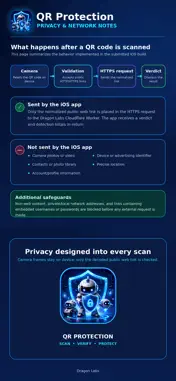
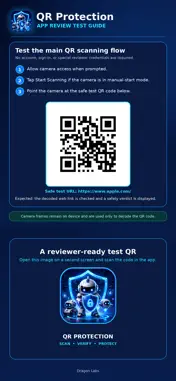
QR Protection helps you examine web links before deciding whether to open them. Scan a standard QR code or paste a web address directly into the app. QR Protection analyzes the link and presents an easy-to-understand result to help you make a more informed decision. LEARN WHILE YOU PLAY Spin the animated Safety Wheel and see whether it lands on a Good Link or Bad Link. Every result includes a short lesson explaining the warning signs—or positive clues—found in the example. The Safety Wheel works offline and does not require a camera, QR code, account, or internet connection. CHECK LINKS TWO WAYS • Scan any standard QR code containing an HTTP or HTTPS link. • Type or paste a web address without using the camera. No proprietary marker or special QR code is required. SPOT SUSPICIOUS LINKS The Safety Center teaches you to watch for: • Misspelled or misleading domain names • Unexpected login or payment requests • Urgent or threatening messages • Suspicious subdomains • Unusual shortened links • Links containing embedded usernames or passwords • Offers that appear too good to be true Remember: HTTPS and a padlock do not guarantee that a website is trustworthy. CLEAR, FRIENDLY RESULTS QR Protection explains whether a checked link appears safe, suspicious, or requires additional caution. Results are presented with friendly graphics and straightforward guidance. LOCAL SCAN HISTORY Review up to 25 of your most recent live checks. History is stored locally on your device so you can revisit previously checked links. PRIVACY-FOCUSED SCANNING For a live security check, only the normalized web link is submitted for analysis. QR Protection does not submit: • QR code images • Camera frames • Photos or contacts • Location information • Device identifiers Camera access is used only to recognize QR codes when you choose to scan one. IMPORTANT No automated security tool can guarantee that every website is safe. Results should be treated as guidance. Always review the destination carefully before entering passwords, payment information, or other sensitive information. QR Protection makes safer link checking approachable, educational, and easy to use.
What's New
Version v1.21 2026-08-13
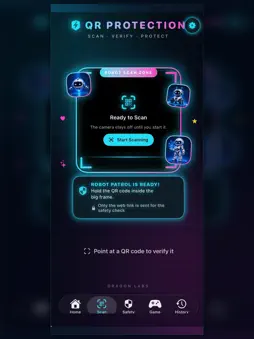
Scanner now fills nearly the entire Scan screen. Responsive portrait camera view on iPhone and iPad. Instructions/privacy notice moved inside the scanner. Immed...Scanner now fills nearly the entire Scan screen. Responsive portrait camera view on iPhone and iPad. Instructions/privacy notice moved inside the scanner. Immediate full-screen verdict fix preserved. Friendly robots and scan animation retained. Technical Analysis
Package Overview Basic metadata
Bundle ID
com.DragonLabs.qrguard Current Version v1.21
Minimum iOS 17.0
Package Size App Store Size
Package Metadata 0 / 0 version records
Detailed binary, privacy manifest, framework, and Info.plist results have not been indexed for this package yet. The verified App Store and archive metadata above remains available.
Developer Information
Known Version Records
0 version records with stored package metadata
Stored metadata does not guarantee a package is currently available to download.
| Details | Version / IDs | Version date | Action |
|---|