Preview


Description
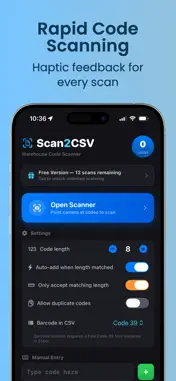
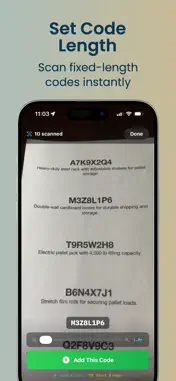
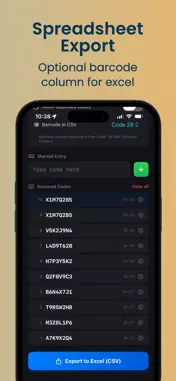
Stop typing codes manually. Scan2CSV is built for capturing fixed-length letter and number codes instantly without mistakes and exporting them as clean data or barcode formats. Key Benefits • Scan codes instantly using your camera • Eliminate manual typing and reduce errors • Capture consistent, structured data • Export to CSV (Excel-ready) or barcode format Scan2CSV is designed for speed, precision, and real-world workflows: • Set a fixed code length for faster scanning • Automatically capture codes when length matches • Filter out incorrect or unwanted scans • Optional duplicate detection • Export codes as barcode-formatted data (Code 39) Perfect for • Warehouse workflows • Serial number tracking • Product labeling systems • Inventory and asset management • Converting codes into scannable barcodes How it works: 1. Set your code length 2. Scan codes continuously 3. Instantly capture valid entries 4. Export to CSV or barcode format Capture codes faster. Export them smarter. Download Scan2CSV and streamline your workflow.
What's New
Version 1.2.0 2026-05-04
Batch Scanning Organize your work into batches — create separate sessions for different aisles, pallets, or jobs. Switch between batches anytime and export them... Technical Analysis
Package Overview Basic metadata
Bundle ID
StewartSoft.Warehouse Current Version 1.2.0
Minimum iOS 26.2
Package Size App Store Size
Package Metadata 1 / 3 version records
Detailed binary, privacy manifest, framework, and Info.plist results have not been indexed for this package yet. The verified App Store and archive metadata above remains available.
Developer Information
Known Version Records
1 version record with stored package metadata • 3 known version records
Stored metadata does not guarantee a package is currently available to download.
| Details | Version / IDs | Version date | Action |
|---|---|---|---|
| 1.76 MB | v1.2.0 App Store ID: 885217584Build: 1.2.0 | 2026-05-04 02:23:37 | Get Version |
| Not archived | App Store ID: 884106984 | Unknown | Request Version |
| Not archived | App Store ID: 883899149 | Unknown | Request Version |