
Preview






Description
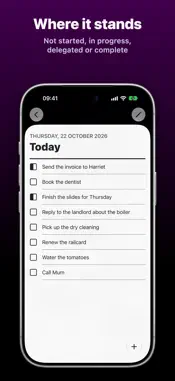
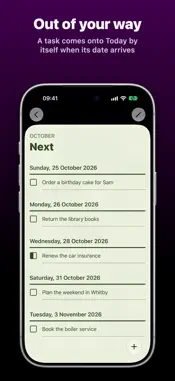
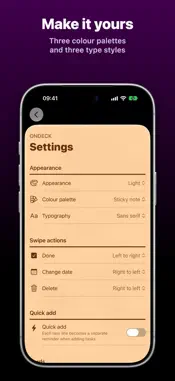
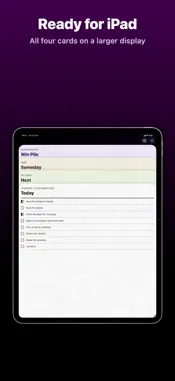
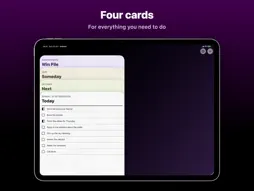
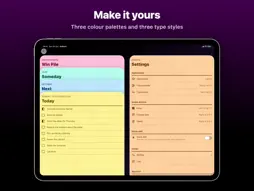
Stop drowning in endless task lists. Start finishing what matters. OnDeck strips away the complexity of traditional to-do apps and gives you just four cards to manage your life: Today, Next, Someday and the Win Pile. THE FOUR-CARD SYSTEM FOR GETTING THINGS DONE • Today: what needs your attention right now • Next: what's coming up soon • Someday: ideas and tasks for the future • Win Pile: everything you've accomplished Tap a card's heading to open it, and pull it down to put it back. The card at the front of the deck works right where it sits: scroll it, tick tasks off, or tap one to edit it. Drag tasks into the order you want, and swipe one to finish it, change its date or delete it. It's task management that works the way your brain does. KNOW WHERE EVERYTHING STANDS Every task has one of four statuses: Not started, In progress, Delegated or Complete. Finish a task, or hand it to someone else, and it's filed in the Win Pile. Need to move a few at once? Choose several tasks and change their status, date or card together. THE WIN PILE Completed tasks don't just disappear. They move to your Win Pile: a record of everything you've accomplished, grouped by the day you finished it. Look back on productive days, and remind yourself how much you're actually getting done. DESIGNED TO STAY OUT OF YOUR WAY No complicated projects. No tags. No priorities within priorities. OnDeck keeps your list up to date so you don't have to: • A task comes onto the Today Card by itself when its date arrives. • Anything left unfinished on Today is carried over to the next day. • Choose how far ahead the Next Card looks, with anything later going to Someday. SYNCS WITH APPLE REMINDERS Your tasks aren't locked inside OnDeck. Each card is a list in the Reminders app, so your tasks sync and back up the way your reminders already do, across all your devices. Tick one off in Reminders, on your Apple Watch or with Siri, and OnDeck keeps up. Your data stays yours, and it's still there if you stop using the app. HOME SCREEN WIDGETS Add OnDeck to your Home Screen in four sizes, with a fifth, taller one on iOS 27. Choose which card to show: Today, Next or Someday. Tap a task in the widget to open it in the app. Or press and hold the app's icon to add a task straight to a card. MAKE IT YOURS • Appearance: System, Light or Dark • Colour palette: Pastel, Greyscale or Sticky note • Typography: Sans serif, Serif or Rounded • Three app icons to choose from READY FOR IPHONE, IPHONE DUO AND IPAD On an iPad, and on the iPhone Duo's inner display, the deck stays on screen with the card you opened beside it. Turn an iPhone on its side and all four cards are on screen at once. OnDeck works in every orientation. ALSO ON THE MAC OnDeck for Mac is on the Mac App Store, with your four cards in a window of their own, a Task menu, keyboard shortcuts, a Dock menu for adding tasks and a widget for the desktop. Your tasks are in Reminders, so they're the same on your iPhone, iPad and Mac. PRIVATE BY DESIGN No accounts, no adverts and no analytics. Your tasks are stored in Apple Reminders and nowhere else. OnDeck is free. There's a tip jar on the Settings Card if you'd like to support it.
What's New
Version 2.3.1 2026-10-27
Bug fixes and minor improvements Technical Analysis
Package Overview Basic metadata
Bundle ID
art.johnpe.OnDeck Current Version 2.3.1
Minimum iOS 26.0
Package Size App Store Size
Package Metadata 0 / 5 version records
Detailed binary, privacy manifest, framework, and Info.plist results have not been indexed for this package yet. The verified App Store and archive metadata above remains available.
Developer Information
Known Version Records
0 version records with stored package metadata • 5 known version records
Stored metadata does not guarantee a package is currently available to download.
| Details | Version / IDs | Version date | Action |
|---|---|---|---|
| Not archived | App Store ID: 884427111 | Unknown | Request Version |
| Not archived | App Store ID: 883318489 | Unknown | Request Version |
| Not archived | App Store ID: 883115495 | Unknown | Request Version |
| Not archived | App Store ID: 883036388 | Unknown | Request Version |
| Not archived | App Store ID: 882585719 | Unknown | Request Version |