
Preview



Description
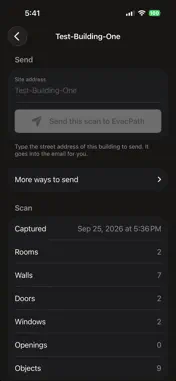
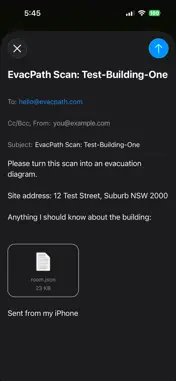
EvacPath Scan replaces the floor plan you cannot find. Walk your building with your iPhone, one room at a time, and the app measures the walls, doors and windows as you go. When you are done, send the scan to EvacPath and a drafter turns it into an AS 3745 evacuation diagram for your site. WHAT YOU NEED An iPhone Pro or Pro Max, iPhone 12 Pro or newer. These models carry the LiDAR scanner the app uses to measure a room. If your iPhone is not a Pro model, you can still order a diagram: email photos of your rooms and any floor plan you have to [email protected]. HOW IT WORKS 1. Tap New Scan, stand in the first room, and walk it slowly with the phone at chest height. Tap Finish Room when every wall is covered. 2. For a whole building, tap Add another room and walk through the doorway with the app open. Scan each room the same way, then tap Finish. 3. Give the building a name, save it, and tap Send this scan to EvacPath. Your draft diagram comes back by email, and you see the first draft before you pay. WHAT THIS APP DOES NOT DO It does not draw the diagram itself. The scan gives an EvacPath drafter an accurate, measured layout to draw from. PRIVATE BY DESIGN No accounts, no analytics, no tracking, and no network connections. Scans stay on your iPhone until you choose to send one, and sending opens an email from your own mail account. EvacPath Scan is free. Evacuation diagram drafting is an EvacPath service, ordered by email and delivered per the process at evacpath.com. No photos or video are saved or sent. A scan is a small file of measurements, and scanning works without an internet connection; you only need one to email the scan.
What's New
Version 1.2 2026-11-21
A small map in the top corner fills in while you scan: thick green walls are done, thin red ones need a closer look, and a red dot is a gap. The map needs iOS 2...A small map in the top corner fills in while you scan: thick green walls are done, thin red ones need a closer look, and a red dot is a gap. The map needs iOS 27 or later. Each scan now notes which way the building faces, using the phone's compass. It does not use GPS or your location. Fixed: once a scan is saved, the Saved screen now closes only with Done, so the same scan cannot be saved twice. Fixed: if the app is closed from the app switcher partway through a walk, the rooms you already finished are offered back the next time you open it. Technical Analysis
Package Overview Basic metadata
Bundle ID
com.evacpath.scan Current Version 1.2
Minimum iOS 17.0
Package Size App Store Size
Package Metadata 0 / 0 version records
Detailed binary, privacy manifest, framework, and Info.plist results have not been indexed for this package yet. The verified App Store and archive metadata above remains available.
Known Version Records
0 version records with stored package metadata
Stored metadata does not guarantee a package is currently available to download.
| Details | Version / IDs | Version date | Action |
|---|