
Preview





Description
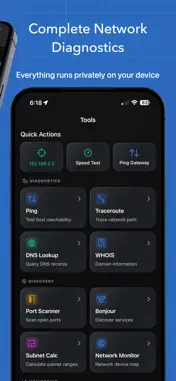
10 professional network tools. Zero cloud. Zero ads. Zero subscriptions. Everything runs locally on your Mac. NetMonitor is a complete network monitoring and diagnostics toolkit built for macOS. Scan your network, discover every connected device, trace routes across the globe, and diagnose issues in seconds — all without creating an account or sending a single byte off your machine. WHO IT'S FOR • Network admins — Monitor infrastructure and catch rogue devices • Developers — Debug connectivity, inspect DNS, scan ports • Homelab enthusiasts — Map your entire network and track every device NETWORK DASHBOARD See your entire network at a glance. A live health score grades your connection quality in real time, combining latency, packet loss, and DNS responsiveness into a single number. Monitor gateway reachability, public IP, ISP details, and live connection events — all in one view. DEVICE DISCOVERY Find devices other apps miss. NetMonitor's multi-phase scanning engine uses ARP, Bonjour, TCP probes, and reverse DNS to build a complete picture of your network. See IP and MAC addresses, vendor names, open ports, running services, and connection history for every device. 10 BUILT-IN DIAGNOSTIC TOOLS • Ping — ICMP with TCP fallback, live latency graphs, and packet statistics • Traceroute — Hop-by-hop path analysis with timing • GeoTrace — Visual traceroute plotted on a world map • World Ping — Test reachability from 20+ global nodes simultaneously • Port Scanner — TCP scanning with preset and custom port ranges • DNS Lookup — Query A, AAAA, MX, NS, TXT, and CNAME records • Speed Test — Download and upload throughput with peak speed and jitter tracking • WiFi Heatmap — Walk-around signal survey with floorplan overlay • WHOIS — Domain registration and ownership lookup • Bonjour Browser — Discover mDNS services on your network WIFI HEATMAPPING Import a floorplan or use freeform mode, then walk around to map signal strength across your space. Identify dead zones and optimize access point placement with real data instead of guesswork. GEOTRACE See the physical path your traffic takes. GeoTrace plots each hop on a satellite map so you can visualize routing across cities, countries, and continents. IPHONE COMPANION Connect to NetMonitor on your iPhone over your local network via Bonjour. Synchronize devices, run remote diagnostics, and monitor your network from either platform. No cloud relay — communication stays on your LAN. TIMELINE & EVENT HISTORY Every scan, device change, and network event is logged. Scroll back through your network history to spot patterns, track when devices appeared or disappeared, and review past diagnostics. No data ever leaves your device. No analytics. No tracking. Just tools that work.
What's New
Version 2.2.0 2026-04-23
Added heatmapping through Shortcuts Improved visibility on light mode devices for clearer screens, easier reading, and a more consistent experience across the ... Technical Analysis
Package Overview Basic metadata
Bundle ID
com.blakemiller.netmonitor Current Version 2.2.0
Minimum iOS 18.0
Package Size App Store Size
Package Metadata 1 / 6 version records
Detailed binary, privacy manifest, framework, and Info.plist results have not been indexed for this package yet. The verified App Store and archive metadata above remains available.
Developer Information
Known Version Records
1 version record with stored package metadata • 6 known version records
Stored metadata does not guarantee a package is currently available to download.
| Details | Version / IDs | Version date | Action |
|---|---|---|---|
| 10.27 MB | v2.2.0 App Store ID: 884788148Build: 2.2.0 | 2026-04-23 20:22:56 | Paid / Arcade |
| Not archived | App Store ID: 883717839 | Unknown | Paid / Arcade |
| Not archived | App Store ID: 883456578 | Unknown | Paid / Arcade |
| Not archived | App Store ID: 883385686 | Unknown | Paid / Arcade |
| Not archived | App Store ID: 882840211 | Unknown | Paid / Arcade |
| Not archived | App Store ID: 882382420 | Unknown | Paid / Arcade |