
Preview


Description
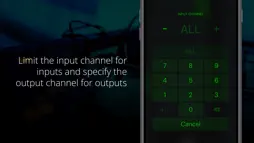
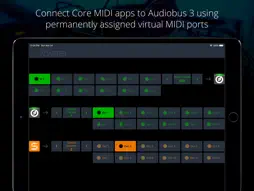
This MIDI app for Audiobus 3 allows you to include music apps, which don't support Audiobus MIDI but only Core MIDI. It creates permanent virtual MIDI ports for input and output. After distinctly selecting each of those ports in your "legacy" music apps, they can receive and send MIDI from/to Audiobus 3. + Connect up to 10 receiving apps (like synthesizers) + Connect up to 10 sending apps (like sequencers) + Use multiple instances of this app in Audiobus NOTE: This app requires Audiobus 3. Insert it into one or more MIDI input and output ports. Furthermore, this adapter only works with apps that allow you to select MIDI ports for sending and receiving. It won't work with apps that have no MIDI setup page. IMPORTANT: Connecting apps via Core MIDI is an advanced topic. If you haven't done it before, please become familiar with it prior to downloading this app. CONNECT YOUR "LEGACY" APPS TO AUDIOBUS 3 Audiobus 3 has introduced a powerful MIDI routing system that makes interconnecting MIDI apps a lot easier than it was before. However, not all music apps support this new system, yet. Midiflow Adapter makes those apps compatible, by translating between the "old" Core MIDI system and the new Audiobus 3. This, however, only works with apps that let you to select MIDI ports for input and output, or at least the MIDI channel. It is not enough if these apps create their own virtual MIDI port. SETUP FOR SYNTH APPS (RECEIVERS) Midiflow Adapter creates 10 permanent virtual MIDI output ports. This means that you can use up to 10 music apps with this adapter. For setting it up, start Midiflow Adapter. Then, start your first synth app that you want to connect with Audiobus via this adapter app. Go to its MIDI settings and activate reception on the MIDI port called "MF Adapter Out 1". It is essential that you deactivate reception on all other ports. Now, go to Audiobus 3 and insert MF Adapter into a MIDI output slot. In the input slot, add any other app, like Midiflow Keyboard. When you switch to Midiflow Adapter, you can select which of your synth apps the MIDI data should go. In this case, it is already set to "Out 1", so you're ready to go. For your second synth app, do the same steps, but select MIDI port "MF Adapter Out 2", and so on. Then, you can select it in the adapter app. SETUP FOR SEQUENCER APPS (SENDERS) The procedure is identical to the one for receiver apps (see above). However, you need to configure the MIDI output settings instead of the input settings. Midiflow Adapter creates 10 permanent virtual MIDI input ports for that purpose. They are called "MF Adapter In 1-10". WORKING WITH CHANNELS Some Core MIDI apps don't allow you to select the input/output ports, but only the MIDI input/output channel. In that case, they receive on all ports. The only way to selectively trigger them is to assign a unique channel to them. In Midiflow Adapter, you can then select this channel as input/output. NON-COMPATIBLE APPS If one of your music apps neither supports selecting the MIDI port nor setting the MIDI channel, you cannot use it with Midiflow Adapter.
What's New
Version 1.0.5 2024-05-07
Compatibility improvements for recent iOS versions Technical Analysis
Package Overview Basic metadata
Bundle ID
de.johannesdoerr.MidiflowAdapter Current Version 1.0.5
Minimum iOS 10.2
Package Size App Store Size
Package Metadata 0 / 6 version records
Detailed binary, privacy manifest, framework, and Info.plist results have not been indexed for this package yet. The verified App Store and archive metadata above remains available.
Known Version Records
0 version records with stored package metadata • 6 known version records
Stored metadata does not guarantee a package is currently available to download.
| Details | Version / IDs | Version date | Action |
|---|---|---|---|
| Not archived | App Store ID: 865719279 | Unknown | Paid / Arcade |
| Not archived | App Store ID: 839411217 | Unknown | Paid / Arcade |
| Not archived | App Store ID: 833653801 | Unknown | Paid / Arcade |
| Not archived | App Store ID: 827309442 | Unknown | Paid / Arcade |
| Not archived | App Store ID: 823596280 | Unknown | Paid / Arcade |
| Not archived | App Store ID: 821727538 | Unknown | Paid / Arcade |