
Preview





Description
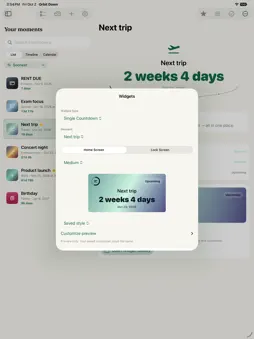
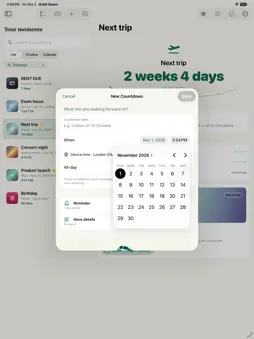
Orbit Down is a free, ad-free countdown app for iPhone, iPad, and Mac. Use it without ads, tracking, or an account. Track launches, birthdays, trips, exams, bills, holidays, weddings, goals, appointments, and milestones. No app account, ads, analytics SDK, or third-party tracking. Make each countdown feel right. Choose collections, tags, notes, locations, links, searchable custom SF Symbols, typed hex color palettes, typography, photos, progress starts, milestones, urgency badges, repeat rules, completion behavior, reminder presets, actionable reminder notifications: Snooze 1 Hour, Snooze 1 Day, Snooze Tomorrow Morning, time zones, business-day units, total time units, and standard, short, or digital labels. Use 10 curated one-tap style presets. Start from built-in templates for travel, project deadlines, tax deadlines, visa renewals, concerts, dinner reservations, subscription renewals, paydays, baby due dates, retirement, moving day, birthdays, holidays, exams, and goals; then save your own templates and palettes. Widgets are central. Add small, medium, large, extra-large, and accessory widgets where supported. A single widget asks for Countdown and optional Layout; Upcoming asks for Source, optional Collection, and Rows; Collection Dashboard asks only for Collection. Widgets inherit saved countdown appearances and open matching app detail when tapped. Mutation controls stay in Live Activities, Control Center, Shortcuts, notifications, and the app. Create countdowns quickly from natural language. Quick Add, Siri, Shortcuts, Share Extension, and macOS Services all use the same parser for phrases such as "Dinner tomorrow at noon", "Launch brief by EOD", "Payday every other Friday", "Trip in 5 business days", "Countdown to Thanksgiving", "7/10/26 at 6pm", "#Launch #VIP", or multi-line pasted lists. You can include reminders, links, locations, collections, tags, favorite status, time zones, style presets, symbols, typography, units, milestones, and visual settings in the text before saving; New Countdown and Quick Add also respect the current collection or tag context unless explicit collection or tag details are supplied. Default creation collection, default creation tags, default creation style, default creation appearance, default creation progress details, default creation reminders, default creation completion behavior, default creation favorite, default creation repeat, default creation progress start, default creation units, default creation time labels, default creation typography, and default creation time zone settings keep blank, Quick Add, and Siri-created countdowns organized. Shortcuts can also duplicate countdowns, reschedule dates, rename or remove tags, set typography, copy visual styles between countdowns, use clipboard text, create countdowns from link page text, and create or review countdowns from text-bearing files. Bring Apple apps into the flow. Import upcoming Calendar events, dated Reminders, and Contacts birthdays or anniversaries with review screens and Shortcuts actions. Add countdown targets back to Calendar or Reminders, refresh imported countdowns from their source, open calendar invite files, and share countdowns as text or Markdown with progress percentage and elapsed/remaining context, a visual card, a calendar invite, a QR code, or a portable Countdown File. Live Activities and Dynamic Island keep important countdowns visible with Skip, Postpone, and Done / Next controls. Native system entry points include iOS quick actions, Control Center controls, file opening, macOS Services, the command menu, and the menu bar glance. The menu bar supports New Countdown, Quick Add, clickable Next rows, Skip, Postpone 1 Day, Done / Next, Undo Completion, and Clear History. Data stays local by default. Optional iCloud sync uses your Apple ID; backups with import summary, portable files, and Erase Local Data keep you in control.
What's New
Version 1.2.2 2026-10-03
Orbit Down 1.2.2 fixes widget configuration across iPhone, iPad and Mac. • Saved countdowns are available when editing a widget. • Countdown, layout, collectio... Technical Analysis
Package Overview Basic metadata
Bundle ID
com.zelnick.countdownstudio Current Version 1.2.2
Minimum iOS 17.0
Package Size App Store Size
Package Metadata 0 / 0 version records
Detailed binary, privacy manifest, framework, and Info.plist results have not been indexed for this package yet. The verified App Store and archive metadata above remains available.
Developer Information
Known Version Records
0 version records with stored package metadata
Stored metadata does not guarantee a package is currently available to download.
| Details | Version / IDs | Version date | Action |
|---|