
Preview




Description
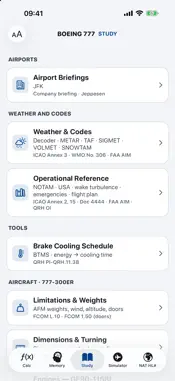
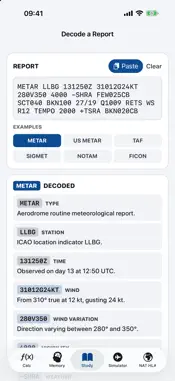
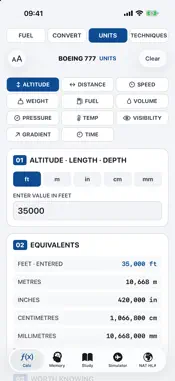
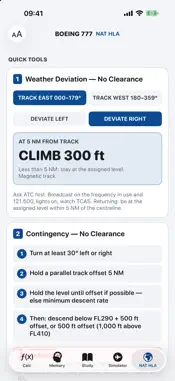
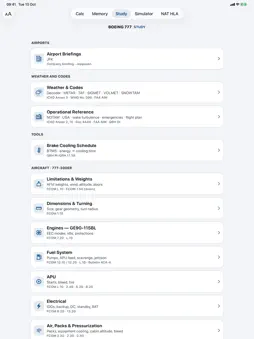
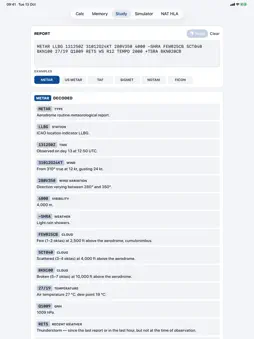
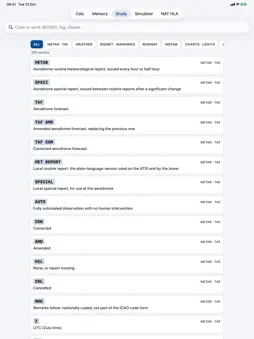
B777 Tools is a personal study aid for a closed group of 777-300ER freighter crews: ask for access in the app, and it opens once your request is approved. Everything works offline except the live data. Large text and a dark appearance for the flight deck; on iPad, a sidebar with large maps. TODAY • UTC clock, today's NAT tracks, SIGMETs and space weather at a glance • Weather category at your airports and the EASA conflict zone bulletins in force • Alerts for today only, crew reports from the group, and your favourite tools FLIGHT • Route Check: open or share the flight plan PDF — the route on the map, the SIGMETs, conflict zones, turbulence and space weather along it, EDTO entry, ETP and exit with the alternates' weather, advisories for the countries crossed and a short summary • Weather Check: the TAF at each aerodrome for the time you will be there, against the planning minima • ETOPS / EDTO map: diversion circles, arrival windows and alternate weather • Escape routes for L888 and Y1 by segment • Weather map: SIGMETs and METARs for the North Atlantic, Europe, the Middle East, Asia or the world • Airport weather and NOTAMs; runways with head- and crosswind, D-ATIS for US airports, crew notes and crew reports • Conflict zone bulletins on a map, NAT tracks, oceanic FIR NOTAMs, aircraft reports, space weather • Decoder: any METAR, TAF, SIGMET, NOTAM or FICON in plain words CALC • Maximum fuel available, second-stage fuel and landing weight, with checks against the limits • Fuel conversion with density and uplift; unit converter; time calculator • Wind components with magnetic or true references, descent, cold-temperature correction, ETP and PNR, CAS · Mach · TAS, pressure and density altitude COMMS • ATC to Text: controller transmissions written down on the device, with the matching standard phrase and reply • ICAO phraseology by phase of flight, with the pilot replies • CPDLC: every message, its meaning and the reply it needs; failure and correction procedures • Emergencies and contingencies, SLOP and incident reports • NAT HLA step by step, with weather deviation and contingency tools LIBRARY • More than 500 questions on the aircraft and its procedures, EICAS message trainer, memory item drills • Aircraft and operations topics, airport briefings, weather and codes, operational reference • Interactive FMA, simulator scenarios, brake cooling • A user guide for every tab and tool IMPORTANT B777 Tools is a study aid. It is not approved documentation and it is not for operational use. The approved manuals, charts, NOTAMs and company instructions always take precedence. It is not produced or endorsed by any aircraft manufacturer, chart provider, authority or operator.
What's New
Version 2.2 2026-11-19
B777 Tools is a study aid for the pilots of one airline's 777 freighter fleet. Access is limited to that group: a pilot creates an account in the app (REQUEST A...B777 Tools is a study aid for the pilots of one airline's 777 freighter fleet. Access is limited to that group: a pilot creates an account in the app (REQUEST ACCESS) and the app owner approves it. There is no purchase and nothing is unlocked by a code. Please use the demo account above, which is already approved. Accounts can be deleted in the app (Aa → Account → Delete my account). The Today and Flight tabs download public aviation data from the FAA, NOAA and EASA. ATC to Text (Comms tab) uses the microphone and on-device speech recognition only while LISTEN is pressed; nothing is recorded or sent. Version 1.2 adds crew reports (Flight → Airport Weather & NOTAMs → an airport → "Runways, wind and crew notes" → CREW REPORTS): approved members of the group post short notes about an airport, which expire after 24 hours or 7 days. Only approved members can read or post. Each report shows its author; the author or the app owner can delete it; any member can report a note to the owner by e-mail or hide another member's notes (the "…" button on the note). The owner removes members who post objectionable content. Version 1.3: Route Check (Flight tab) can open a flight plan PDF, chosen in the app or shared from another app; the PDF is read on the device and only the route is kept. Without a company flight plan, use the "Example" button or paste a route such as: EBLG DCT LNO UN852 KHG L888 SADAN DCT VHHH. Version 1.4: Next Flight (Flight tab) opens when a flight plan PDF is shared to the app. Besides the route it keeps, on the device, the schedule, fuel, weights, MEL items and dispatch remarks of that one flight, until the next plan replaces it; with iCloud signed in, the same flight is kept in the user's own iCloud key-value store so the user's iPhone and iPad show it. To try it without a company plan: Flight → Next Flight — City Pair, type EBLG and KJFK, a date, an STD and a block time. FTL — Duty and Rest (Library → Crew) is a calculator from the operator's manual; the roster and the operator decide. Version 1.4.1: crew reports can be posted from Today (Today → CREW REPORTS → Post). Each report now carries an optional category and is shown for 24 hours; authors can delete their own. Same moderation as before: report or hide via "…" on the airport page, the owner removes members who post objectionable content. Version 1.5: Holdover Time (Flight → Cold Weather) reads the public METAR and the FAA holdover time tables; its optional reminders are local notifications on the device. Commuting (Library → Crew) keeps the pilot's own tickets on the device and in the pilot's own iCloud key-value store; the train times come from the public iRail (Belgian railways) timetable; the flight searches open Google Flights, Skyscanner or Kayak in the browser. Nothing is bought in the app. All other content is reference text and simple calculators. To try the decoder: Flight → Decode a Report → tap any example. A user guide is behind the "?" at the top of Today, Flight and Comms. Text size can be changed with the "AA" button at the top left. The app states on every page that it is a study aid and not for operational use. • One clear button per subject on Today, your flight, Before flight, In flight, the checklists and the Library — in the colour of what it holds • Airport minima : departure against the landing minima, take-off alternate, destination, alternates and ERA against the planning minima, TEMPO and PROB • Alternates in the USA: the FAA alternate minima as well; fire cover (RFFS) by role • ETOPS from the OFP: alternates, windows and time; the OM A one-engine speed • The airports of the flight at a glance, kept for flight without a connection • A back arrow on every page, on the iPad too • Fixes Technical Analysis
Package Overview Basic metadata
Bundle ID
com.reguengos.B777Tools Current Version 2.2
Minimum iOS 17.0
Package Size App Store Size
Package Metadata 0 / 0 version records
Detailed binary, privacy manifest, framework, and Info.plist results have not been indexed for this package yet. The verified App Store and archive metadata above remains available.
Known Version Records
0 version records with stored package metadata
Stored metadata does not guarantee a package is currently available to download.
| Details | Version / IDs | Version date | Action |
|---|