
Preview


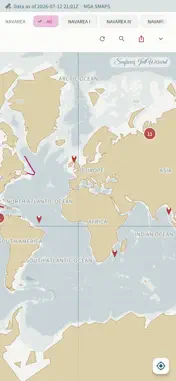


Description
Bring your passage into the app, keep only the navigational warnings that actually touch it, and carry them over to the ECDIS. NAVAREA and coastal NAVTEX warnings are plotted on a world map whose coastline is bundled inside the app — no tile server, and the last warnings you pulled stay readable with no connection. WARNINGS ALONG YOUR ROUTE — MSI PRO · Import a route file (RTZ, GPX, CSV or JSON) and see it drawn under the warning pins · Keep only the warnings within 100, 200 or 300 nm of that route and clear the rest away · Re-fetch every source on demand, instead of the free once-daily cycle EXPORT TO THE ECDIS — MSI PRO Warnings are carried over as latitude/longitude lines with text marks, ready to open on the bridge. · JRC user map (.uchm) — native format · GPX · Furuno user chart (beta) WARNING SOURCES · NGA — worldwide NAVAREA plus HYDROLANT, HYDROPAC and HYDROARC · Coastal NAVTEX, collected automatically from seven countries — the United States (USCG), Australia (AMSA), Japan (JCG/MSIL), Taiwan (MOTC), Hong Kong (Marine Department), Finland (Traficom) and Denmark (DMA Niord) · NAVAREA III — Spain (IHM) · Korea (KHOA) — collected as well once you enter your own free data.go.kr service key in Settings THE MAP · Fully offline vector coastline at three levels of detail, three bathymetry bands, national boundaries and 167 place labels covering major ports, straits and canals · Coordinates and areas are extracted from the warning text and drawn as points, circles, polygons and tracklines · Filter by NAVAREA, by geometry type, and by NAVAREA versus coastal NAVTEX · Place and port search in English, with no network call · Your own GPS position on the chart CHANGE HISTORY Compares each refresh with the one before it and lists what is new, what was cancelled and what changed. DEPARTURE BRIEFING SHEET Print the current list to an A4 PDF. Free. MSI PRO IS A ONE-TIME PURCHASE Not a subscription. Restores on a new device with Restore Purchase under the same store account. The map, the warning list, the change history and the briefing sheet are free. LOCATION GPS is read only when you tap the my-position button, and only while the app is in the foreground. It is used solely to draw your own position on the chart on this device — it is never sent to a server, never stored as a history, and never collected in the background. Decline the location permission and everything else keeps working. There are no push notifications. Refresh is checked when you open the app or return to it. English and Korean. Note — for reference only. Not for navigation. Not a substitute for GMDSS receiving equipment or official notices to mariners.
What's New
Version 1.0.8 2026-10-30
• Community: you can now delete your own posts and comments. • You can delete your account in the app even without signing in. Deleting your account also remove... Technical Analysis
Package Overview Basic metadata
Bundle ID
com.seafarerjobwizard.msi Current Version 1.0.8
Minimum iOS 15.5
Package Size App Store Size
Package Metadata 0 / 3 version records
Detailed binary, privacy manifest, framework, and Info.plist results have not been indexed for this package yet. The verified App Store and archive metadata above remains available.
Known Version Records
0 version records with stored package metadata • 3 known version records
Stored metadata does not guarantee a package is currently available to download.
| Details | Version / IDs | Version date | Action |
|---|---|---|---|
| Not archived | App Store ID: 891550295 | Unknown | Request Version |
| Not archived | App Store ID: 889730404 | Unknown | Request Version |
| Not archived | App Store ID: 888830529 | Unknown | Request Version |