Preview

Description
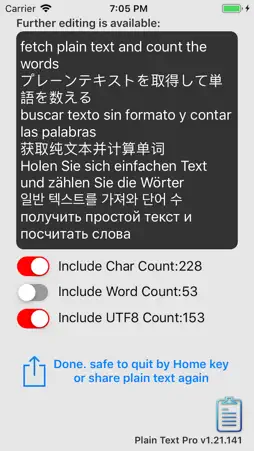
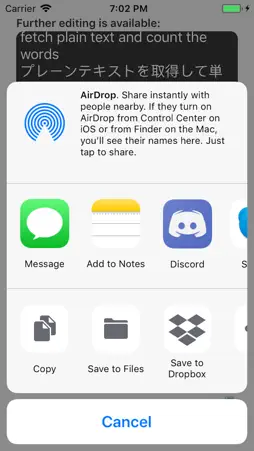
Convert all plain text from whatever you copied and count the character and words at the same time! Features: v1.21 - automatic output of plain text with even no need to touch the interface of the app - equipped with a plain text editor for further editing - text can be quickly shared with other apps with one-touch - not only the characters but also the words and UTF8 words will be counted and attached - all languages supported (please use the UTF8 number instead of word for some languages) - very accurate UTF8 word count engine for any Unicode character language users v1.21 -> v1.22 - fine-tuning, app size reduced - animation changed v1.22 -> v1.24 - all deprecated code rewritten v1.24 -> v1.27 - All deprecated code corrected for iOS15 and up - App interface modified: share button's size & image - System menu implemented: Technical Support, Rate Me, More From Us - App display name modified from "Plain Text Pro + Word Counter" to "Word Counter + Plain Text Pro" - App information updated for the new 13+/16+/18+ age-rating system Instructions basic mode: 1. copy anything from another app (just include pictures and videos, you can simply "Select all" then "Copy" ) 2. start "Plain Text Pro", the app will popup displaying all plain text it grabbed and converted 3. close "Plain Text Pro" by pressing the iPhone's Home key (yes, no need to touch anywhere in the app) 4. open another app and Paste the plain text Instructions professional mode: 1. copy anything from another app (just include pictures and videos, you can simply "Select all" then "Copy" ) 2. start "Plain Text Pro", the app will popup displaying all plain text it grabbed and converted 3. touch the button "Copy back to clipboard" 4. do further editing on the editor (the keyboard can be dismissed when you touch outside the editor) 5. choose what word count information be added to the end of the plain text, character, word, and UTF8 6. touch the Share button to share out or if you only need the plain text in the clipboard to paste, jump to the next step 7. close "Plain Text Pro" by pressing the iPhone's Home key (yes, no need to touch anywhere in the app)
What's New
Version v1.27 2025-07-31
v1.24 -> v1.27 - All deprecated code corrected for iOS15 and up - App interface modified: share button's size & image - System menu implemented: Technical Suppo...v1.24 -> v1.27 - All deprecated code corrected for iOS15 and up - App interface modified: share button's size & image - System menu implemented: Technical Support, Rate Me, More From Us - App display name modified from "Plain Text Pro + Word Counter" to "Word Counter + Plain Text Pro" - App information updated for the new 13+/16+/18+ age-rating system Technical Analysis
Package Overview Basic metadata
Bundle ID
com.dragonbtv.PlainTextPro Current Version v1.27
Minimum iOS 15.6
Package Size App Store Size
Package Metadata 0 / 4 version records
Detailed binary, privacy manifest, framework, and Info.plist results have not been indexed for this package yet. The verified App Store and archive metadata above remains available.
Developer Information
Known Version Records
0 version records with stored package metadata • 4 known version records
Stored metadata does not guarantee a package is currently available to download.
| Details | Version / IDs | Version date | Action |
|---|---|---|---|
| Not archived | App Store ID: 876865954 | Unknown | Paid / Arcade |
| Not archived | App Store ID: 855245180 | Unknown | Paid / Arcade |
| Not archived | App Store ID: 832503386 | Unknown | Paid / Arcade |
| Not archived | App Store ID: 832372127 | Unknown | Paid / Arcade |