
Preview




Description
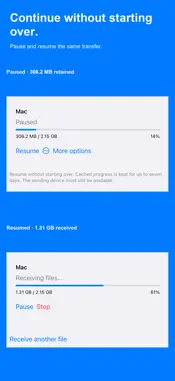
Send photos, videos, PDFs and other files between your devices, nearby or over the internet. Send original footage to your editor while you’re still on location, or move work between your phone and computer. SEYFR works across iPhone, iPad, Android, Mac, Windows and Linux. Both devices need SEYFR installed and available. Remote transfers need an internet connection on both devices. SEND ORIGINAL FILES Share photos, videos, audio, documents and folders. SEYFR does not compress or convert the files you select, so the recipient gets those files in their original quality. SEND AGAIN TO SAVED DEVICES Save a device once, then send again without exchanging a new transfer ticket while the receiving device is online. The receiver can accept or decline. Automatic receiving is optional and applies only to devices the receiver chooses to trust. RESUMABLE FILE TRANSFERS Pause a transfer and continue without starting over. After an interruption, SEYFR can reuse retained transfer data. The sender must still be available, and the required files and recovery data must remain on the devices. Choose Wait for Wi-Fi when you prefer to wait before resuming rather than use your current connection. SHARE NEARBY WITHOUT INTERNET Connect your devices to the same local Wi-Fi network or phone hotspot to transfer nearby without internet data for the file transfer. Sending to someone on another network needs internet access. HOW IT WORKS 1. Choose the files or folder to send. 2. Share the QR code or transfer ticket. 3. Scan the code or paste the ticket on the receiving device, then choose where to save. 4. Save the device to make the next transfer easier. No SEYFR account or USB cable is required. You do not need to upload files to a cloud drive first. Transfers are end-to-end encrypted; SEYFR uses a direct connection when available, with encrypted relay forwarding when needed. Files are not stored in a SEYFR cloud drive. There is no fixed transfer-size cap in the app. Available storage, filesystems, platform limits and network conditions still apply. Keep both apps available during a transfer; on iPhone and iPad, keep SEYFR open because iOS may suspend background connections. Choose your preferred interface language in SEYFR settings. Free to download and use today. Built by JITPOMI.
What's New
Version 2.1.7 2026-11-21
Improved storage recovery and saved-device protection. Fixed transfer progress after reconnecting, with more consistent pause, resume and file-size displays. Technical Analysis
Package Overview Basic metadata
Bundle ID
com.jitpomi.seyfr Current Version 2.1.7
Minimum iOS 16.0
Package Size App Store Size
Package Metadata 0 / 0 version records
Detailed binary, privacy manifest, framework, and Info.plist results have not been indexed for this package yet. The verified App Store and archive metadata above remains available.
Developer Information
Known Version Records
0 version records with stored package metadata
Stored metadata does not guarantee a package is currently available to download.
| Details | Version / IDs | Version date | Action |
|---|