
Preview



Description
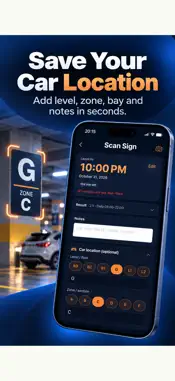
Not sure if you can park here, when you need to leave, or where you left the car? ParkTimer is an AI-powered parking assistant for Australian drivers. Scan a parking sign or ticket, get a leave-by time, set reminders, and save exactly where you parked, even in a multi-level car park. SCAN PARKING SIGNS Take a photo of an Australian parking sign and ParkTimer reads the visible restrictions: time limits, restricted periods, days and times, and other conditions. Review the result, then get a calculated leave-by time. If a time limit would run past the end of the restricted period, ParkTimer shows when the limit starts again. SCAN PARKING TICKETS Got a ticket from a meter or machine? Scan it and ParkTimer picks out the parking time and starts a session for you, with no manual typing. MANUAL AND QUICK TIMERS Don't need to scan anything? Start a timer yourself, or tap a quick timer (30 min, 45 min, 1 hour, 2 hours) or set a custom length. Always free. PARKING REMINDERS Get reminders before your parking expires, so you have time to get back to your car. FIND MY CAR Save where you parked in one tap, with or without a timer. • Add the level, zone and bay, for example Level B2, Zone C, Bay 47 • Take up to three photos: the bay, a pillar, a lift or any landmark • Save the car park entrance, because GPS is unreliable indoors • See your car on a map and navigate back, with a reminder of which level and zone to look for when you arrive Add car location details after scanning a sign or ticket, or when you set a manual timer. Always free. PARKING HISTORY Review past sessions, locations, photos and maps whenever you need them. BUILT FOR AUSTRALIAN DRIVERS Designed around everyday Australian parking: street parking, timed zones, signs, tickets and public holidays by state. KEY FEATURES • AI parking sign scanner • AI parking ticket scanner • Leave-by time calculation • Countdown timer and expiry reminders • Manual and quick timers • Find My Car: level, zone, bay and photos • Navigate back to your car • Parking history and maps FREE AND PARKTIMER PLUS Your first 5 AI scans (sign or ticket) are free, so you can try ParkTimer before you subscribe. Manual timers, quick timers, Find My Car, reminders and history stay free. To keep scanning with AI after the free scans, choose a ParkTimer subscription: • Yearly (renews every year) • Monthly (renews every month) Prices are shown in the App Store for your region. Fair use limits apply to AI scans. Payment is charged to your Apple ID account at confirmation of purchase. The subscription renews automatically unless it is cancelled at least 24 hours before the end of the current period. Your account is charged for renewal within 24 hours before the end of the current period. You can manage or cancel your subscription in your App Store account settings after purchase. IMPORTANT ParkTimer is a driver-assistance tool. AI results may be incomplete or incorrect. Always check the original sign, ticket and local parking rules before leaving your vehicle. ParkTimer does not provide legal advice and cannot guarantee that parking is permitted. Support: https://maxaistudio.github.io/apppages/parktimer/support.html Privacy Policy: https://maxaistudio.github.io/apppages/parktimer/privacy.html Terms of Use (EULA): https://www.apple.com/legal/internet-services/itunes/dev/stdeula/
What's New
Version 2.3.0 2026-11-02
Find your car, even in a multi-level car park. • NEW: Find My Car. Save where you parked in one tap, with or without a timer. Add the level, zone and bay, take... Technical Analysis
Package Overview Basic metadata
Bundle ID
com.maxaistudio.parktimer Current Version 2.3.0
Minimum iOS 15.5
Package Size App Store Size
Package Metadata 0 / 1 version records
Detailed binary, privacy manifest, framework, and Info.plist results have not been indexed for this package yet. The verified App Store and archive metadata above remains available.
Developer Information
Known Version Records
0 version records with stored package metadata • 1 known version records
Stored metadata does not guarantee a package is currently available to download.
| Details | Version / IDs | Version date | Action |
|---|---|---|---|
| Not archived | App Store ID: 883382345 | Unknown | Request Version |