
Preview










Description
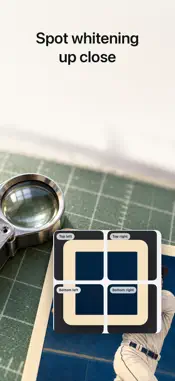
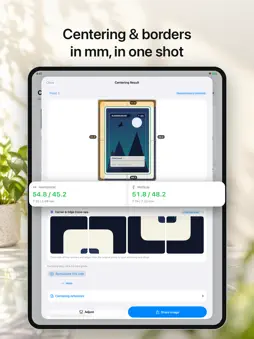
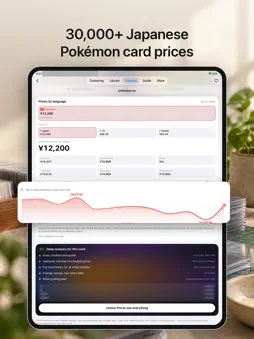
Is this card worth grading, and what is it worth? Take one photo: CenterMint measures the centering, recognizes the card and shows what it sells for in Japan, the US and Europe. CenterMint finds the cut edge and the printed border on all four sides of a raw card, shows the left/right and top/bottom ratios, and tells you the best centering grade they allow under common published standards (PSA, BGS, CGC and more). Works with standard-size cards such as Pokémon, One Piece, Magic: The Gathering and sports cards; smaller cards like Yu-Gi-Oh! can be measured too. NEW IN 2.2 • Card recognition: after measuring, CenterMint reads the name, set and number and shows the card's price. When it is not sure, it lists likely cards for you to tap. • In the catalog, take a photo of a card to open its price page. • Same number, different print (regular, mirror holo, Master Ball holo)? Switch with one tap. • More photos are measured automatically, with fewer lines to fix by hand. • Far fewer cards without a price. When there is none, the app says why. • Pro: the result shows PSA 10 and PSA 9 prices and how many times the raw price they sell for. • New Proof and Glass line styles, and corner and edge close-ups that line up more precisely. PRICES • 30,000+ Japanese and 28,000+ English Pokémon cards. Pick Japan, the US or Europe to see recent sales and a 30-day chart. • Price alerts on 3 cards, a target price on 1 card, My collection, and Worth Grading? with the prices filled in. Prices are for reference only, not buying or selling advice. HOW IT WORKS • Take a photo or import one. The frames are found automatically. • Not sure about a line? CenterMint takes you to the least certain one first, with the magnifier already on it. Tap "Looks Right" to move on, or nudge it a pixel at a time with the magnifier, pixel grid and edge profile. • Save the front and back as a pair, search your history, and share a clean image. FREE • Automatic centering for raw cards, a 1x–50x magnifier and manual adjustment • Border widths in mm or inches • Corner and edge close-ups on 3 cards a week, one batch of up to 5 photos a week, Worth Grading? on one card • Card prices, the 30-day chart and alerts on 3 cards The free version shows ads. CENTERMINT PRO No ads, graded prices (PSA 10, PSA 9 and more) with full history, unlimited price alerts, Worth Grading?, corner and edge close-ups, a submission log, a decision assistant that sorts cards into submit / fix first / below target, batch scanning of up to 50 photos, a submission checklist PDF, report images, 4K enhanced view and export, CSV export and saved presets. Choose monthly or yearly (yearly starts with a 1-week free trial); prices are shown in the app. Subscriptions renew automatically unless canceled at least 24 hours before the end of the period. Manage them in your Apple Account settings. GOOD TO KNOW • Automatic measurement is for raw cards. For a card in a sleeve, top loader or slab, you line up the edges yourself; CenterMint tells you when it sees a sleeve. • It measures centering only. Corners, edges and surface are for your own eyes, and no grade is ever promised. • Centering standards are references based on each company's published guidelines. CenterMint is an independent app, not affiliated with PSA, Beckett (BGS), CGC or any grading company, or with any card publisher. Pokémon, One Piece, Yu-Gi-Oh! and Magic: The Gathering are trademarks of their respective owners. Measurement runs on your device and needs no account. Terms of Use: https://www.apple.com/legal/internet-services/itunes/dev/stdeula/ Privacy Policy: https://centermint.app/privacy
What's New
Version 2.2.0 2026-11-11
What's new in 2.2 ■ Recognizes the card for you After you measure, CenterMint reads the card's name, set and number and shows its price. No searching. When it ...What's new in 2.2 ■ Recognizes the card for you After you measure, CenterMint reads the card's name, set and number and shows its price. No searching. When it isn't sure, it shows a few likely cards to tap. ■ Switch prints with one tap Same card number, different print (regular, mirror holo, Master Ball holo)? Pick the right one with one tap. ■ More photos measure on their own The card edge and printed border are found more reliably, so more photos give a centering result without moving lines by hand. For the best result, take the card out of its sleeve or holder. ■ More cards with prices Far fewer cards are missing a price. If a price looks unusual, you still see it, with a short note. If there is no price, we tell you why: a new card with no sales yet, rarely traded, or no recent sales. ■ Graded prices on the result (Pro) Once the card is recognized, the result shows PSA 10 and PSA 9 prices and how many times the raw price they sell for. ■ Two new line styles Proof, with print trim and registration marks, and Glass, a see-through frame. ■ Sharper close-ups Corner and edge close-ups now line up with the cut edge at the original photo's resolution. ■ Photo lookup in the catalog In the catalog, take a photo of a card to open its price page. Technical Analysis
Package Overview Basic metadata
Bundle ID
com.centermint.app Current Version 2.2.0
Minimum iOS 17.0
Package Size App Store Size
Package Metadata 0 / 4 version records
Detailed binary, privacy manifest, framework, and Info.plist results have not been indexed for this package yet. The verified App Store and archive metadata above remains available.
Developer Information
Known Version Records
0 version records with stored package metadata • 4 known version records
Stored metadata does not guarantee a package is currently available to download.
| Details | Version / IDs | Version date | Action |
|---|---|---|---|
| Not archived | App Store ID: 887798445 | Unknown | Request Version |
| Not archived | App Store ID: 885662636 | Unknown | Request Version |
| Not archived | App Store ID: 884458253 | Unknown | Request Version |
| Not archived | App Store ID: 883631596 | Unknown | Request Version |