
Preview










Description
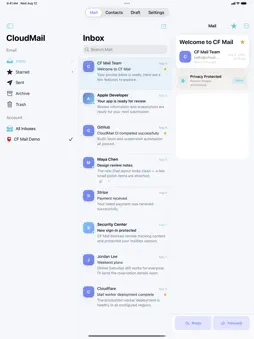
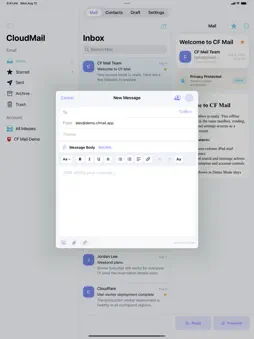
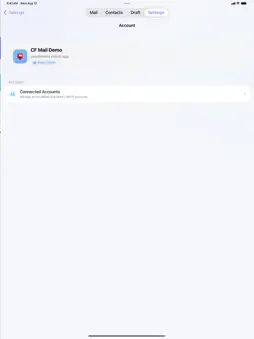
CF Mail is a privacy-focused iOS mail client for the accounts and servers you choose. Connect standard IMAP/SMTP mailboxes or your own self-hosted CloudMail Server in one focused app for iPhone and iPad. Highlights: • Standard IMAP/SMTP email support • Self-hosted CloudMail Server support • Unified inbox, search, drafts, attachments, contacts, reply and forwarding workflows • Rich-text email composition • Face ID / Touch ID / device passcode protection • Mail privacy controls for remote images • Local, redacted diagnostics • Multiple appearance themes CF MAIL Pro is available through optional in-app purchases, including auto-renewable subscription plans. Subscription prices and billing periods are shown in the app using the localized information provided by the App Store before purchase. Auto-renewable subscriptions continue until canceled and can be managed or canceled in your Apple Account subscription settings. Privacy Policy: https://cfmail.readori.com/privacy.html Terms of Use (EULA): https://www.apple.com/legal/internet-services/itunes/dev/stdeula/
What's New
Version 1.0.4 2026-11-06
This update brings a wide range of reliability and usability improvements: Compose • New "Hide Keyboard" button above the keyboard, and swipe-down to dismiss n...This update brings a wide range of reliability and usability improvements: Compose • New "Hide Keyboard" button above the keyboard, and swipe-down to dismiss now works even with short messages, making it easier to add photos and attachments • Replying to a message you sent now goes to its original recipients • Bold, italic and font sizes are preserved when sent; messages written in Dark Mode no longer arrive with white text • Fixed an issue where the last typed text could be lost when sending or saving a draft • When forwarding, sending waits until all attachments are added Inbox & Reading • Fixed IMAP paging that could skip messages; loading is faster and uses less data • Background refresh no longer jumps back to the top of a list you've scrolled through • More efficient real-time mail updates that stop immediately when you switch mailboxes or leave the app • Fixed messages in different folders occasionally mixing up attachments or Later reminders • Messages deleted or moved while offline no longer reappear before syncing • More accurate search and filters, with no stale results when switching quickly • CloudMail messages now show CC recipients • More reliable remote image blocking • On iPad split view, the message and reply recipients update correctly when switching messages Accounts & Notifications • Prevents adding the same account twice • Fixed account switching occasionally staying on the previous account • The app icon badge now clears when you open the app or sign out • Removed accounts no longer receive push notifications • Tapping a notification after a cold launch opens the right message Privacy & Security • With App Lock on, mail content is hidden in the app switcher and no new-mail banners appear while locked • Turning off your device passcode no longer locks you out of the app • Stronger protection for stored and transmitted account credentials • Subscription expiry is reflected more promptly Admin Console (CloudMail administrators) • Confirmation required before deleting users, mailboxes, roles and invite codes • Invite code expiry dates are shown and calculated in local time • Fixed several issues, including the All Mail filters and the login-page opacity setting • Completed missing English translations Technical Analysis
Package Overview Basic metadata
Bundle ID
com.readori.mail Current Version 1.0.4
Minimum iOS 16.0
Package Size App Store Size
Package Metadata 0 / 0 version records
Detailed binary, privacy manifest, framework, and Info.plist results have not been indexed for this package yet. The verified App Store and archive metadata above remains available.
Developer Information
Known Version Records
0 version records with stored package metadata
Stored metadata does not guarantee a package is currently available to download.
| Details | Version / IDs | Version date | Action |
|---|