
Preview




Description
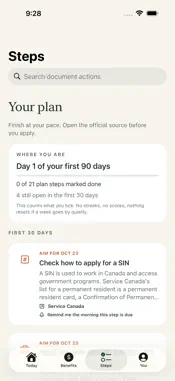
MapleSteps turns the letters you get in your first months in Canada into the next thing to do, with the official page behind each item and the date it was last checked. WHAT IT DOES • A plan for your first year, from your province, status, arrival date and household: SIN, health card, first tax return, child benefit, free settlement services. • A benefits radar that lists programs you may be missing and says why each matched you. • Notice to action: scan pages, import a PDF, choose photos or share a file. It reads on device and pulls out only the dates, times and requirements it can quote word for word. What the letter leaves out becomes a question, not a guess. • A Today tab that names the few commitments actually due now, not the whole schedule; check your holiday list and it marks a due date that falls on one. • One tap on the environment card returns the alerts Environment Canada has active over your area and the newest air-quality (AQHI) reading from the nearest station. • One tap on the holiday card gives the next public holiday for your province or territory, how many days off it is, and the page that date came from. • Task reminders fire on the time zone saved with each task, so summer and winter keep the same clock time. An optional daily nudge fires once a day at the clock time you set on this device. A lock-screen widget names your next dated commitment. • Collection days for Toronto addresses, from the city's own published areas — which day, and the next two dates. WHAT IT DOES NOT DO • It never decides whether you qualify. Every result is a lead to verify, with its source and review date, and guidance past that date says so out loud. • It never fills in or submits a government form, and never sends a message for you. A reply the app drafts stays a draft until you send it yourself. • No accounts, no server of ours, no advertising, no trackers. Your profile, document text, actions and drafts stay on your device, and you can wipe them all from the You tab. • No streaks, points, badges or levels. The progress card counts only what you ticked, and nothing falls if a week passes quietly. • Nothing watches for you: the live lookups happen only when you tap them. DETAILS Guidance ships inside the app: thirty-three arrival steps and fourteen benefit checks, each reviewed against an official page and dated. Federal items apply anywhere in Canada — SIN, child benefit, dental care plan, newcomer benefits and credits, free settlement services, the first tax return and the clinics that file it for nothing, the 730 days behind permanent resident status, and PR card renewal. Public health coverage is written out for ten provinces and territories, Ontario adding child and trillium benefits, child care subsidy, school, licence, legal aid, family doctor register and rent rules. Where a local page could not be read, the app hands over the federal list of health plans rather than guessing, and never presents a Toronto rule as if it applied to Markham. Three things are fetched live, only when you ask: the City of Toronto's published collection areas, under its Open Data Licence; Environment Canada's open feeds for active alerts and the newest AQHI reading; and the provincial holiday list at canada-holidays.ca, whose rows link back to each jurisdiction's own page — that page is the authority. The weather and holiday lookups leave nothing behind on your device. The city's answer is cached there with the address you typed, until you clear it or use Delete all app data. Reading a notice with a model needs iOS 26, a compatible device and Apple Intelligence; otherwise on-device rules quote the letter instead of summarising it. A cloud model is an optional switch, off by default, that works only with your own API key, and its answers must quote your original too or the field is dropped. MapleSteps is guidance, not legal, tax or immigration advice. Rules change — check the official page linked in the app before you apply.
What's New
Version 1.0.0 2026-11-02
Once you check your province's holidays, a due date that falls on one is marked. A new optional daily nudge reminds you at your own clock time. Technical Analysis
Package Overview Basic metadata
Bundle ID
com.maplesteps.app Current Version 1.0.0
Minimum iOS 17.0
Package Size App Store Size
Package Metadata 0 / 0 version records
Detailed binary, privacy manifest, framework, and Info.plist results have not been indexed for this package yet. The verified App Store and archive metadata above remains available.
Known Version Records
0 version records with stored package metadata
Stored metadata does not guarantee a package is currently available to download.
| Details | Version / IDs | Version date | Action |
|---|