Preview




Description
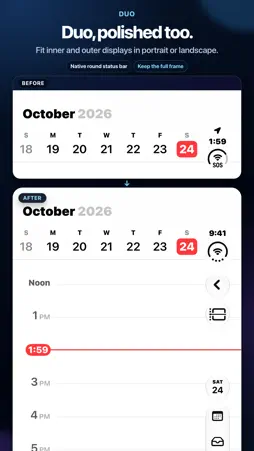
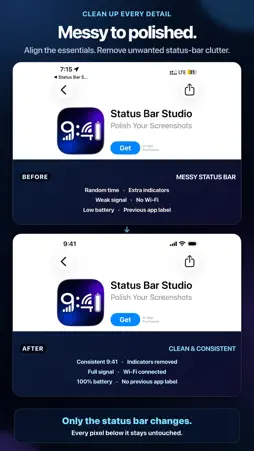
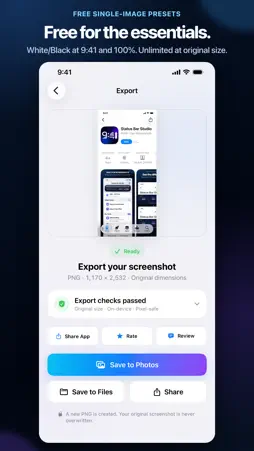
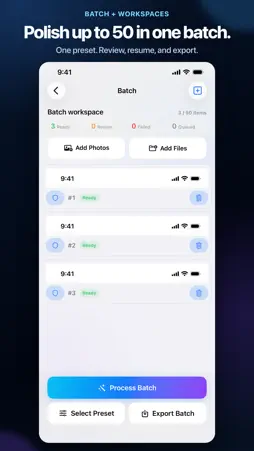
Clean up screenshot status bars before you share, publish, or present them. Set a consistent time, signal, Wi-Fi, and battery while preserving every pixel below the status bar. Remove location indicators and return-to-app labels, compare Before and After, and export a new PNG at original size. Status Bar Studio imports a full-size screenshot from Photos or Files and processes it entirely on device. SUPPORTED IPHONE SCREENSHOTS The app supports full-size PNG and JPEG screenshots with these exact model families and pixel dimensions: - 1170 × 2532 — iPhone 12, 12 Pro, 13, 13 Pro, 14, and 17e - 1284 × 2778 — iPhone 12 Pro Max, 13 Pro Max, and 14 Plus - 1179 × 2556 — iPhone 14 Pro, 15, 15 Pro, and 16 - 1206 × 2622 — iPhone 16 Pro, 17, 17 Pro, and 18 Pro - 1260 × 2736 — iPhone Air - 1290 × 2796 — iPhone 14 Pro Max, 15 Plus, 15 Pro Max, and 16 Plus - 1320 × 2868 — iPhone 16 Pro Max, 17 Pro Max, and 18 Pro Max Compatible dimensions are recognized automatically. iPhone 18 Pro and Pro Max share screenshot sizes with earlier models; the app reads the status-bar layout to tell them apart and asks only when unsure. Some supported models support iOS 26 and iOS 27 styles: Auto matches each screenshot (iOS 27 when unsure), or choose one yourself. iPhone 18 Pro and Pro Max use iOS 27. Unmodified, full-size screenshots work best; Display Zoom, cropping, or resizing can produce unsupported dimensions. Duo supports inner and outer screens in portrait and landscape. Layouts match by size; missing or uncertain status bars are kept or flagged. Custom controls depend on layout. START FREE - Preview every style before export - Export White or Black status bars with the free 9:41, 100% battery preset - Keep exporting the free preset without a watermark or size reduction CONTROL THE DETAILS - Normalize the displayed signal and Wi-Fi - Set a custom time and choose 12-hour or 24-hour format with Pro - Adjust battery level, glyph tone, color, and style - Review complex backgrounds and keep the original status bar when needed WORK FASTER WITH PRO - Export with Seamless, Frosted, Gradient, and Color styles - Set any supported time, clock format, and battery level - Apply one preset to batches of up to 50 screenshots - Batch presets skip locked items - Review flagged items individually - Save and resume single-image edits and batch workspaces on your device CHOOSE HOW TO GO PRO - Pro Monthly is an auto-renewable monthly subscription - Pro Annual is an auto-renewable annual subscription - Pro Lifetime is a one-time purchase with no recurring subscription charge Same Apple Account: Pro works on iPhone and Mac. Images and workspaces stay local and do not sync automatically. Monthly and Annual renew automatically unless canceled. Pro Lifetime permanently unlocks Pro for a one-time charge. Prices and eligible offers for Monthly and Annual subscriptions are shown by the App Store before purchase. Manage or cancel subscriptions in your Apple Account, and use Restore Purchases in the app to recover an eligible purchase. EXPORT YOUR WAY Save the finished PNG to Photos or Files, or send it through the iOS share sheet. Your source screenshot is never overwritten. PRIVATE BY DESIGN Screenshots are processed on your device. Status Bar Studio has no account, image upload, ads, analytics, tracking, or generative AI. Subscription and Lifetime purchases are handled by Apple through the App Store. Status Bar Studio edits imported image files only. It does not change your iPhone's live system status bar or capture the screen in the background. TERMS & PRIVACY Terms of Use (EULA): https://www.apple.com/legal/internet-services/itunes/dev/stdeula/ Privacy Policy: https://peterjiajunzhang.github.io/StatusBarStudioCom/privacy/
What's New
Version 1.2.0 2026-11-01
Duo inner and outer display support in portrait and landscape. Improved iOS 26/27 style matching and preview controls on supported models. Pro adds custom time ...Duo inner and outer display support in portrait and landscape. Improved iOS 26/27 style matching and preview controls on supported models. Pro adds custom time and battery, batches of up to 50, and protects locked items. One Pro entitlement works on iPhone and Mac under the same Apple Account; images and workspaces stay on each device. Technical Analysis
Package Overview Basic metadata
Bundle ID
com.loop.StatusBarStudio Current Version 1.2.0
Minimum iOS 17.0
Package Size App Store Size
Package Metadata 0 / 0 version records
Detailed binary, privacy manifest, framework, and Info.plist results have not been indexed for this package yet. The verified App Store and archive metadata above remains available.
Developer Information
Known Version Records
0 version records with stored package metadata
Stored metadata does not guarantee a package is currently available to download.
| Details | Version / IDs | Version date | Action |
|---|