Preview




Description
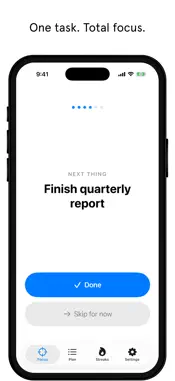
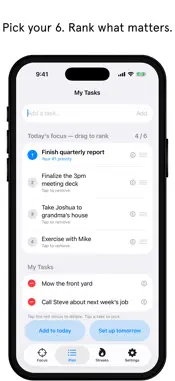
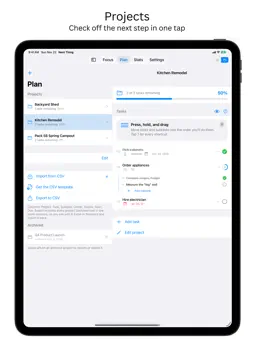
Most productivity apps make you more stressed, not less. Endless lists, complex systems, notifications pulling you in every direction. Next Thing is different: one list, one task at a time. Built on the Ivy Lee Method, a century-old system famously used by Charles Schwab, Next Thing strips productivity down to its most powerful form. Each evening, choose your most important tasks and rank them in order of priority. The next day, focus on one thing at a time. That's it. We've heard from users with ADHD that this single-task approach is a game changer. No overwhelming lists, just the next thing in front of you. How it works: - Add tasks to your list anytime a thought crosses your mind - Each evening, pick your top 6 and rank them by priority - The next day, focus on one task at a time. Done or skip. Nothing else. - Build the habit with streaks and satisfying completion moments - Optional morning and evening reminders, off unless you turn them on NEW: Projects Some work is bigger than a day. Tap the pill in the corner to switch to Projects mode, with the same calm, one-thing-at-a-time focus. - Break projects into tasks and subtasks - Add owners, start dates, and due dates - Progress rings fill as you check off subtasks - Rank your projects and see each one's next step on your focus screen - Check off the next step with one tap, right from the focus screen - Archive finished projects and restore them anytime Free to use, including one active project. Upgrades are one-time purchases. No subscription, ever. Ivy Lee Pro: - Live Activity and Dynamic Island - your current task, always in view - Lock screen widgets - see your #1 task without unlocking your phone - Home screen widget - see your #1 task without opening the app - Focus bell - set a reminder to check in on your current task - Streaks heatmap - track your consistency over time - Recurring tasks - daily habits auto-return to your list - Custom app icons and focus screen themes - Unlimited task list Projects Pro: - Unlimited active projects Complete: - Everything in Ivy Lee Pro and Projects Pro, for less than buying both Already own Pro from an earlier version? Thank you. Projects Pro is included, free. Your privacy matters. No account required, no login, no data sharing. Your tasks live on your device and nowhere else. Stop managing your productivity system. Start doing your next thing.
What's New
Version 3.1 2026-11-24
Faster with a keyboard, easier with VoiceOver. NEW • Keyboard shortcuts on iPad and a menu bar on Mac: ⌘N for a new task or project, ⌘↩ for Done, ⇧⌘↩ to skip, ...Faster with a keyboard, easier with VoiceOver. NEW • Keyboard shortcuts on iPad and a menu bar on Mac: ⌘N for a new task or project, ⌘↩ for Done, ⇧⌘↩ to skip, ⌘1, ⌘2, and ⌘3 to switch screens, ⌘, for Settings, and ⇧⌘M to switch between Daily and Projects. Hold ⌘ on iPad to see them all IMPROVED • Clearer VoiceOver on the dashboards, the iPad layout, and Up Next FIXED • iCloud sync between devices: devices that weren't syncing catch up on their own after updating • Spreadsheet dates with two-digit years (like 12/1/26) now import as 2026 Enjoying Next Thing? A quick review helps more than you know. Technical Analysis
Package Overview Basic metadata
Bundle ID
com.jeremiah.NextThing Current Version 3.1
Minimum iOS 17.6
Package Size App Store Size
Package Metadata 0 / 3 version records
Detailed binary, privacy manifest, framework, and Info.plist results have not been indexed for this package yet. The verified App Store and archive metadata above remains available.
Known Version Records
0 version records with stored package metadata • 3 known version records
Stored metadata does not guarantee a package is currently available to download.
| Details | Version / IDs | Version date | Action |
|---|---|---|---|
| Not archived | App Store ID: 887875103 | Unknown | Request Version |
| Not archived | App Store ID: 887163887 | Unknown | Request Version |
| Not archived | App Store ID: 886832869 | Unknown | Request Version |