Preview


Description
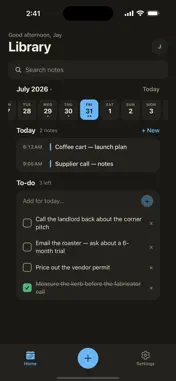
Roughline is a canvas for the ideas that aren't finished yet. Start with the messy version. Sketch a shape, write a line, paste in a photo of a napkin. Nothing has to be tidy, and nothing has to be typed. Then circle any part of it and ask. The answer doesn't arrive in a chat window you have to copy things out of. It lands on the canvas, next to the thing you asked about, and it stays tied to that spot. Ask about the timeline and get a timeline — a real table with phases, owners, dates and statuses, laid out cleanly. Ask again and it revises the same table instead of stacking up another copy underneath. That's the whole idea: the canvas is the document, and the AI works on it with you rather than beside it. WRITE BY HAND Write mode is pen-first, built for Apple Pencil. Pen, highlighter and eraser, with your palm resting on the glass — fingers pan and scroll, so the page moves the way paper would. Double-tap your Pencil to switch tools. Tap or drag anywhere with the Ask tool to start a conversation about that exact spot. You don't have to select anything first. A CANVAS THAT ANSWERS - Select a region and ask a question about it - Replies are drawn onto the canvas: structured boards, plan tables, images - Every conversation keeps a highlight on the part of the canvas it belongs to - Revising a plan rewrites it in place - Full history reads in a side panel whenever you want it - Snapshot any selection and drag it into the chat to talk about it NOTES BY DAY Your library opens on today. Scroll the date strip to move through the week, see what you made on any day, and keep that day's to-do list right underneath it. New notes title themselves — from the date, then from the first thing you actually write — so nothing sits in your library called "Untitled". MAKE IT YOURS Dark by default, light if you prefer, and four colour palettes — Paper, Slate, Bloom and Dusk. Every one of them is contrast-checked, so nothing is decorative at the cost of being readable. Individual canvases can go light while the rest of the app stays dark, because a drawing surface is content, not chrome. ON EVERY SCREEN YOU USE iPhone, iPad and the web share one account and one set of notes. Start something on your phone on the train, open it on the iPad with a Pencil, finish it on a laptop. Everything saves as you go. Share a note by link as viewer or editor when someone else needs to see it. Roughline is for the part of the work that happens before anything is decided — and for getting it the rest of the way.
What's New
Version 1.0.1 2026-09-11
• On iPad, only Apple Pencil inks in Write mode — your palm no longer draws • Long-press to copy and paste images onto a note • Clearer Home: note cards, calend...• On iPad, only Apple Pencil inks in Write mode — your palm no longer draws • Long-press to copy and paste images onto a note • Clearer Home: note cards, calendar, filters, and rename • More reliable sign-in and in-app feedback Technical Analysis
Package Overview Basic metadata
Bundle ID
com.roughline.app Current Version 1.0.1
Minimum iOS 16.4
Package Size App Store Size
Package Metadata 0 / 0 version records
Detailed binary, privacy manifest, framework, and Info.plist results have not been indexed for this package yet. The verified App Store and archive metadata above remains available.
Developer Information
Known Version Records
0 version records with stored package metadata
Stored metadata does not guarantee a package is currently available to download.
| Details | Version / IDs | Version date | Action |
|---|