
Preview



Description
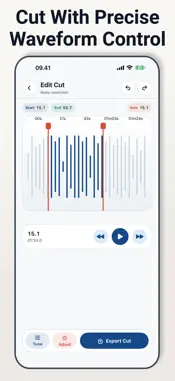
MP3 Trimmer helps you cut audio into the exact section you want to keep. Import a clip from Photos, Files, or a direct URL, then use the waveform editor to choose the start and end points before saving the result. The app is built for practical audio edits: shortening a recording, cutting a song section, preparing a sound bite, cleaning up a voice note, or keeping only the useful part of a longer file. You can preview the selected range, switch between regular cut and middle cut, and make small adjustments with zoom, playback controls, and undo or redo. Edit Audio With Control - Import audio from Photos, Files, or URL - Trim with draggable waveform handles - Use regular cut or middle cut mode - Zoom into the waveform for finer timing - Preview playback before exporting - Undo or redo trim changes while editing Adjust the Output - Change volume before saving - Adjust tempo when needed - Add fade in and fade out - Choose output quality options - Save the finished audio file - Share the result from the export screen Keep Your Clips Organized - View saved audio in History - Preview previous exports - Rename saved clips - Share or delete saved files - Reopen a saved clip for another edit MP3 Trimmer works well for audio notes, music snippets, ringtone-style clips, podcast cuts, study recordings, voice memos, and quick social media sound edits. Most editing happens on your device after you choose the source file. URL import requires network access to download the audio. MP3 Trimmer is free to use. Optional Pro access removes ads, unlocks unlimited trims, and enables all output options. Terms of Use: https://alderpathstudio.github.io/MP3-Trimmer/term-of-use.html Privacy Policy: https://alderpathstudio.github.io/MP3-Trimmer/privacy-policy.html
Technical Analysis
Package Overview Basic metadata
Bundle ID
com.alderpath.MP3-Trimmer Current Version 1.0
Minimum iOS 16.0
Package Size App Store Size
Package Metadata 0 / 0 version records
Detailed binary, privacy manifest, framework, and Info.plist results have not been indexed for this package yet. The verified App Store and archive metadata above remains available.
Developer Information
Known Version Records
0 version records with stored package metadata
Stored metadata does not guarantee a package is currently available to download.
| Details | Version / IDs | Version date | Action |
|---|