
Preview



Description
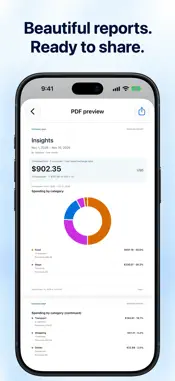
Keep track of everyday spending with receipts, voice, or a quick note. Save a capture to Inbox, then check the details before adding it to Expenses. Capture your way • Take a receipt photo, choose one from Photos, or import a receipt PDF. • Record an expense and save the audio for playback or transcription. • Type a sentence or send text from Shortcuts. • Review suggested amounts, merchants, dates, categories and places before approving. Choose your processing • Use Apple processing on supported devices, with optional Private Cloud Compute. • Optionally enable OpenAI for new photos, saved recordings and submitted expense descriptions using your own API key. • OpenAI is off by default. The app explains what will be sent and asks for permission before you enable it. • OpenAI bills your API account separately. A ChatGPT subscription does not cover API usage. OpenAI's data policies apply to captures you send. Keep the details handy • View receipt originals and play saved recordings. • Organize expenses with categories and tags. • Select drafts together, review suggested amounts and edit details before saving. See where your money goes • Explore spending by category, merchant, city or month. • See purchases on a map or calendar. • Save custom reports and share PDF or CSV exports. • Keep original currencies and use saved exchange rates for converted reports. Bring your history • Import CSV, TSV or delimited text and preview the fields before importing. • Back up reviewed expenses and their original attachments. • Preview a backup before merging it with your library or replacing reviewed expenses. Local drafts are kept. Start on your iPhone • No Expense Map account or bank connection is needed. • Keep your library on your device, with optional private iCloud sync. • Use Face ID or Touch ID to lock the app on supported devices. • Try a separate demo library with fictional expenses. Free to download. Start a 14-day free trial when you choose, then use a one-time Full Unlock to keep adding and editing personal expenses. The trial has no automatic renewal or charge. After the trial, existing expenses remain available to view, export and delete. The unlock price appears in your local App Store currency. Optional OpenAI usage is a separate charge to your OpenAI API account. Camera, microphone and optional location features require permission. Apple AI availability depends on your device and settings. Private Cloud Compute, OpenAI, Apple Maps, exchange-rate lookups and iCloud use network services when their features are enabled. Support — https://expense.jenny.media/support/ Privacy — https://expense.jenny.media/privacy/ OpenAI guide — https://expense.jenny.media/openai/
What's New
Version 1.2 2026-11-12
• Added optional OpenAI model support for receipt photos, voice recordings, and typed expenses. It’s off by default and requires your own API key. OpenAI charge...• Added optional OpenAI model support for receipt photos, voice recordings, and typed expenses. It’s off by default and requires your own API key. OpenAI charges separately. • Improved receipt review with clearer total confirmation and better suggestions for the business name, date, category, and location. • Improved performance when managing Inbox drafts. • Redesigned PDF exports and made CSV export and import more reliable. Technical Analysis
Package Overview Basic metadata
Bundle ID
media.jenny.ExpenseMap Current Version 1.2
Minimum iOS 27.0
Package Size App Store Size
Package Metadata 0 / 0 version records
Detailed binary, privacy manifest, framework, and Info.plist results have not been indexed for this package yet. The verified App Store and archive metadata above remains available.
Developer Information
Known Version Records
0 version records with stored package metadata
Stored metadata does not guarantee a package is currently available to download.
| Details | Version / IDs | Version date | Action |
|---|