Preview


Description
Seolapin is a document assistant designed for foreign residents in Korea who need to open, understand, translate, and make simple text edits to HWP and HWPX documents. Many Korean government offices, public institutions, schools, and organizations still distribute notices, application forms, announcements, and templates in HWP or HWPX format. Seolapin helps users open these documents on iPad, edit necessary text fields or blank form areas, and export the result as PDF, HWP, or HWPX without purchasing a dedicated Korean word processor for simple text changes. On supported devices, Seolapin provides document summarization, document question answering, and translation features using Apple Intelligence. Users can quickly understand long Korean notices or administrative documents through summaries, ask questions about the open document, and translate editable text on a selected page or across the entire document into the language they choose. Translated text is applied to the editable draft so users can review it before exporting. Seolapin supports English, Korean, Japanese, Simplified Chinese, Traditional Chinese, Vietnamese, Thai, Spanish, French, and German. The app follows the device language by default, and users can also choose their preferred app language manually. Seolapin is not intended to replace a full desktop word processor. It focuses on practical access to Korean public documents and forms, helping foreign residents read, understand, translate, and make simple text edits more easily. If you experience any inconvenience or have suggestions for improvement, please let me know. I will review them carefully and reflect them as quickly as possible. --- Seolapin is an independently developed document editing app based on publicly available HWP file format information and HWPX/OWPML document format information. The HWP/HWPX document processing features are implemented directly in Swift without using the Hancom SDK, Hancom Office components, Hancom executables, Hancom converters, or external HWP/HWPX-specific libraries. Seolapin is not affiliated with, endorsed by, certified by, or sponsored by Hancom Inc.
What's New
Version 2.0 2026-10-07
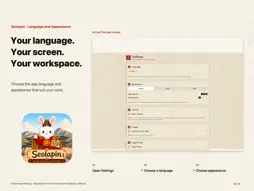
A fresh look inspired by hanji, traditional Korean paper, comes with improvements to document viewing, editing, and AI. Refreshed light and dark modes - Update...A fresh look inspired by hanji, traditional Korean paper, comes with improvements to document viewing, editing, and AI. Refreshed light and dark modes - Updated background, text, and button colors pair with light hanji and dark, ink-toned hanji styles. - Appearance follows the system setting, or you can choose a mode in Settings. - The launch screen now has dedicated light and dark artwork. Document page and text colors remain faithful to the original. Better document display and formatting - Improved text rendering to reduce clipping in titles, body text, and tables in some HWP and HWPX documents. - Fonts, character width, character spacing, text colors, and line breaks are reproduced more faithfully. Formatting is better preserved during editing and HWPX export. Improved on-device AI - Long-document processing, summaries, questions, and translation are better adapted to the context window of the model available on the device. - You can ask a question without first summarizing the entire document. Finding relevant content and processing responses are more efficient. - Improved progress indicators, cancellation, and checks that prevent outdated responses from being applied after an edit. More reliable autosave and draft recovery - Existing editing drafts and recovery data are better protected when a recent document cannot be accessed or a save fails. - Improved file access permission handling and reading from external storage, while preserving export compatibility for existing drafts. More stable editing and better memory management - Fixed an issue that marked a document as edited just by opening it or changing pages. - Added stronger checks when handling malformed document structures and excessively large tables. - Reduced unnecessary processing and memory use in search, AI response display, and caching. More apps from the developer - Redesigned the app section in Settings, with search by name and supported-platform information. - Updated the information and icon for MajorDex, now available. Requires iPadOS 27 or later. AI features are available on an iPad that supports Apple Intelligence when Apple Intelligence is enabled and the model is available. Check the results against the original text. Technical Analysis
Package Overview Basic metadata
Bundle ID
com.seolapin.app Current Version 2.0
Minimum iOS 27.0
Package Size App Store Size
Package Metadata 0 / 4 version records
Detailed binary, privacy manifest, framework, and Info.plist results have not been indexed for this package yet. The verified App Store and archive metadata above remains available.
Developer Information
Known Version Records
0 version records with stored package metadata • 4 known version records
Stored metadata does not guarantee a package is currently available to download.
| Details | Version / IDs | Version date | Action |
|---|---|---|---|
| Not archived | App Store ID: 885821929 | Unknown | Request Version |
| Not archived | App Store ID: 885549390 | Unknown | Request Version |
| Not archived | App Store ID: 885451495 | Unknown | Request Version |
| Not archived | App Store ID: 885107046 | Unknown | Request Version |