
Preview







Description
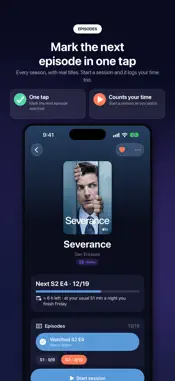
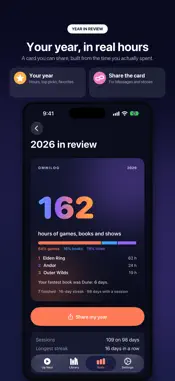
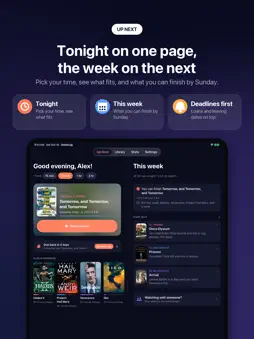
Log the time. Know when you'll finish. OmniLog keeps your games, books and shows in one library, and keeps track of the thing other trackers forget: your time. Start a session when you pick something up, end it when you put it down, and OmniLog learns your real pace. Then it tells you when you'll finish, and what fits the evening you actually have. ◆ WHAT FITS TONIGHT • Tell Up Next how much time you have (15 minutes, an hour, two) and it puts what fits first. • Library loans that are due and shows leaving a service go to the top, so nothing slips away. • Plan the week: set a nightly time and see what you can finish by Sunday. ◆ KNOW WHEN YOU'LL FINISH • Finish forecasts from your own sessions: "about 7 hours left, at your usual 45 minutes a night you finish Oct 19." • Games start with a typical time to beat until your own pace takes over. • Your pace and your usual sitting, worked out for you. ◆ PICK UP WHERE YOU LEFT OFF • Add one line when you end a session, typed or spoken. • "Previously on…": a spoiler-safe recap written from your own notes with Apple Intelligence (OmniLog Plus). ◆ ONE LIBRARY FOR EVERYTHING • Games, books, shows and movies with covers, lengths and genres filled in for you. • Every episode of every season, with real titles. Mark the next one in a tap. • Where to watch, prices and leaving dates for your region. • Add anything: search, scan a whole shelf with the camera (OmniLog Plus), share a link from Safari, or import a CSV or export file from the app you use now. • Collections for what's leaving soon, favorites and what you've borrowed. ◆ YOU RARELY NEED TO OPEN THE APP • Home Screen and Lock Screen widgets. • A Live Activity timer on the Lock Screen and in the Dynamic Island. • Control Center, Siri and Shortcuts: "Start a session in OmniLog." • NFC tags: stick one on a game case or a book and tap to start or stop. • An Apple Watch app with a complication. • iPad, and iPhone Duo with a two-page layout and a tabletop timer. ◆ YOUR YEAR, IN REAL HOURS • Stats by day and by kind, this month and all year. • A year in review built from the time you actually spent. ◆ PRIVATE BY DESIGN • No account. No ads. No tracking. No analytics. • Your library lives on your devices and syncs through your own iCloud, which we can't read. • Searches send only a title, to look up its cover and details. • Daily backups to your iCloud Drive, and a full export whenever you want it. ◆ FREE, WITH OMNILOG PLUS FOR MORE Your whole library, sessions, Up Next, finish forecasts, widgets, Apple Watch, Siri, Live Activities, iCloud sync and export are free. OmniLog Plus adds: • "Previously on…" recaps • Start-next picks explained by Apple Intelligence • Scan a shelf to add it all at once • Release radar alerts: out today, now on a service you pay for, cheaper to rent • Share your year in review • Watch together: what fits you both tonight OmniLog Plus is available as a monthly or yearly subscription. The yearly plan includes a one-week free trial for new subscribers. Payment is charged to your Apple Account at confirmation of purchase. Subscriptions renew automatically unless cancelled at least 24 hours before the end of the current period, and your account is charged for renewal within 24 hours before the period ends. Manage or cancel any time in your Apple Account settings. Some features use Apple Intelligence and need a compatible device. Terms of Use: https://jcmobileappstudio.com/apps/omnilog/terms/ Privacy Policy: https://jcmobileappstudio.com/apps/omnilog/privacy/
Technical Analysis
Package Overview Basic metadata
Bundle ID
com.jcmappstudio.omnilog Current Version 1.0
Minimum iOS 27.0
Package Size App Store Size
Package Metadata 0 / 0 version records
Detailed binary, privacy manifest, framework, and Info.plist results have not been indexed for this package yet. The verified App Store and archive metadata above remains available.
Developer Information
Known Version Records
0 version records with stored package metadata
Stored metadata does not guarantee a package is currently available to download.
| Details | Version / IDs | Version date | Action |
|---|