
Preview



Description
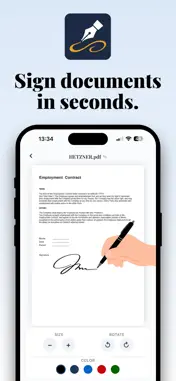
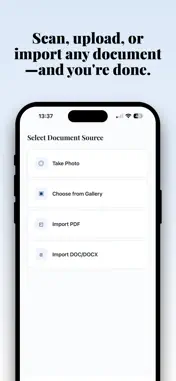
Signlyus is the fastest way to sign PDFs, Word documents, contracts and forms from your iPhone. Add your handwritten signature, fill out forms, write text and dates, and share signed documents in seconds. No printer, no scanner, no computer. Tired of printing a document just to sign it by hand, scanning it and sending it back? Signlyus replaces that entire workflow with a few taps on your iPhone. Sign contracts while on a call, complete a rental agreement from your couch, add your signature to an invoice in the elevator. >>> HOW SIGNLYUS WORKS | Fill and sign any document in under a minute. - Step 1: Import a PDF, Word file or image from Mail, Files, iCloud Drive, Google Drive, Dropbox or your camera roll. - Step 2: Draw your handwritten signature with your finger or Apple Pencil. Adjust color, thickness, size and rotation. - Step 3: Place your signature, fill blank fields, check boxes and add dates wherever you need. - Step 4: Export your signed document and share it through Mail, WhatsApp, AirDrop or any cloud service. >>> SUPPORTED DOCUMENTS AND FORMATS | Everything you need, one single app. - PDF files and PDF forms - Word documents (DOC, DOCX) - Images (JPG, PNG, HEIC) - Scanned contracts and camera photos - Agreements, receipts and paperwork >>> COMMON DOCUMENTS TO SIGN WITH SIGNLYUS - Work and employment contracts - Lease and rental agreements - Non-disclosure agreements (NDAs) - Sales contracts and proposals - Invoices, estimates and receipts - Payslips and severance documents - School permission slips - Waivers and consent forms - Banking forms and everyday paperwork - Claim forms and complaints >>> WHY SIGNLYUS IS DIFFERENT - HANDWRITTEN SIGNATURES | Real signatures drawn with your finger or Apple Pencil, not just a name in a default font. - WORKS OFFLINE | Sign documents even without internet. Your files never need to leave your iPhone. - PRIVACY FIRST | Every document is processed locally on your device. We never share your files with third parties. - NO LEARNING CURVE | Intuitive interface designed so you can sign your first document within seconds of opening the app. - FULL SIGNATURE CONTROL | Change color, adjust stroke thickness, resize and rotate your signature to fit any field perfectly. - ALL IN ONE APP | Fill, sign, annotate and share without switching between multiple tools. >>> SIGNATURE OPTIONS THAT MATCH YOUR STYLE - Draw your signature naturally with your finger - Sign with Apple Pencil for maximum precision - Pick from a palette of ink colors to match each document - Adjust stroke thickness from fine to bold - Resize your signature to fit any box or line - Rotate your signature for angled or vertical fields - Save multiple signatures for personal and work use >>> BUILT FOR ANYONE WHO HANDLES PAPERWORK Signlyus is designed for independent professionals, students, small business owners, remote workers and anyone who signs documents on a regular basis. Whether you are a lawyer, real estate agent, consultant, notary, HR manager, contractor or simply someone who wants to stop wasting time at the printer, Signlyus turns your iPhone into a complete signing office. >>> YOUR WORKFLOW, YOUR WAY Import from any app that supports file sharing on iOS. Once signed, export in high quality and send wherever you need: email attachments, WhatsApp, Telegram, iCloud Drive, Google Drive, OneDrive, Dropbox and more. Every signed document is saved on your device so you can access it anytime. >>> GO PAPERLESS AND SAVE TIME EVERY DAY Every document signed with Signlyus means one less printed page, one less scanned sheet and one less hour wasted on paperwork. Digitize your document workflow, cut printing costs and sign contracts from wherever you are. Download Signlyus today and start signing smarter. Terms of Use: https://www.apple.com/legal/internet-services/itunes/dev/stdeula/ Privacy Policy: https://signlyus.app/privacy/
What's New
Version 1.2 2026-06-02
This version includes performance improvements and refinements across the app for a smoother signing experience. Technical Analysis
Package Overview Basic metadata
Bundle ID
com.appsyra.signlyus.sign.fill.docs Current Version 1.2
Minimum iOS 15.1
Package Size App Store Size
Package Metadata 0 / 2 version records
Detailed binary, privacy manifest, framework, and Info.plist results have not been indexed for this package yet. The verified App Store and archive metadata above remains available.
Developer Information
Known Version Records
0 version records with stored package metadata • 2 known version records
Stored metadata does not guarantee a package is currently available to download.
| Details | Version / IDs | Version date | Action |
|---|---|---|---|
| Not archived | App Store ID: 886242154 | Unknown | Request Version |
| Not archived | App Store ID: 884660907 | Unknown | Request Version |