
Preview







Description
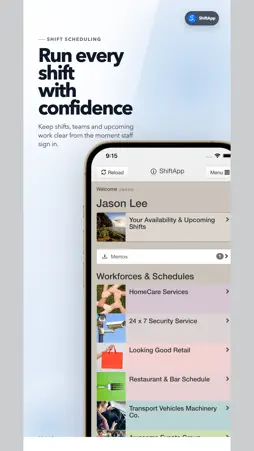
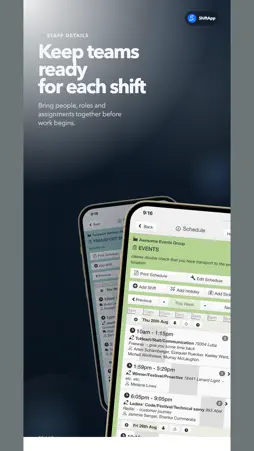
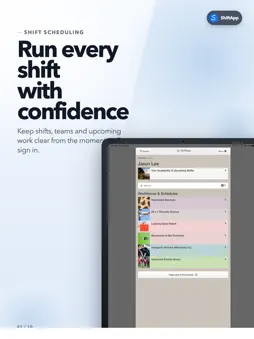
ShiftApp is an employee scheduling app for shift teams. Check your schedule, get a reminder before each shift, share your availability and request time off from your iPhone or iPad. Managers can add, edit and repeat shifts from anywhere. When a shift changes, the people on it get a notification, so there are fewer "Am I working?" messages. What staff can do • See your upcoming shifts and tap one for the details • Get a notification when one of your shifts changes • Get a reminder before each shift starts • Set your availability for each day • Accept or decline new shifts, or show interest in one • Send a time off request • Read memos and reply to them • Chat with the team, or message a manager privately • Call, text or email a colleague from their profile • Add your shifts to Apple Calendar with a private feed that updates as the schedule changes Managers choose what their staff can see and do, including whether staff see the whole schedule or only their own shifts. For managers away from the desk • Add a shift, with breaks, a title and notes • Repeat shifts into future weeks • Assign staff, clients and resources, or take them off a shift • Confirm draft shifts and time off requests • Copy a whole day of shifts • Add time off and sick leave • Send a memo to your staff • Add a new employee, take their photo with the phone's camera and send them an invitation Building a new schedule from scratch is easier on a bigger screen, so use the shift schedule planner on the shiftapp.com website. Anything you change in the app shows there right away, because both use the same schedule. "One really horrible job now quite pleasant to do!" - Jennie Goodman, Managing Director, A Bride 2 Bee, on building the schedule Getting started Staff: your manager adds you to ShiftApp and emails you an invitation. Follow it to create your login, then sign in to the app. Managers: set up your business and staff on the ShiftApp website, then sign in to the app with the same details. ShiftApp is built and supported by founder Jason Lee and team, who have made online scheduling software since 2009. For help, email [email protected].
What's New
Version 64.13.5 STAFF SHIFT SCHEDULING APP 2026-10-31
Small improvements to the employee schedule. Technical Analysis
Package Overview Basic metadata
Bundle ID
shiftapp.shiftapp Current Version 64.13.5 STAFF SHIFT SCHEDULING APP
Minimum iOS 15.6
Package Size App Store Size
Package Metadata 0 / 62 version records
Detailed binary, privacy manifest, framework, and Info.plist results have not been indexed for this package yet. The verified App Store and archive metadata above remains available.
Developer Information
Known Version Records
0 version records with stored package metadata • 62 known version records
Stored metadata does not guarantee a package is currently available to download.
| Details | Version / IDs | Version date | Action |
|---|---|---|---|
| Not archived | App Store ID: 888038550 | Unknown | Request Version |
| Not archived | App Store ID: 887983665 | Unknown | Request Version |
| Not archived | App Store ID: 887946689 | Unknown | Request Version |
| Not archived | App Store ID: 886148515 | Unknown | Request Version |
| Not archived | App Store ID: 886000442 | Unknown | Request Version |
| Not archived | App Store ID: 883451679 | Unknown | Request Version |
| Not archived | App Store ID: 882802686 | Unknown | Request Version |
| Not archived | App Store ID: 882423808 | Unknown | Request Version |
| Not archived | App Store ID: 880629552 | Unknown | Request Version |
| Not archived | App Store ID: 880625763 | Unknown | Request Version |
| Not archived | App Store ID: 880505454 | Unknown | Request Version |
| Not archived | App Store ID: 880362061 | Unknown | Request Version |
| Not archived | App Store ID: 880094338 | Unknown | Request Version |
| Not archived | App Store ID: 879687939 | Unknown | Request Version |
| Not archived | App Store ID: 879470179 | Unknown | Request Version |
| Not archived | App Store ID: 879314515 | Unknown | Request Version |
| Not archived | App Store ID: 879225554 | Unknown | Request Version |
| Not archived | App Store ID: 878052330 | Unknown | Request Version |
| Not archived | App Store ID: 877887752 | Unknown | Request Version |
| Not archived | App Store ID: 877002658 | Unknown | Request Version |
| Not archived | App Store ID: 875677897 | Unknown | Request Version |
| Not archived | App Store ID: 875520473 | Unknown | Request Version |
| Not archived | App Store ID: 875342849 | Unknown | Request Version |
| Not archived | App Store ID: 875099558 | Unknown | Request Version |
| Not archived | App Store ID: 874858459 | Unknown | Request Version |
| Not archived | App Store ID: 874723919 | Unknown | Request Version |
| Not archived | App Store ID: 874684577 | Unknown | Request Version |
| Not archived | App Store ID: 872930593 | Unknown | Request Version |
| Not archived | App Store ID: 872904575 | Unknown | Request Version |
| Not archived | App Store ID: 871573766 | Unknown | Request Version |
| Not archived | App Store ID: 871551650 | Unknown | Request Version |
| Not archived | App Store ID: 871441734 | Unknown | Request Version |
| Not archived | App Store ID: 871191904 | Unknown | Request Version |
| Not archived | App Store ID: 870882121 | Unknown | Request Version |
| Not archived | App Store ID: 870120971 | Unknown | Request Version |
| Not archived | App Store ID: 868162209 | Unknown | Request Version |
| Not archived | App Store ID: 867961926 | Unknown | Request Version |
| Not archived | App Store ID: 864011116 | Unknown | Request Version |
| Not archived | App Store ID: 862901593 | Unknown | Request Version |
| Not archived | App Store ID: 861593885 | Unknown | Request Version |