
Preview



Description
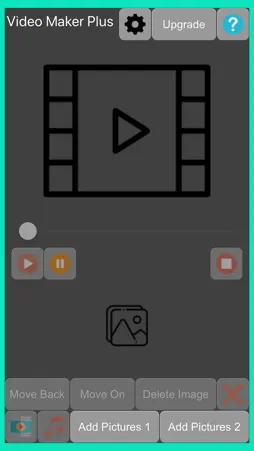
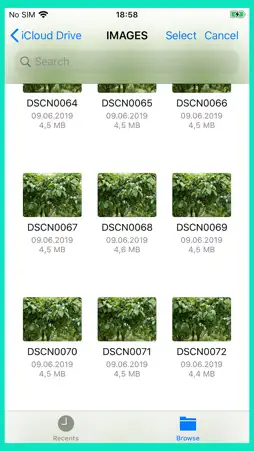
Video Maker Plus is a video-making program. The video is made of images added to the program. Music can also be added to the finished video. You can add up to 40 images to a video without upgrading. Add pictures Press the “Add Pictures1” or “Add Pictures 2” button to add pictures. You will then be presented with a file picker. Whether the images are in the cloud or on the phone media, you can add them to the images in the application. In the “Add Pictures 1” window, you can select all pictures by double-clicking on the window. And by clicking the window three times with your finger, you will delete all the selected images. Edit Added Pictures You can delete inserted images one at a time or all at a time. To delete a single image, press the image in the Image bar. When a blue box appears around the image, then the image is selected. To delete, press the “Delete Image” button in the bottom row of buttons. To delete all images, press the 4th button in the bottom row of buttons. You can move the image left or right in the list. Press the "Move Back" button to move left and press the "Move On" button to move right. Press the image twice with your finger to move to the beginning of the image list. Pressing the image 3 times in a row moves to the end of the image list. Make a video When the bottom strip of images contains images, a video can be made. To make a video, press the first button in the bottom row of buttons. Edit video size and multiple frames per second To do this, press the first button in the top row of buttons the “Video Settings” box is displayed. In this box, you can change the width and height of the video. Also, the video setting about several frames per second can be adjusted. In addition, there is a box where you can choose to save the video to the library of images (“Save video to library”) or not. Add audio to a video You can add audio to a ready-made video. To do this, press the 2rd button in the bottom row of buttons. Then the music library opens. From there, you can select music for the video. Edit Video You can watch the ready-made video from the location you want. To do this, move the video slide to the desired location. To play the video, press the first button in the average row of buttons. The second button in this row is a pause, putting the video in pause status. And if you no longer want to watch the video, press the third button in the average row of buttons - that's a stop. The numbers are visible, in the average row of buttons which show the position of playing the video, and the length of the entire video. Watch a video You can import video from Apple Finder->Phone->Files Video Maker Plus folder. The phone must be connected to a computer.
What's New
Version 1.5 2026-01-02
Update age ratings question. Technical Analysis
Package Overview Basic metadata
Bundle ID
jansasoft.VideoMaker Current Version 1.5
Minimum iOS 13.6
Package Size App Store Size
Package Metadata 1 / 6 version records
Detailed binary, privacy manifest, framework, and Info.plist results have not been indexed for this package yet. The verified App Store and archive metadata above remains available.
Developer Information
Known Version Records
1 version record with stored package metadata • 6 known version records
Stored metadata does not guarantee a package is currently available to download.
| Details | Version / IDs | Version date | Action |
|---|---|---|---|
| 534.0 KB | v1.5 App Store ID: 881156377Build: 1.5 | 2026-01-02 23:50:24 | Get Version |
| Not archived | App Store ID: 868388189 | Unknown | Request Version |
| Not archived | App Store ID: 836305450 | Unknown | Request Version |
| Not archived | App Store ID: 836278555 | Unknown | Request Version |
| Not archived | App Store ID: 836223689 | Unknown | Request Version |
| Not archived | App Store ID: 831921137 | Unknown | Request Version |