Preview


Description
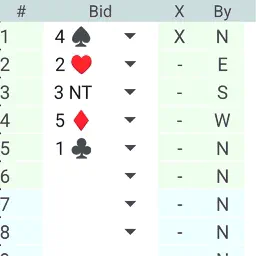
Bridge IMP/VP protocol for four-player bridge card games The Bridge Game Score app is aimed at the one million members of the World Bridge Federation (WBF) in four-player IMP/VP matches in national and club leagues. With Bridge Game Score you can record your IMP/VP scores on your smartphone or tablet instead of using a paper score sheet. The app looks like a typical WBF score sheet, is therefore self-explanatory and meets established WBF regulations. The app's interface resembles a standard scoreboard. First, you need to enter the number of game deals, sessions, and the VP scoring system you use. Then, you need to specify whether each round is played North-South (NS) or East-West (EW). After that, you can start the game. You can enter a winning contract by selecting it from the list, setting a double, and then clicking on the hand's holder. After completing the hand, you need to enter the game result from the list, and the program will automatically calculate the game score. If an error occurs, use the "Edit" button on the left. This button disables the scoreboard's anti-tampering protection and allows you to edit the information highlighted in yellow. Clicking the "Edit" button again will restore the protection mode. After the session, if your teammate has the Bridge Game Score app installed, you can use the QR code button to display a QR code containing your score. Your teammate's phone can read the QR code, eliminating the need for manual data entry. The reverse process updates your scoresheets. The QR code upload function only applies to completed deals and is a secure way to upload scores. No Wi-Fi or internet connection is required. Alternatively, you can manually enter your teammate's positive and negative scores, and the program will automatically calculate IMPs and VPs. To do this, click the "Edit" button in the lower left corner. If a team has IMPs that need to be transferred or penalty points that need to be noted, you can mark them on the right after clicking the "Edit" button. You can also create PDF files (which can be sent via email) and print the scoresheet using the "Print" button. These files can be used for future match analysis. By scanning the QR code to upload data, it also includes your teammates' contract information, making your analysis more comprehensive. When starting a new match, press the reset button and confirm: Protocol has been reset. You can now set the NS/EW direction for this match and restart the game.
What's New
Version 1.10 2026-11-11
Technical update, no functional change Technical Analysis
Package Overview Basic metadata
Bundle ID
se.alphabet.bridgegamescore Current Version 1.10
Minimum iOS 18.6
Package Size App Store Size
Package Metadata 0 / 3 version records
Detailed binary, privacy manifest, framework, and Info.plist results have not been indexed for this package yet. The verified App Store and archive metadata above remains available.
Developer Information
Known Version Records
0 version records with stored package metadata • 3 known version records
Stored metadata does not guarantee a package is currently available to download.
| Details | Version / IDs | Version date | Action |
|---|---|---|---|
| Not archived | App Store ID: 884871000 | Unknown | Request Version |
| Not archived | App Store ID: 884404619 | Unknown | Request Version |
| Not archived | App Store ID: 882691159 | Unknown | Request Version |