
Preview





Description
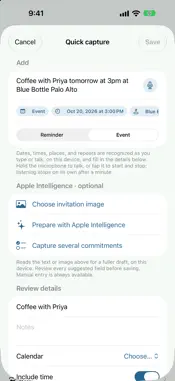
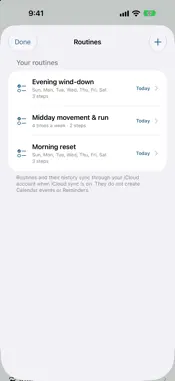
Ca.dence is a daily dashboard for your whole life, not just your work. It brings Apple Calendar, Apple Reminders, weather and the news together, tells you honestly whether today fits, suggests what to do next, and carries the remembering so the things you care about don't get dropped. THE HONEST DAY See at a glance whether today (or tomorrow) fits: what's due, scaled by how long your tasks really take, against the time you actually have. When a day is overcommitted, Ca.dence names what to move and moves it only after you confirm. WHAT TO DO NOW An explainable next step based on your current free time, priorities, deadlines, place and energy. It works on evenings and weekends too, favouring home and errand tasks, and tells you when nothing needs you. CARRY THE REMEMBERING • Life admin: passport renewals, car registration, the dentist, furnace filters, each with the lead time it needs, plus a starter list to get going • People: birthdays with gift lead time, keep-in-touch rhythms and what you're waiting on • Look ahead: upcoming events suggest their preparation, like a gift for a birthday or packing for a trip, for you to review • Open loops: one list of follow-ups, things you're waiting on and reminders going stale ROUTINES, GOALS AND REFLECTION Build routines and goals that show "5 of the last 7" instead of a streak one miss resets. Close the day with a short note and mood, review your week, and see patterns found in your own records. CAPTURE ANYTHING Type or hold to speak a sentence like "take the bins out every Tuesday" and Ca.dence fills in a reminder or event for you to review. Voice is transcribed on your device and the audio is not kept. EVERYWHERE YOU ARE Widgets for the Home Screen and Lock Screen, an Apple Watch app, a Mac app with a menu bar companion, Siri and Shortcuts, Live Activities, and optional notifications with quick actions. SHARE A HOME (OPTIONAL) Invite the person you live with through iCloud and share only the life-admin items and routines you choose. PRIVATE BY DESIGN Ca.dence has no account and no server of its own, and it doesn't collect your data. Your calendar, reminders and Health data are never sent to a third-party AI service. Apple Intelligence features run on your device. CA.DENCE PRO The dashboard, Calendar and Reminders actions, capture, search, headlines and standard widgets are free. Ca.dence Pro adds reviewed day planning and day recovery, multi-item and image capture, semantic search, priority actions in widgets and evening planning. Pro is available as a monthly or annual auto-renewing subscription, with a free trial for eligible new subscribers. One subscription covers iPhone, iPad and Mac. Payment is charged to your Apple Account at confirmation of purchase. Subscriptions renew automatically unless cancelled at least 24 hours before the end of the current period. Manage or cancel in your Apple Account settings. Some features require Apple Intelligence, which is available on supported devices and in supported languages and regions. Terms of Use: https://www.apple.com/legal/internet-services/itunes/dev/stdeula/ Privacy Policy: https://jamsoftinc.com/privacy-policy-cadence
What's New
Version 1.3 2026-11-09
Life & progress now has its own tab. Routines, goals, open loops, life admin, people, your journal and the weekly review are one tap away, and anything that use...Life & progress now has its own tab. Routines, goals, open loops, life admin, people, your journal and the weekly review are one tap away, and anything that used to open from a notification or Siri lands right there. A simpler start. A short setup walks you through connecting Calendar and Reminders, choosing your working hours and picking the reminders you want, instead of a stack of prompts. Every setting now lives in one place. A more honest honest day. Once you have tracked a few focus sessions, the day’s verdict uses how long your tasks really took rather than how long they were scheduled for, and tells you which it used. Goals with a target date show whether you are on pace, and a goal that is slipping shows up as an open loop. Ask your day knows more. Ask what you are waiting on, what life admin is due, who you owe a call, which routines are left today, or whether today fits. It tells you when a question falls outside the days it can see, and before it moves an event it shows you what that would overlap. What your days show. New patterns from your own records: how workouts affect what you finish, how often a block that has been moved more than once still gets done, and which kinds of work tend to run long. You can also let the journal read the moods you log in Health. On your wrist. A new Now complication shows your next step, the running focus session or today’s verdict, and the Smart Stack brings it forward at the right moment. The routines widget comes in more sizes, including the Lock Screen. Notifications that matter. Leave-by and meeting alerts can break through Focus as Time Sensitive. Household check-offs arrive right away instead of waiting for a refresh. Everywhere, smaller things. Swipe to complete, skip or snooze across Life & progress. Haptics where they help. An Edit button on event details. Working hours are now free for everyone. The Mac receives Handoff. Articles open in Reader when it is available. Fixes. Completing a reminder now taps once, on confirmation. Priorities appear on Apple Watch again. The Health permission text now says exactly what Ca.dence does: it writes nothing unless you turn on logging your evening mood as State of Mind. Technical Analysis
Package Overview Basic metadata
Bundle ID
JAMSoft.Ca-dence Current Version 1.3
Minimum iOS 27.0
Package Size App Store Size
Package Metadata 0 / 0 version records
Detailed binary, privacy manifest, framework, and Info.plist results have not been indexed for this package yet. The verified App Store and archive metadata above remains available.
Developer Information
Known Version Records
0 version records with stored package metadata
Stored metadata does not guarantee a package is currently available to download.
| Details | Version / IDs | Version date | Action |
|---|