Preview




Description
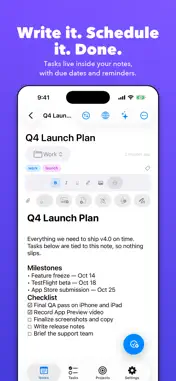
Note-Due brings your notes and tasks together. Write a note, add tasks inside it, set due dates, and get reminded — all without switching apps. NOTES THAT DO MORE Rich text with bold, italic, highlights, checklists, and code blocks. Attach photos, scan documents, record voice memos, and embed video. Draw with Apple Pencil or your finger — handwriting can be recognised and converted to typed text. While you write or scroll, toolbars slide away so your words get the whole screen. TASKS BUILT INTO YOUR NOTES Create tasks inside any note, or add standalone tasks. Set due dates, priorities, and reminders. Quick Add understands natural language — type "call James tomorrow at 9am high priority" and Note-Due does the rest. Block tasks behind other tasks to map real dependencies. POWERFUL ORGANISATION Folders, subfolders, tags, and smart filters keep everything findable. Switch between Today, Upcoming, Overdue, All, and Inbox, and between list, agenda, calendar, and kanban layouts. Snooze tasks, pin notes, and search everything instantly. The Trash keeps deleted items until you're sure. INBOX AND FOCUS MODE Capture first, schedule later: tasks without a date land in your Inbox. When it's time to work, Focus Mode shows only today's tasks in a distraction-free view. SIRI, SHORTCUTS & SPOTLIGHT Add tasks, check what's overdue, or complete something with your voice or the Shortcuts app. Find notes and tasks from Spotlight search. BUILT FOR EVERY SCREEN Designed for iPhone, iPad, and iPhone Duo. On iPad, see your notes list beside the open note, or open any note in its own window with Stage Manager. PRIVATE BY DEFAULT Your data lives on your device. No accounts, no servers, no tracking. Optional iCloud sync keeps your Apple devices up to date using your personal iCloud — we never see it. ——— UNLOCK NOTE-DUE PRO — $9.99 ONCE, NO SUBSCRIPTION Apple Intelligence Extract tasks from a note, summarise long notes, and rewrite selected text in any style — all on-device. Your previous version is saved before every AI rewrite. Privacy Vault & Note Locking Hide folders behind Face ID in the Vault, lock individual notes, or require Face ID every time you open the app. Version History Every note is versioned automatically. Browse and restore any earlier draft. Power Tasks Recurring tasks (daily, weekdays, weekly, monthly, yearly), subtasks, dependencies, and Apple Calendar sync. Advanced Notifications Morning daily digest, second reminders, quiet hours, custom lead times, lock-screen snooze, and custom sounds. Export & Import Export notes as PDF or HTML, or your whole library as a Markdown ZIP. Import Markdown and text notes from Bear, Obsidian, or Apple Notes, and tasks from Apple Reminders. Projects & Time Tracking Group notes and tasks into projects with live progress and due dates. Add time estimates to tasks and track real time with a built-in timer. PDF Annotation & Tables Draw on PDF attachments with Apple Pencil, saved per page. Insert editable grid tables into any note. Smart Scheduling Smart Schedule checks your task load and suggests the least-busy day and time. Kanban Board Manage tasks across To Do, In Progress, and Done, and drag cards between columns.
What's New
Version 3.8 2026-10-11
What’s New New & Improved Your writing gets the whole screen. When you type or scroll, the toolbars and note details now slide out of the way. “Include Sample... Technical Analysis
Package Overview Basic metadata
Bundle ID
Idonthaveasite.com.Note-Due Current Version 3.8
Minimum iOS 26.0
Package Size App Store Size
Package Metadata 0 / 15 version records
Detailed binary, privacy manifest, framework, and Info.plist results have not been indexed for this package yet. The verified App Store and archive metadata above remains available.
Developer Information
Known Version Records
0 version records with stored package metadata • 15 known version records
Stored metadata does not guarantee a package is currently available to download.
| Details | Version / IDs | Version date | Action |
|---|---|---|---|
| Not archived | App Store ID: 887692594 | Unknown | Request Version |
| Not archived | App Store ID: 887527811 | Unknown | Request Version |
| Not archived | App Store ID: 887352879 | Unknown | Request Version |
| Not archived | App Store ID: 887102047 | Unknown | Request Version |
| Not archived | App Store ID: 887003393 | Unknown | Request Version |
| Not archived | App Store ID: 886927472 | Unknown | Request Version |
| Not archived | App Store ID: 886883045 | Unknown | Request Version |
| Not archived | App Store ID: 886494919 | Unknown | Request Version |
| Not archived | App Store ID: 886438411 | Unknown | Request Version |
| Not archived | App Store ID: 886254589 | Unknown | Request Version |
| Not archived | App Store ID: 886045528 | Unknown | Request Version |
| Not archived | App Store ID: 886019905 | Unknown | Request Version |
| Not archived | App Store ID: 885984788 | Unknown | Request Version |
| Not archived | App Store ID: 885917910 | Unknown | Request Version |
| Not archived | App Store ID: 885781923 | Unknown | Request Version |