
Preview




Description
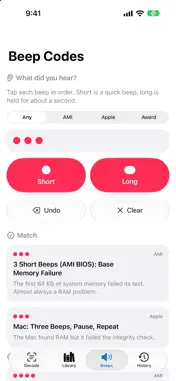
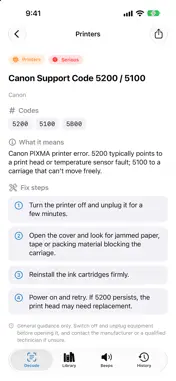
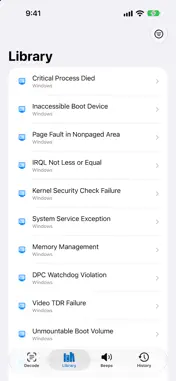
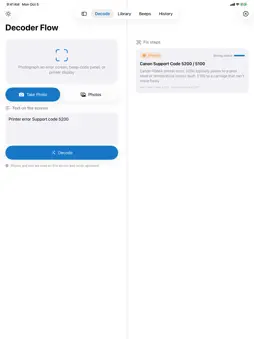
Error on the screen and no idea what it means? Point your camera at it. Decoder Flow reads the message, works out what it is, and walks you through the fix, all privately on your device. Photograph a PC blue-screen code, a printer display, a router warning or a beep-code panel. Decoder Flow finds the most likely matches and gives you clear, plain-English steps you can tick off as you go. HOW IT WORKS 1. Take a photo, choose one from your library, or just type the error text. 2. Get ranked matches, each marked Strong match, Likely or Possible. 3. Open a guide to see what the error means and follow the steps. WHAT YOU GET • Photo decoding. Text is read from your photo using Apple's on-device recognition, so error codes and messages are picked up in seconds. • Step-by-step fix guides. Every entry explains what the error means, how serious it is, and what to try, in order. Tick off each step as you complete it. • Beep code finder. Beep patterns can't be photographed, so tap out what you heard, short or long, and Decoder Flow matches it to common BIOS and Mac startup beep codes. • 60+ built-in errors. Browse or search PC stop codes and update errors, Mac startup and disk problems, iPhone restore errors, printer faults, browser and network errors, and washing machine codes. • Smart matching. Works even when the photo has small recognition slips, such as a letter O read as a zero. • History. Reopen recent decodes any time, and delete them whenever you like. • Share a guide. Send the steps to a friend or colleague in one tap. PRIVATE BY DESIGN • Photos and text are processed entirely on your device and never uploaded. • No account, no ads, no analytics and no tracking. • Works fully offline. The app makes no network requests. • Your history stays in the app's private storage on your device. DESIGNED FOR EVERY SCREEN Light and dark mode, plus a layout that adapts from iPhone to iPad and dual-screen and foldable-style displays, with fix steps beside your photo when there's room. GOOD TO KNOW Fix steps are general guidance and may not suit every model, so always switch off and unplug equipment before opening it, and contact the manufacturer or a qualified technician if you're unsure. Some displays, such as seven-segment readouts, may be hard to read from a photo. You can always type the code instead. Decoder Flow is an independent app and is not affiliated with, endorsed by or sponsored by any manufacturer or company mentioned. All product names and trademarks belong to their respective owners.
Technical Analysis
Package Overview Basic metadata
Bundle ID
com.jamesroche.ErrorDecoder Current Version 1.0
Minimum iOS 26.0
Package Size App Store Size
Package Metadata 0 / 0 version records
Detailed binary, privacy manifest, framework, and Info.plist results have not been indexed for this package yet. The verified App Store and archive metadata above remains available.
Developer Information
Known Version Records
0 version records with stored package metadata
Stored metadata does not guarantee a package is currently available to download.
| Details | Version / IDs | Version date | Action |
|---|