Preview


Description
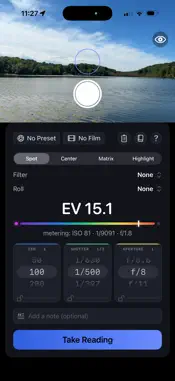
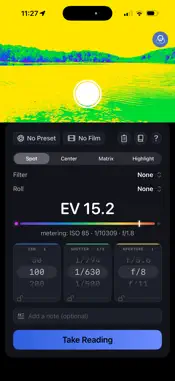
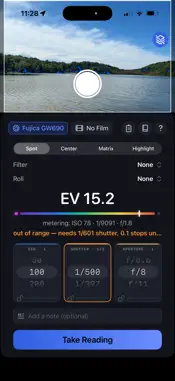
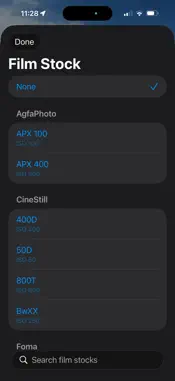
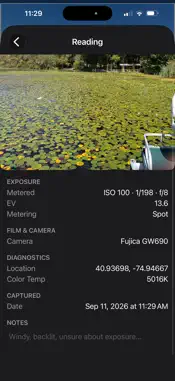
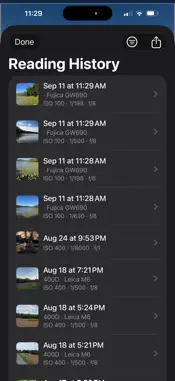
LumenMeter is a reflected-light meter for film photography and a full manual camera, in one app you buy once. Meter a scene for the film and camera you're shooting, then switch to the camera and take the picture yourself. METERING Choose spot, center-weighted, matrix, or highlight-priority metering, and watch the reading update live through your phone's camera. A false-color overlay shows where the frame will clip to black or blow to white, using your film's own shadow and highlight latitude. FILM DATA 45 film stocks from Kodak, Ilford, Fujifilm, Kentmere, CineStill, Foma, Rollei, AgfaPhoto, Lomography, and more, each with its own ISO, exposure latitude, and reciprocity correction for long exposures. Where a manufacturer publishes reciprocity data, LumenMeter uses it, and where they don't, it says so. THE CAMERA Switch to Camera and the screen becomes a camera's finder, with an exposure compensation scale down the side, a live histogram, a level that taps your hand when it's straight, and shutter, aperture and ISO along the bottom. - P, S and M exposure: set the shutter, or the shutter and ISO, by hand. - Manual focus with focus peaking, and white balance in kelvin. - RAW + HEIF saved together as one photo, and full resolution where your phone has it. - Lens buttons for each of your phone's cameras, plus a 35mm-style 1.5x. - A contrasty black-and-white finder for judging tones. Photos are saved in color, with a black-and-white copy beside each one. - Tap the last shot to look back through what you've taken. CAMERA CONTROL AND THE LOCK SCREEN Set LumenMeter as your Camera Control app or put it on the Lock Screen, and it opens straight to a camera, even while your phone is locked. Light-press Camera Control for zoom, exposure, P/S/M, black and white, and the flashlight, or hold it to turn the light on. IPHONE DUO Unfolded, the viewfinder and meter sit side by side. Half-open like an L, the camera becomes a waist-level finder: you look down into the flat half, as you would into a tilted camera screen. Folded, everything fits the outer screen. DIALS AND PRESETS Lock shutter or aperture priority and let the other dial follow the light. Set ISO, shutter, and aperture to their own stop increments (1/3, 1/2, or full stops), since cameras and lenses don't all click the same way. Camera presets keep their own aspect ratio and shutter and aperture ranges, and can start from 19 classic film cameras, so the dials only show what your gear can do. ROLLS Start a roll and generate a QR code for it. Every reading you take is tagged to that roll, along with GPS location, color temperature, push/pull stops, and an optional reference photo. Filter compensation covers ND, polarizers, and contrast filters. READING LOG LumenMeter logs every reading automatically, and you can search, filter, and export the log. There's no account, subscription or server, and nothing leaves your phone unless you share it.
What's New
Version 1.3.1 2026-11-18
LumenMeter is now a camera too. Tap Camera in the viewfinder for a manual camera with a finder display like a camera's. - P, S and M exposure, manual focus with...LumenMeter is now a camera too. Tap Camera in the viewfinder for a manual camera with a finder display like a camera's. - P, S and M exposure, manual focus with focus peaking, and white balance in kelvin. - RAW + HEIF, full resolution, and lens buttons including a 35mm-style 1.5x. - A black-and-white finder, with a black-and-white copy saved beside each color photo. - Exposure compensation scale, histogram, level with a tap when straight, grid, flash and self-timer. - Tap the last shot to review your pictures. - Camera Control and the Lock Screen open LumenMeter's camera, even when your phone is locked. Light-press Camera Control for zoom, exposure, P/S/M, black and white and the flashlight; hold it for the light. - iPhone Duo: a waist-level finder when half-open, and a better fit on the folded outer screen. Technical Analysis
Package Overview Basic metadata
Bundle ID
JPennucci.LumenMeter Current Version 1.3.1
Minimum iOS 18.0
Package Size App Store Size
Package Metadata 0 / 0 version records
Detailed binary, privacy manifest, framework, and Info.plist results have not been indexed for this package yet. The verified App Store and archive metadata above remains available.
Known Version Records
0 version records with stored package metadata
Stored metadata does not guarantee a package is currently available to download.
| Details | Version / IDs | Version date | Action |
|---|