Preview



Description
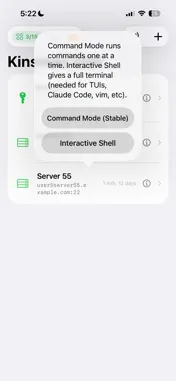
Kinsman SSH is a focused, no-nonsense SSH client for iPhone and iPad. Connect to your servers securely with password or private key authentication. Features: - Save multiple SSH host connections - Password and private key authentication - Import keys via Files, AirDrop, QR code scan, or directly from your Mac over local WiFi - Full interactive terminal with command input - Secure credential storage in Keychain - Universal Clipboard support — copy on Mac, paste in app - Copy terminal output with one tap - Clean, dark terminal interface - Works on iPhone and iPad 5 free connection slots included. Purchase more as needed. Remote Control Pair with Kinsman Terminal on your Mac by scanning a QR code, then drive a terminal tab from your phone — switch and search tabs, send one command to several at once, take a screenshot of the Mac's terminal, and reuse recent commands. Data Bridge Use your iPhone's cellular connection from your Mac when the Wi-Fi you are both on has no working internet. Protected by a PIN, with a live traffic log, block and allow rules, and an optional data cap. Runs only while the app is open. VNC Screen Sharing is available as an in-app purchase.
What's New
Version 1.1.3 2026-08-12
Remote Control — drive your Mac's terminal from your iPhone. Scan a QR code to pair, then connect the fastest way available: same Wi-Fi, Nearby, SSH, or the web...Remote Control — drive your Mac's terminal from your iPhone. Scan a QR code to pair, then connect the fastest way available: same Wi-Fi, Nearby, SSH, or the web. Switch and search tabs, stack several and send one command to all of them at once, grab a screenshot of the Mac's real terminal, and reuse recent commands. Paired Macs are saved and reconnect like any other connection. Data Bridge — share your iPhone's cellular data with your Mac. One tap copies the command to run on the Mac, a 4-digit PIN keeps it yours, and a live traffic log shows what is going through — with block and allow rules for anything you would rather it did not. VNC Screen Sharing is now available as an in-app purchase. In Remote Control's Web tab, a new "What is this?" explains what the Server URL is and how the relay works, and you can now clear a saved server address in one tap. Fixes: a crash on launch, a blank screen after scanning the pairing QR code, and the Send button going dead on stale tabs. Technical Analysis
Package Overview Basic metadata
Bundle ID
com.kinsman.ssh Current Version 1.1.3
Minimum iOS 17.0
Package Size App Store Size
Package Metadata 0 / 4 version records
Detailed binary, privacy manifest, framework, and Info.plist results have not been indexed for this package yet. The verified App Store and archive metadata above remains available.
Developer Information
Known Version Records
0 version records with stored package metadata • 4 known version records
Stored metadata does not guarantee a package is currently available to download.
| Details | Version / IDs | Version date | Action |
|---|---|---|---|
| Not archived | App Store ID: 889627699 | Unknown | Request Version |
| Not archived | App Store ID: 889570840 | Unknown | Request Version |
| Not archived | App Store ID: 885983139 | Unknown | Request Version |
| Not archived | App Store ID: 883233909 | Unknown | Request Version |