
Preview



Description
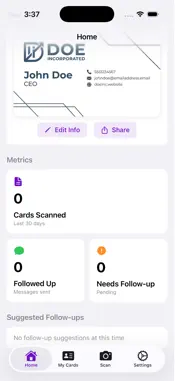
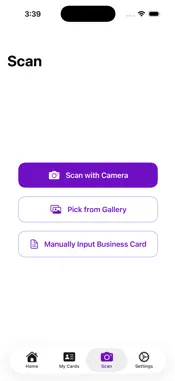
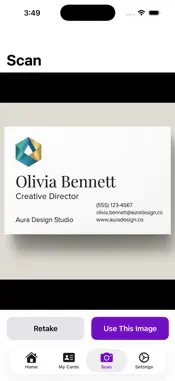
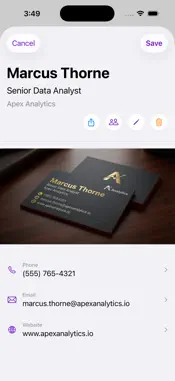
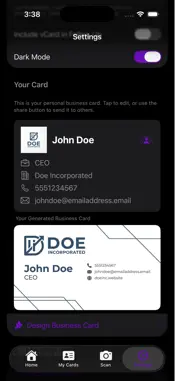
Arc Business Card Scanner is a powerful mobile application designed to streamline the process of capturing, organizing, and managing business contacts. This app transforms your smartphone into a sophisticated business card scanner that instantly extracts contact information and integrates with your existing workflows. What It Does Core Functionality * Smart Business Card Scanning: Instantly scan cards using your camera * AI-Powered Text Extraction: Extract names, phone numbers, emails, titles, and companies * Contact Management: Organize all scanned contacts in one place * CRM Integration: Seamless sync with GoHighLevel (GHL) Key Features Advanced Scanning Technology * Real-time Camera Scanning * Gallery Upload for existing card images * AI OCR for accurate text recognition * Fallback Methods ensure reliability Contact Management * Deduplication to avoid duplicates * Store details like name, title, phone, email, company, meeting location, and notes Communication Integration * One-Tap Calling, Email, and SMS * Send customizable welcome messages * Share contacts via any app CRM & Business Integration * Direct GHL Sync * API v2 Support * Automated Contact Creation * CRM Contact Updates Smart Settings & Preferences * Light & Dark Themes * Custom SMS Templates * Save to Device Contacts * Personalized User Profile How It Works 1. Scan & Capture: Use camera or gallery to capture card 2. Extract & Organize: AI parses and categorizes info 3. Manage & Connect: Edit, save, message, and sync contacts User Experience * Clean Interface * Smooth Navigation * Offline Support * Local Data Storage for privacy Privacy & Security * Contact data stored only on your device * No cloud uploads * Encrypted local storage * Full user control over data and permissions Permissions * Camera: For scanning * Contacts: Optional saving * SMS: Optional for messages * Storage: For image handling Technical Details * Built on Swift 5 * AI-powered OCR & Parsing with fallback logic Use Cases * Sales Pros: Capture leads and follow up instantly * Business Owners: Organize client contacts and sync with CRM * Networking: Stay connected after events * Consultants: Manage business relationships Integration Capabilities * CRM Integration with GoHighLevel * Save contacts to device * SMS, email, and contact sharing support Benefits * Time Saving: No manual data entry * High Accuracy: AI-powered extraction * Better Organization: Searchable and categorized contacts * Effective Follow-Up: Message new contacts right away Target Audience * Sales Professionals * Entrepreneurs & Business Owners * Consultants & Networkers Getting Started 1. Download from the app store 2. Set up preferences and grant permissions 3. Scan, organize, and stay in touch Arc Business Card Scanner transforms how you manage contacts, helping you capture leads, stay organized, and follow up faster. Subscription Arc Business Card Scanner requires an auto-renewable monthly subscription for full access. Payment is charged to your Apple ID account at confirmation of purchase. The subscription automatically renews unless auto-renew is turned off at least 24 hours before the end of the current period. Manage or cancel anytime in your Apple ID Account Settings. Terms of Use (EULA): https://cardscanner.arcautomated.io/terms-of-service.html Privacy Policy: https://cardscanner.arcautomated.io/privacy-policy.html
What's New
Version 1.1.6 2026-10-10
Scanning and generation models have been updated to replace depreciated models. Technical Analysis
Package Overview Basic metadata
Bundle ID
app.arcautomated.arcbusinesscardscanner Current Version 1.1.6
Minimum iOS 17.6
Package Size App Store Size
Package Metadata 0 / 7 version records
Detailed binary, privacy manifest, framework, and Info.plist results have not been indexed for this package yet. The verified App Store and archive metadata above remains available.
Known Version Records
0 version records with stored package metadata • 7 known version records
Stored metadata does not guarantee a package is currently available to download.
| Details | Version / IDs | Version date | Action |
|---|---|---|---|
| Not archived | App Store ID: 889041562 | Unknown | Request Version |
| Not archived | App Store ID: 887970254 | Unknown | Request Version |
| Not archived | App Store ID: 887957193 | Unknown | Request Version |
| Not archived | App Store ID: 887839670 | Unknown | Request Version |
| Not archived | App Store ID: 882995752 | Unknown | Request Version |
| Not archived | App Store ID: 876880269 | Unknown | Request Version |
| Not archived | App Store ID: 876737675 | Unknown | Request Version |