Preview




Description
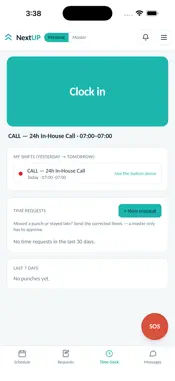
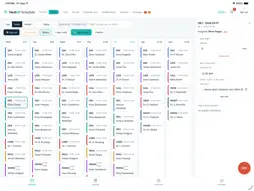
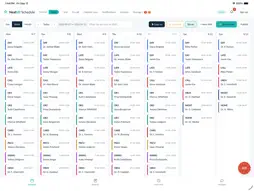
NextUP Schedule is your anesthesia department's assignment sheet, live, on your phone and iPad. Purpose-built for anesthesia — not a generic scheduler bent to fit. Anesthesiologists, CRNAs, residents, and the coordinators who staff them all see the same schedule at the same moment. It replaces the printed sheet, the group text, and the phone tree. TODAY, AT A GLANCE Your room, your shift, your call, and who you're working with. When the coordinator changes it, you see the change. KNOW THE MOMENT SOMETHING CHANGES Push notifications for assignment changes, added shifts, and urgent staffing needs — from the app, not from a hallway conversation. THE TIME CLOCK, TIED TO YOUR SHIFT Clock in when you arrive and out when you leave. Your hospital can require an on-site check at the punch; your location is never collected at any other time. REQUESTS THAT DON'T GET LOST Time off and shift swaps, submitted from the schedule and tracked to a yes or a no. MESSAGING FOR YOUR FACILITY ONLY Message a colleague or the day's team. No outside contacts, no public feed. SOS One button alerts the anesthesiologist in charge and puts the call on your screen — for the moments when finding a number is not an option. FOR THE PERSON RUNNING THE SCHEDULE On iPad, the master's tools: the full week across the screen, the grid board with every line and every provider, conflict detection, and the solver that fills the week. Open a shift to reassign or split it without losing sight of the week. MORE THAN ONE HOSPITAL One login. Request access at each hospital you work at, and switch between them. NextUP Schedule requires an invitation from your hospital. Ask your department administrator, or contact [email protected] to bring NextUP to your facility.
What's New
Version 1.2 2026-10-23
• Full support for iPhone Duo: the app adapts as you fold and unfold, with tabs in the side column and a week view on the large screen. • Editing a shift on iPh...• Full support for iPhone Duo: the app adapts as you fold and unfold, with tabs in the side column and a week view on the large screen. • Editing a shift on iPhone now opens a bottom sheet instead of squeezing the schedule. • Time clock is now the first tab. • Week view fits more neatly on narrower screens. • SOS alerts now sound and appear even while NextUP is open, and tapping one opens the conversation with the room. • Older messages now show their date. Technical Analysis
Package Overview Basic metadata
Bundle ID
health.nextup.schedule Current Version 1.2
Minimum iOS 15.0
Package Size App Store Size
Package Metadata 0 / 0 version records
Detailed binary, privacy manifest, framework, and Info.plist results have not been indexed for this package yet. The verified App Store and archive metadata above remains available.
Developer Information
Known Version Records
0 version records with stored package metadata
Stored metadata does not guarantee a package is currently available to download.
| Details | Version / IDs | Version date | Action |
|---|