
Preview





Description
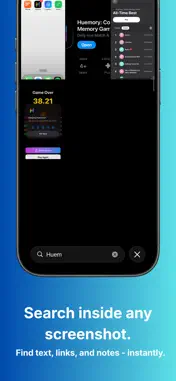
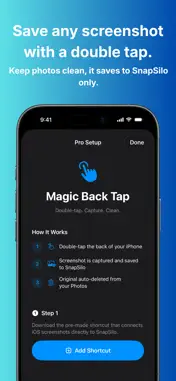
SnapSilo is the ultimate screenshot manager for iPhone. Stop cluttering your photo library — capture, organize, search, and export your screenshots with ease. CAPTURE WITHOUT THE CLUTTER Set up a simple Back Tap shortcut to save screenshots directly to SnapSilo — bypassing your Photos library entirely. No more scrolling past hundreds of screenshots to find your vacation photos. SMART ORGANIZATION SnapSilo automatically classifies your screenshots into tags like Shopping, Social Media, Banking, Travel, and more using on-device AI. Add multiple tags, mark favorites, and filter instantly. SEARCH ANY TEXT Every screenshot is scanned with on-device OCR. Search for any word or phrase across all your screenshots — find that confirmation number, address, or recipe in seconds. Live Text lets you copy, translate, or look up text directly from the image. CLEAN UP YOUR LIBRARY Batch-delete screenshots from your Photos library with one tap. Your SnapSilo copies stay safe. Set up auto-cleanup rules by age and tag to keep things tidy. STORAGE DASHBOARD See exactly how much space your screenshots use, broken down by tag. Export everything as a ZIP or PDF archive whenever you need. BUILT FOR PRIVACY Everything stays on your device. No cloud uploads, no accounts, no tracking. OCR and classification happen entirely on-device. FEATURES • Back Tap shortcut capture • Auto-tag classification (AI-powered) • Full-text OCR search with highlighting • Live Text interaction (copy, translate, look up) • Multi-tag organization with favorites • Photos-style swipe navigation • Storage dashboard with per-tag breakdown • Manual cleanup with age & tag filters • ZIP and PDF export • Weekly cleanup reminders • Beautiful dark-mode grid interface 7-day free trial, then unlock forever for a one-time purchase. No subscription.
What's New
Version 1.3 2026-05-18
- Smarter onboarding: import your first screenshots right in the welcome flow. - Cleaner free experience: the trial timer no longer kicks in until you actually ...- Smarter onboarding: import your first screenshots right in the welcome flow. - Cleaner free experience: the trial timer no longer kicks in until you actually use the app. - iOS 26: new bottom search bar with quick filters for faster cleanup. - Quick library stats: tap the item counter to see your screenshot breakdown by tag. - New "Send feedback" link in Settings — share ideas or vote on the roadmap. - Lots of small UI polish and stability improvements. Technical Analysis
Package Overview Basic metadata
Bundle ID
dev.jakubpilch.dev.clean-it Current Version 1.3
Minimum iOS 17.0
Package Size App Store Size
Package Metadata 0 / 4 version records
Detailed binary, privacy manifest, framework, and Info.plist results have not been indexed for this package yet. The verified App Store and archive metadata above remains available.
Known Version Records
0 version records with stored package metadata • 4 known version records
Stored metadata does not guarantee a package is currently available to download.
| Details | Version / IDs | Version date | Action |
|---|---|---|---|
| Not archived | App Store ID: 885820611 | Unknown | Request Version |
| Not archived | App Store ID: 884777199 | Unknown | Request Version |
| Not archived | App Store ID: 884650675 | Unknown | Request Version |
| Not archived | App Store ID: 884534704 | Unknown | Request Version |